
Last updated on March 19th, 2021 at 06:15 am
Case Example:
Mr. Adi has a small shop. Usually he writes down the buy and sell transaction of his shop in a book. As now he has more customers, suppliers and products, he plans to have his accounts payable and receivable in Excel.
Because he didn’t go to an Economic Schools, he will make the Excel program according to what he thinks is fit. So he starts gathering the data needed to make the accounts payable and receivable in Excel report.
Preparation
- A list of customer and supplier name
- A list of product name
- Opening balance of the accounts payable and receivable
- Opening balance of the inventory
After all those points above collected, Mr. Adi starts to fill the Excel Worksheet with those data.
1. Make a list of customer, supplier and product names.
First, Mr. Adi name the Excel worksheet by double clicking the “Sheet1” tab, then change the name to “TABLE” by typing in that tab. He also double-click “Sheet2”, then change it to “DATA”.

Then on sheet TABLE, he type all of the names of the customer, supplier, and product which he gathered before in the preparation step. This list of names in the worksheet TABLE will be used when inputting the buy or sell transaction. Below is the example image:

(please ignore the sheet name)
2. Make the Main Data

(please ignore the header and the sheet name)
Next, Mr. Adi create a transaction table in sheet DATA, with the headers from cell B1 to cell N1 as followed:
- DATE = the date of the transaction
- INV = invoice number
- NAME = customer / supplier name
- BOOK = stock / cash
- POST = CU for Customer, SU for Supplier
- ITEM = product name
- QT = item quantity
- PRICE = price of the item
- SUM = QT * PRICE (positive/negative)
- QTY = item quantity (positive/negative)
- D/C = Debit / Credit
- Y/M = Year and Month of the invoice
- PAID = will be filled when paid
3. Fill the Main Data with the Inventory opening balance

(please ignore the name)
4. Fill the Main Data with the accounts payable and receivable opening balance

(please ignore the name)

(please ignore the name)
NOTE:
- In the INV column, the invoice number has a format as follow :
- The first two characters are CU or SU followed by a hyphen. CU- represents as a customer invoice and SU- represents as a supplier invoice.
- The six digits after the hyphen is a date format : YYMMDD.
- The last three digits is the number of the invoice in a day. The next day, the number will reset to 001 both for CU and SU.
- The value of SUM and QTY column will be a negative number for the accounts payable transaction (selling to the customer) and will be a positive number for the accounts receivable transaction (buying from the supplier)
- D/C column value is Debit for a positive value and Credit for a negative value.
- In the Y/M column, the date will always the first date.
5. Create a Dynamic Named Range
In order the range of the customer, supplier, product name list and the Main Data dynamic, Mr. Adi create a Dynamic Named Range as follow:

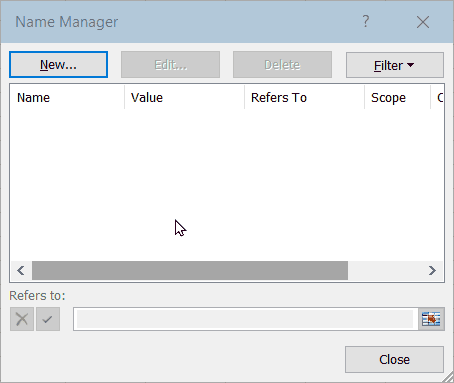
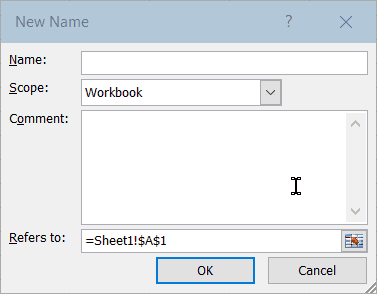
In the New Name window, leave the “Scope:” and “Comment:” as it is, while for the “Name:” and “Refers to:” copy-paste the following …
Name : Customer
Refers to : =OFFSET(TABEL!$B$2,0,0,COUNTA(TABEL!$B$2:$B$10000),1)
Click OK – Click New
Name : data
Refers to : =OFFSET(DATA!$B$1,0,0,COUNTA(DATA!$B:$B),13)
Click OK – Click New
Name : Item
Refers to : =OFFSET(TABEL!$F$2,0,0,COUNTA(TABEL!$F$2:$F$10000),1)
Click OK – Click New
Name : Supplier
Refers to : =OFFSET(TABEL!$D$2,0,0,COUNTA(TABEL!$D$2:$D$10000),1)
Click OK – Click Close
After making four Dynamic Named Range one by one, the result in the Name Manager is like in the image below:

(please ignore the sheet name)
So that’s the first five beginning step which Mr. Adi did to make the accounts payable and receiable in Excel. In the next page, Mr. Adi will make two Pivot Tables. One for the accounts payable/receivable report, and one for the inventory report.
If there is something is not clear regarding this topic, please don’t hesitate to ask in the Comment box. I’ll try my best to answer.
355 replies on “Accounts Payable and Receivable in Excel report”
Thanks so much for the blog article.Really thank you! Keep writing.
Hey there! I just wanted to ask if you ever have any trouble with hackers?My last blog (wordpress) was hacked and I ended up losing several weeks ofhard work due to no data backup. Do you have anymethods to protect against hackers?
This very blog is definitely awesome as well as informative. I have found a bunch of handy stuff out of it. I ad love to visit it every once in a while. Cheers!
I do believe all of the concepts you have presented in your post. They’re really convincing and will certainly work. Nonetheless, the posts are very brief for starters. May you please extend them a bit from next time? Thank you for the post.
I wanted to thank you for this excellent read!! I certainly enjoyed every little bit of it. I have you bookmarked to check out new stuff you postÖ
ventolin inhaler directions for use ventolin tablet dosage copd inhalers
Thanks for your marvelous posting! I genuinely enjoyed reading it, you are a great author.I will ensure that I bookmark your blog and may come back down the road. I want to encourage you continue your great writing, have a nice holiday weekend!
I need to to thank you for this excellent read!! I absolutely loved every bit of it. I have you book-marked to check out new stuff you postÖ
WOW just what I was looking for. Came here by searching for 12BET
Thanks for sharing, this is a fantastic article. Really Cool.
Thanks so much for the blog post.Really thank you! Fantastic.
Thanks for sharing, this is a fantastic blog post.Really thank you! Much obliged.
Im obliged for the article post.Much thanks again. Cool.
Really enjoyed this article.Really looking forward to read more. Much obliged.
Im obliged for the blog article. Great.
Fastidious answers in return of this question with real arguments and tellingeverything regarding that.
Thanks so much for the blog.Really looking forward to read more. Will read on…
Thanks for the post.Really looking forward to read more. Cool.
I needed to thank you for this fantastic read!! I certainly enjoyed every bit of it. I have you book-marked to look at new things you post…
Very informative blog.Much thanks again. Great.
I cannot thank you enough for the blog article.Really thank you! Great.
Great article post.Really thank you!
Fantastic blog post.Really looking forward to read more. Really Great.
It’s great that you are getting thoughts from this post as well as from our dialogue made at this place.
Aw, this was an exceptionally good post. Spending some time and actual effort to create a good articleÖ but what can I sayÖ I put things off a whole lot and never seem to get nearly anything done.
ivermectin horse paste human dosage how long does ivermectin toxicity last
This post presents clear idea for the new viewers of blogging, that
Thanks for a marvelous posting! I certainly enjoyed reading it, you are a great author.I will alwaysbookmark your blog and definitely will come back later in life.I want to encourage continue your greatposts, have a nice evening!
Usually I don’t learn article on blogs, however I would like to say that this write-up very pressured me to take a look at and do it! Your writing style has been amazed me. Thank you, quite great article.
I want to to thank you for this excellent read!!I certainly loved every little bit of it. Ihave got you saved as a favorite to look at new things you post…Check out my blog post … id Mega888
It’s arduous to find educated folks on this subject, however you sound like you realize what you’re speaking about! Thanks
F*ckin’ amazing things here. I am very glad to see your article. Thanks a lot and i’m looking forward to contact you. Will you please drop me a e-mail?
Thanks for the article.Really looking forward to read more. Keep writing.
You might also find publications on how you may be in a position to get a game of poker in the store. To truly improve game play it will not be as much fun if you are not utilizing poker chips.
A big thank you for your blog article. Fantastic.
zithromax perscription a zithromax is zithromax an antibiotic
This is one awesome blog article.Thanks Again. Really Great.
Aw, this was an extremely nice post. Taking the time and actual effort to generate a superb article… but what can I say… I hesitate a whole lot and never manage to get anything done.
This tool need to have proxies, captcha solving , indexingand most vital content material.Feel free to visit my blog :: ser links
Your views sit in agreement with my views for the most part. This is certainly very good reading material for your visitors.
hydrochloride cream hydroxychloroquine covid 19
Hey! Do you use Twitter? I’d like to follow you if that would be ok.I’m undoubtedly enjoying your blog and look forward to new updates.
Como ver el Noble National 2021: radio the big race en vivo este domingo
Thank you for your sharing. I am worried that I lack creative ideas. It is your article that makes me full of hope. Thank you. But, I have a question, can you help me?
A round of applause for your article post.Much thanks again. Keep writing.
Thanks again for the blog post.Thanks Again. Fantastic.
where to get zithromax over the counter zithromax – zithromax over the counter canada
Really informative article post. Will read on…
Thanks so much for the blog.Much thanks again. Fantastic.
Really enjoyed this blog article.Much thanks again. Will read on…
Really informative blog.Much thanks again. Much obliged.
Hello my family member! I want to say that this article is amazing, nice written and include almost all vital infos.I’d like to look extra posts like this .
Really enjoyed this article.Really thank you! Really Cool.
Fantastic blog.Really looking forward to read more. Fantastic.
Muchos Gracias for your article.Much thanks again. Cool.
I loved your blog.Really thank you!
Thanks for finally talking about > pexels-photo-1250653 sve – Intercambios
Really enjoyed this post.Really looking forward to read more. Awesome.
Thanks again for the post. Will read on…
Thank you for your sharing. I am worried that I lack creative ideas. It is your article that makes me full of hope. Thank you. But, I have a question, can you help me?
Thanks again for the blog.Really thank you! Really Cool.
A big thank you for your article. Want more.
This is one awesome post.Really looking forward to read more. Much obliged.
Major thanks for the blog.Much thanks again. Really Cool.
I will immediately grasp your rss feed as I can’t in finding your email subscription link or e-newsletter service.Do you’ve any? Please allow me understand in order that I maysubscribe. Thanks.
Thanks so much for the article.Really looking forward to read more.
A big thank you for your blog article.Thanks Again. Really Great.
I loved your article. Fantastic.
Thanks for sharing. I read many of your blog posts, cool, your blog is very good.
Major thankies for the article post.Much thanks again. Much obliged.
I think this is a real great article post.Thanks Again. Will read on…
Awesome blog.Much thanks again. Cool.
Hey there! I simply wish to offer you a big thumbs up for your great information you have got here on this post. I will be returning to your blog for more soon.
metoprolol succinate metoprolol metoprolol xl
Thank you for your sharing. I am worried that I lack creative ideas. It is your article that makes me full of hope. Thank you. But, I have a question, can you help me?
wow, awesome blog.Much thanks again. Really Cool.
I wanted to thank you for this wonderful read!! I absolutely enjoyed every bit of it. I have you bookmarked to check out new stuff you postÖ
Hmm is anyone else experiencing problems with the pictures on this blog loading?I’m trying to figure out if its a problem on myend or if it’s the blog. Any suggestions would be greatly appreciated.
Ahaa, its good dialogue concerning this post at this place at this blog, I haveread all that, so at this time me also commenting here.
A big thank you for your article.Thanks Again. Will read on…
Thanks for sharing. I read many of your blog posts, cool, your blog is very good.
Hey dude, what kind of wordpress theme are you using? i want it to use on my blog too ”
Great, thanks for sharing this article post.Really looking forward to read more. Want more.
This is my first time visit at here and i am genuinely happy to read all atsingle place.
generic tadalafil at walmart – online tadalafil discount tadalafil
Your point of view caught my eye and was very interesting. Thanks. I have a question for you.
There’s certainly a lot to learn about thistopic. I like all of the points you’ve made.
Your point of view caught my eye and was very interesting. Thanks. I have a question for you.
I really liked your blog post.Much thanks again. Want more.
Really enjoyed this blog.Really looking forward to read more. Much obliged.
Enjoyed every bit of your blog post.Much thanks again. Keep writing.
Major thankies for the article post. Much obliged.
I really enjoy the article.Really looking forward to read more. Really Cool.
I think this is a real great article.Really thank you! Much obliged.
Muchos Gracias for your blog article.Much thanks again. Really Great.
Your article helped me a lot, is there any more related content? Thanks!
Great blog.Really looking forward to read more. Really Great.
Thank you ever so for you blog post. Will read on…
This is one awesome blog post.Really thank you! Great.
A big thank you for your blog post.Really looking forward to read more. Awesome.
I really like what you guys tend to be up too. This kind of clever work and exposure! Keep up the awesome works guys I’ve included you guys to my blogroll.
Thanks. Loads of facts! how to write an illustrative essaypaper helper
hi!,I love your writing very so much! proportion we communicate more approximately your article on AOL? I need an expert on this house to solve my problem. May be that is you! Taking a look forward to peer you.
Wow, great post. Really Cool.
A fascinating discussion is worth comment. I do think that you need to write more on this topic, it may not be a taboo matter but typically people don’t discuss these issues. To the next! Cheers!!
Howdy just wanted to give you a quick heads up and let you know a few of the pictures aren’t loading properly.I’m not sure why but I think its a linking issue.I’ve tried it in two different browsers and both show thesame results.
Really appreciate you sharing this post.Thanks Again. Really Great.
It’s hard to find professional men and women concerning this matter, however, you look like you know what you’re discussing! Many thanks
Appreciate you sharing, great post. Really Great.
Really enjoyed this article. Awesome.
differin dark spot correcting serum walmartdifferin gel 0.1
A big thank you for your blog post.Thanks Again. Will read on…
can strattera make you tiredintuniv vs strattera
I really like and appreciate your article.Really looking forward to read more. Cool.
Really appreciate you sharing this blog article.Thanks Again. Will read on…
Today, I went to the beach front with my kids.
Great post however , I was wanting to know if you could write a litte more on this topic? I’d be very grateful if you could elaborate a little bit further. Appreciate it!
Very neat blog.Really looking forward to read more. Really Great.
Thank you for your blog post.Thanks Again. Awesome.
Hello! Would you mind if I share your blog with my facebook group?There’s a lot of folks that I think would really enjoy your content.Please let me know. Thank you
wow, awesome blog article. Much obliged.
I really liked your blog article. Awesome.
Im thankful for the blog.Much thanks again. Really Cool.
I am so grateful for your article post.Much thanks again. Much obliged.
Your article helped me a lot, is there any more related content? Thanks!
Great post.Much thanks again. Want more.
Thanks-a-mundo for the article post.Really thank you! Much obliged.
Thank you for your blog article.Really looking forward to read more. Awesome.
I loved your article post.Thanks Again. Much obliged.
Thanks-a-mundo for the article post.Really looking forward to read more. Great.
Thanks for sharing, this is a fantastic blog article. Great.
best uk essay writing service how to write scholarship essay what is the best custom essay writing service
Thanks again for the blog article.Thanks Again. Will read on…
Really appreciate you sharing this article.Really looking forward to read more. Great.
Wow, great article.Really thank you! Fantastic.
Thanks-a-mundo for the blog post.Thanks Again. Awesome.
Major thankies for the post.Really looking forward to read more. Will read on…
Thank you ever so for you blog.Thanks Again. Fantastic.
I loved your blog post.Thanks Again.
whoah this blog is great i like studying your articles.Stay up the great work! You already know,many individuals are searching around for this info, you can aid them greatly.
I really liked your blog article.Really thank you! Awesome.
Thanks for sharing, this is a fantastic blog.Much thanks again. Really Great.
I really liked your article post.Thanks Again. Want more.
Really informative blog post. Want more.
I am so grateful for your article post.Much thanks again.
Great blog.Really looking forward to read more. Great.
Excellent post. I was checking continuously this blog and I’m impressed! Extremely helpful info specially the last part 🙂 I care for such information a lot. I was seeking this particular information for a very long time. Thank you and good luck.
Hey! Do you know if they make any plugins to assist with Search Engine Optimization?I’m trying to get my blog to rank for some targeted keywords butI’m not seeing very good gains. If you know of any please share.Thanks!
Thank you for your article post.Really thank you! Want more.
ivermectin tablets uk stromectol tablets – stromectol cream
I loved your post.Really looking forward to read more. Great.
Thank you ever so for you blog post.
Thanks so much for the blog post.Much thanks again. Will read on…
Fantastic blog.Thanks Again. Great.
Perfectly expressed of course! .writing a narrative essay about yourself top cv writing services executive resume writing services toronto
Looking forward to reading more. Great article post.Really looking forward to read more. Awesome.
eprinomectin vs ivermectin ivermectin poultry
Im obliged for the blog post.Really thank you! Really Cool.
El 9 buen verano de américa estado de la historia de repugnancia de bueno a pequeño bueno, estado de repugnancia concluyente
It’s in reality a great and useful piece of information. I’m glad that you simply shared this usefulinfo with us. Please keep us up to date like this.Thank you for sharing.
Really enjoyed this post.Thanks Again. Great.
Say, you got a nice post.Thanks Again. Cool.
Thanks for the post.Much thanks again. Keep writing.
Im grateful for the post.Really thank you! Fantastic.
Very neat article.Thanks Again. Really Cool.
I never thought about it that way, but it makes sense!
A round of applause for your blog post.Much thanks again. Will read on…
I value the blog.Thanks Again. Cool.
Good data. Cheers!uc college essay college essays custom dissertation writing services
Thanks for the blog.Thanks Again. Want more.
Thanks-a-mundo for the blog post.Really looking forward to read more. Keep writing.
Thanks a lot for the post. Want more.
When someone writes an article he/she keeps the plan of a user in his/her brain that how auser can understand it. So that’s why this piece of writing is perfect.Thanks!
Thanks for sharing, this is a fantastic blog article.Really looking forward to read more. Much obliged.
Hey, thanks for the blog post. Cool.
wow, awesome article. Great.
I think this is a real great blog article.Thanks Again. Really Cool.
Enjoyed every bit of your blog.Thanks Again. Cool.
Really appreciate you sharing this post.Really looking forward to read more. Great.
A round of applause for your article.Really thank you! Keep writing.
I appreciate you sharing this blog post.Thanks Again. Much obliged.
A round of applause for your article. Fantastic.
Thanks a lot for the article.Really looking forward to read more. Really Cool.
I cannot thank you enough for the blog.Really looking forward to read more. Great.
Hi there i am kavin, its my first time to commenting anywhere, when i read this paragraph ithought i could also make comment due to this good post.
I am so grateful for your article.Really looking forward to read more. Will read on…
Thank you for your blog article.Really looking forward to read more. Keep writing.
Thanks again for the post.Really thank you! Much obliged.
Thanks so much for the post.Thanks Again.
This blog was… how do you say it? Relevant!! Finally I’ve found something which helped me. Thanks!
I am always invstigating online for ideas that can help me. Thx!
tadalafil pill – tadstrong.com generic tadalafil reviews
Thanks for any other informative blog. The place else could I get that type of information written in such a perfect way?I have a challenge that I’m just now working on, and I’ve been at thelook out for such info.
Only a smiling visitant here to share the love (:, btw outstanding design .
Now I am going to do my breakfast, later than having my breakfast coming yet again to readother news.
Major thankies for the blog.Much thanks again. Will read on…
I loved your blog post.Really looking forward to read more. Keep writing.
I really liked your article.Really looking forward to read more. Great.
Hey! I know this is kind of off topic but I was wonderingif you knew where I could locate a captcha plugin for my comment form?I’m using the same blog platform as yours and I’m having difficulty finding one?Thanks a lot!
since we didn’t have any way When it comes to gaming,
Thank you for the good writeup. It in fact was a amusement account it.Look advanced to far added agreeable from you!By the way, how could we communicate?
I think this is a real great blog article.Really looking forward to read more. Fantastic.
I am often to blogging and i really appreciate your content. The article has really peaks my interest. I am going to bookmark your site and keep checking for new information.
Thanks again for the blog article.Much thanks again. Fantastic.
Very good post.Much thanks again. Will read on…
veridex ivermectina side effects of ivermectin in humans
Thanks-a-mundo for the post.Really looking forward to read more. Great.
Excellent way of describing, and pleasant article to obtain facts concerning my presentation subject,which i am going to deliver in school.
I think this is a real great blog article.Really thank you! Really Cool.
Generally I do not read article on blogs, but Iwish to say that this write-up very pressured me to checkout and do so! Your writing style has been surprised me.Thank you, quite nice article.
Can you be more specific about the content of your article? After reading it, I still have some doubts. Hope you can help me.
Truly loads of helpful advice! canadian pharmacies
I have discovered wonderful blog posts right here. I love the method you create.Good!
Your point of view caught my eye and was very interesting. Thanks. I have a question for you.
A big thank you for your blog post.Really looking forward to read more. Cool.
Thanks-a-mundo for the blog post.
Thanks for sharing. I read many of your blog posts, cool, your blog is very good.
Thank you for your sharing. I am worried that I lack creative ideas. It is your article that makes me full of hope. Thank you. But, I have a question, can you help me?
I don’t think the title of your article matches the content lol. Just kidding, mainly because I had some doubts after reading the article.
Thank you for your sharing. I am worried that I lack creative ideas. It is your article that makes me full of hope. Thank you. But, I have a question, can you help me?
Thank you, your article surprised me, there is such an excellent point of view. Thank you for sharing, I learned a lot.
Thank you for your sharing. I am worried that I lack creative ideas. It is your article that makes me full of hope. Thank you. But, I have a question, can you help me?
Great blog you’ve got here.. It’s hard to find good quality writing like yours nowadays. I really appreciate people like you! Take care!!
Can you be more specific about the content of your article? After reading it, I still have some doubts. Hope you can help me.
Thanks for sharing. I read many of your blog posts, cool, your blog is very good.
Thanks for sharing. I read many of your blog posts, cool, your blog is very good.
Your article helped me a lot, is there any more related content? Thanks!
Can you be more specific about the content of your article? After reading it, I still have some doubts. Hope you can help me.
Your article helped me a lot, is there any more related content? Thanks!
Thanks for sharing. I read many of your blog posts, cool, your blog is very good.
Thank you for your article post.Much thanks again. Cool.
Can you be more specific about the content of your article? After reading it, I still have some doubts. Hope you can help me.
This is one awesome blog.Much thanks again. Awesome.
Thank you for your sharing. I am worried that I lack creative ideas. It is your article that makes me full of hope. Thank you. But, I have a question, can you help me?
Can you be more specific about the content of your article? After reading it, I still have some doubts. Hope you can help me.
Thanks for sharing. I read many of your blog posts, cool, your blog is very good.
Your article helped me a lot, is there any more related content? Thanks!
Great post! Really enjoyed reading this. Keep up the excellent work!
Thanks for sharing. I read many of your blog posts, cool, your blog is very good.
Thank you for your sharing. I am worried that I lack creative ideas. It is your article that makes me full of hope. Thank you. But, I have a question, can you help me?
Thanks for sharing. I read many of your blog posts, cool, your blog is very good.
Can you be more specific about the content of your article? After reading it, I still have some doubts. Hope you can help me.
Your article helped me a lot, is there any more related content? Thanks!
Your point of view caught my eye and was very interesting. Thanks. I have a question for you.
Your point of view caught my eye and was very interesting. Thanks. I have a question for you.
Great post. I used to be checking continuously this blog and I am impressed!
Very helpful info specifically the remaining section :
) I maintain such info a lot. I was seeking this particular information for a long time.
Thanks and good luck.
I switched from another service because of the clear transparency and accurate charts.
Hey there! I’ve been following your website for a while now and
finally got the courage to go ahead and give you a shout out from
Lubbock Tx! Just wanted to tell you keep up the good job!
Your article helped me a lot, is there any more related content? Thanks!
Thanks for sharing. I read many of your blog posts, cool, your blog is very good.
Hello it’s me, I am also visiting this site regularly, this web
site is actually fastidious and the people are in fact sharing pleasant thoughts.
Just wish to say your article is as astounding. The clarity in your publish is
just nice and i can suppose you’re an expert on this subject.
Well with your permission allow me to clutch your
RSS feed to stay up to date with forthcoming post.
Thanks a million and please carry on the enjoyable work.
Can you be more specific about the content of your article? After reading it, I still have some doubts. Hope you can help me.
Can you be more specific about the content of your article? After reading it, I still have some doubts. Hope you can help me.
Thanks for sharing. I read many of your blog posts, cool, your blog is very good.
Really enjoyed this post. Really Cool.
I really like and appreciate your blog post.Thanks Again. Really Cool.
A big thank you for your blog article. Want more.
I really enjoy the article.Really thank you! Really Great.
Im obliged for the blog post. Keep writing.
Your point of view caught my eye and was very interesting. Thanks. I have a question for you.
Thank you for your sharing. I am worried that I lack creative ideas. It is your article that makes me full of hope. Thank you. But, I have a question, can you help me?
Thanks a lot for the article post.Really thank you! Will read on…
Everything is very open with a really clear clarification of the issues.
It was definitely informative. Your site is useful.
Many thanks for sharing!
Hello, I enjoy reading through your post. I wanted
to write a little comment to support you.
Really informative blog.Really thank you!
Hello are using WordPress for your blog platform? I’m new to the blog
world but I’m trying to get started and set up my own. Do you require
any html coding expertise to make your own blog? Any help would be really appreciated!
I don’t think the title of your article matches the content lol. Just kidding, mainly because I had some doubts after reading the article.
obviously like your web site however you need to check the spelling on quite a few of your posts.
Several of them are rife with spelling problems and I
find it very troublesome to inform the truth on the other hand I will
surely come again again.
An impressive share! I’ve just forwarded this onto a
coworker who had been doing a little homework on this. And he actually bought me breakfast simply because I stumbled upon it
for him… lol. So let me reword this…. Thank
YOU for the meal!! But yeah, thanx for spending some
time to discuss this topic here on your website.
Greetings! This is my first visit to your blog! We are a group of volunteers and starting a new initiative
in a community in the same niche. Your blog provided us valuable information to work on.
You have done a wonderful job!
I don’t think the title of your article matches the content lol. Just kidding, mainly because I had some doubts after reading the article.
Enjoyed every bit of your blog post.Really looking forward to read more. Want more.
A round of applause for your blog.Much thanks again. Fantastic.
Thank you for your sharing. I am worried that I lack creative ideas. It is your article that makes me full of hope. Thank you. But, I have a question, can you help me?
Wow that was strange. I just wrote an very long comment but after I clicked submit my comment didn’t appear. Grrrr… well I’m not writing all that over again. Regardless, just wanted to say wonderful blog!
Your point of view caught my eye and was very interesting. Thanks. I have a question for you.
Great post. I am experiencing many of these issues as well..
You are so cool! I do not think I have read through a single thing like this before. So wonderful to find someone with some genuine thoughts on this issue. Really.. many thanks for starting this up. This site is one thing that is required on the web, someone with a bit of originality!
I think this is one of the most important information for me. And i’m glad reading your article. But want to remark on few general things, The web site style is perfect, the articles is really nice : D. Good job, cheers
Hi there friends, how is all, and what you desire to say regarding this paragraph, in my view its actually amazing designed for me.
First off I would like to say excellent blog! I had a quick question which I’d like to ask if you do not mind. I was interested to find out how you center yourself and clear your thoughts before writing. I have had difficulty clearing my thoughts in getting my thoughts out. I truly do enjoy writing however it just seems like the first 10 to 15 minutes are usually wasted simply just trying to figure out how to begin. Any recommendations or hints? Kudos!
I don’t think the title of your article matches the content lol. Just kidding, mainly because I had some doubts after reading the article.
Greate pieces. Keep writing such kind of info on your page. Im really impressed by it.
May I simply just say what a relief to uncover someone who truly understands what they are talking about on the web. You definitely realize how to bring an issue to light and make it important. More people have to check this out and understand this side of the story. I can’t believe you aren’t more popular since you surely have the gift.
May I simply say what a comfort to find someone who actually understands what they are discussing over the internet. You actually realize how to bring a problem to light and make it important. More and more people ought to read this and understand this side of the story. It’s surprising you’re not more popular given that you surely possess the gift.
Can I simply just say what a comfort to find an individual who actually knows what they’re discussing on the net. You certainly realize how to bring an issue to light and make it important. More and more people should check this out and understand this side of the story. I was surprised that you aren’t more popular given that you certainly possess the gift.
Aw, this was a really nice post. Taking a few minutes and actual effort to produce a great article… but what can I say… I put things off a whole lot and don’t manage to get anything done.
Greate pieces. Keep writing such kind of information on your site. Im really impressed by your site.
May I just say what a comfort to uncover someone that truly knows what they are talking about on the web. You actually realize how to bring a problem to light and make it important. A lot more people must look at this and understand this side of the story. I was surprised you’re not more popular since you certainly have the gift.
Wow that was strange. I just wrote an very long comment but after I clicked submit my comment didn’t show up. Grrrr… well I’m not writing all that over again. Anyway, just wanted to say excellent blog!
Thank you ever so for you article.Much thanks again. Great.
Aw, this was an incredibly good post. Spending some time and actual effort to generate a superb article… but what can I say… I put things off a whole lot and don’t seem to get nearly anything done.
Greate post. Keep writing such kind of information on your blog. Im really impressed by your blog.
At this time it looks like Movable Type is the best blogging platform out there right now. (from what I’ve read) Is that what you are using on your blog?
Right now it looks like Drupal is the best blogging platform out there right now. (from what I’ve read) Is that what you’re using on your blog?
Wow that was strange. I just wrote an very long comment but after I clicked submit my comment didn’t appear. Grrrr… well I’m not writing all that over again. Anyhow, just wanted to say great blog!
At this time it looks like Expression Engine is the best blogging platform available right now. (from what I’ve read) Is that what you are using on your blog?
Can I simply say what a comfort to uncover somebody that actually knows what they are talking about on the net. You actually know how to bring a problem to light and make it important. A lot more people really need to look at this and understand this side of the story. I was surprised you are not more popular given that you surely have the gift.
Wow that was odd. I just wrote an extremely long comment but after I clicked submit my comment didn’t show up. Grrrr… well I’m not writing all that over again. Anyways, just wanted to say wonderful blog!
Hey! I’m at work browsing your blog from my new apple iphone! Just wanted to say I love reading your blog and look forward to all your posts! Keep up the outstanding work!
Greate post. Keep writing such kind of information on your site. Im really impressed by it.
Aw, this was an incredibly nice post. Spending some time and actual effort to make a good article… but what can I say… I procrastinate a whole lot and never manage to get anything done.
Greate pieces. Keep writing such kind of info on your page. Im really impressed by it.
Wow that was strange. I just wrote an incredibly long comment but after I clicked submit my comment didn’t show up. Grrrr… well I’m not writing all that over again. Anyways, just wanted to say wonderful blog!
May I simply just say what a comfort to uncover somebody that actually knows what they are talking about on the net. You actually know how to bring an issue to light and make it important. More and more people really need to read this and understand this side of your story. It’s surprising you aren’t more popular since you certainly possess the gift.
May I just say what a comfort to find a person that genuinely knows what they are discussing on the internet. You certainly realize how to bring an issue to light and make it important. More and more people have to read this and understand this side of the story. I can’t believe you aren’t more popular since you most certainly have the gift.
I don’t think the title of your article matches the content lol. Just kidding, mainly because I had some doubts after reading the article.
Hey I know this is off topic but I was wondering if you knew of any widgets I could add to my blog that automatically tweet my newest twitter updates. I’ve been looking for a plug-in like this for quite some time and was hoping maybe you would have some experience with something like this. Please let me know if you run into anything. I truly enjoy reading your blog and I look forward to your new updates.
Hello there, You have performed an excellent job. I will certainly digg it and for my part suggest to my friends. I am confident they’ll be benefited from this web site.
Hi there, You’ve performed an excellent job. I will definitely digg it and in my opinion suggest to my friends. I’m confident they will be benefited from this site.
Can I just say what a comfort to find somebody that actually understands what they are talking about on the internet. You certainly understand how to bring an issue to light and make it important. More and more people should look at this and understand this side of your story. I can’t believe you’re not more popular since you certainly possess the gift.
Aw, this was a really nice post. Finding the time and actual effort to produce a top notch article… but what can I say… I hesitate a whole lot and don’t manage to get nearly anything done.
Wow that was strange. I just wrote an very long comment but after I clicked submit my comment didn’t appear. Grrrr… well I’m not writing all that over again. Anyways, just wanted to say fantastic blog!
May I simply just say what a relief to discover someone who really knows what they are discussing online. You definitely understand how to bring a problem to light and make it important. A lot more people must check this out and understand this side of your story. I can’t believe you aren’t more popular given that you certainly possess the gift.
Right now it seems like Expression Engine is the top blogging platform available right now. (from what I’ve read) Is that what you’re using on your blog?
Excellent pieces. Keep posting such kind of info on your site. Im really impressed by your site.
Can I simply say what a comfort to find somebody who genuinely knows what they are talking about on the net. You certainly realize how to bring a problem to light and make it important. More people have to read this and understand this side of your story. I can’t believe you are not more popular given that you surely possess the gift.
Thanks for sharing. I read many of your blog posts, cool, your blog is very good.
Currently it appears like Expression Engine is the best blogging platform out there right now. (from what I’ve read) Is that what you are using on your blog?
Aw, this was a really nice post. Spending some time and actual effort to make a superb article… but what can I say… I hesitate a lot and never manage to get nearly anything done.
Wow that was strange. I just wrote an incredibly long comment but after I clicked submit my comment didn’t appear. Grrrr… well I’m not writing all that over again. Anyways, just wanted to say great blog!
Can I simply just say what a comfort to find someone who truly knows what they’re discussing on the web. You definitely realize how to bring an issue to light and make it important. A lot more people must check this out and understand this side of your story. I was surprised that you’re not more popular because you surely have the gift.
Thanks for sharing, this is a fantastic post. Cool.
Right now it seems like WordPress is the preferred blogging platform out there right now. (from what I’ve read) Is that what you are using on your blog?
Wow that was strange. I just wrote an extremely long comment but after I clicked submit my comment didn’t appear. Grrrr… well I’m not writing all that over again. Anyhow, just wanted to say superb blog!
Aw, this was a very nice post. Taking the time and actual effort to make a great article… but what can I say… I procrastinate a lot and never seem to get nearly anything done.
Hey I know this is off topic but I was wondering if you knew of any widgets I could add to my blog that automatically tweet my newest twitter updates. I’ve been looking for a plug-in like this for quite some time and was hoping maybe you would have some experience with something like this. Please let me know if you run into anything. I truly enjoy reading your blog and I look forward to your new updates.
Excellent pieces. Keep writing such kind of info on your blog. Im really impressed by it.
At this time it looks like Drupal is the preferred blogging platform out there right now. (from what I’ve read) Is that what you are using on your blog?
Can I simply say what a relief to uncover someone who really understands what they’re talking about over the internet. You definitely know how to bring a problem to light and make it important. More and more people need to check this out and understand this side of the story. I was surprised that you are not more popular since you definitely have the gift.
Right now it appears like Expression Engine is the best blogging platform out there right now. (from what I’ve read) Is that what you are using on your blog?
Hey I know this is off topic but I was wondering if you knew of any widgets I could add to my blog that automatically tweet my newest twitter updates. I’ve been looking for a plug-in like this for quite some time and was hoping maybe you would have some experience with something like this. Please let me know if you run into anything. I truly enjoy reading your blog and I look forward to your new updates.
Aw, this was an incredibly good post. Finding the time and actual effort to make a good article… but what can I say… I put things off a lot and don’t manage to get anything done.
At this time it seems like Expression Engine is the top blogging platform available right now. (from what I’ve read) Is that what you are using on your blog?
Right now it seems like BlogEngine is the preferred blogging platform out there right now. (from what I’ve read) Is that what you’re using on your blog?
At this time it sounds like Expression Engine is the preferred blogging platform out there right now. (from what I’ve read) Is that what you’re using on your blog?
Aw, this was a very nice post. Taking a few minutes and actual effort to produce a very good article… but what can I say… I hesitate a whole lot and don’t manage to get anything done.
Can I just say what a relief to find an individual who actually understands what they are discussing online. You actually realize how to bring a problem to light and make it important. More people ought to read this and understand this side of your story. I can’t believe you’re not more popular because you certainly possess the gift.
Right now it appears like Drupal is the preferred blogging platform out there right now. (from what I’ve read) Is that what you’re using on your blog?
Hello there, You’ve done a fantastic job. I will definitely digg it and for my part suggest to my friends. I’m confident they will be benefited from this web site.
Hey I know this is off topic but I was wondering if you knew of any widgets I could add to my blog that automatically tweet my newest twitter updates. I’ve been looking for a plug-in like this for quite some time and was hoping maybe you would have some experience with something like this. Please let me know if you run into anything. I truly enjoy reading your blog and I look forward to your new updates.
Hi there, You have performed a great job. I’ll certainly digg it and individually suggest to my friends. I am confident they will be benefited from this website.
Wow that was strange. I just wrote an incredibly long comment but after I clicked submit my comment didn’t appear. Grrrr… well I’m not writing all that over again. Anyways, just wanted to say wonderful blog!
Hello there, You’ve done a fantastic job. I’ll definitely digg it and personally recommend to my friends. I am confident they’ll be benefited from this site.
Hey there, You have performed an excellent job. I’ll definitely digg it and for my part suggest to my friends. I’m sure they’ll be benefited from this web site.
Hey there, You’ve done an excellent job. I’ll definitely digg it and for my part recommend to my friends. I am confident they’ll be benefited from this site.
Thanks again for the article post. Great.
May I simply just say what a comfort to uncover someone that actually knows what they are discussing on the internet. You certainly know how to bring a problem to light and make it important. A lot more people have to read this and understand this side of the story. I can’t believe you aren’t more popular because you surely have the gift.
Thank you ever so for you blog post. Fantastic.
Hi there, You’ve done a great job. I’ll certainly digg it and personally suggest to my friends. I’m sure they’ll be benefited from this website.
At this time it appears like BlogEngine is the preferred blogging platform available right now. (from what I’ve read) Is that what you’re using on your blog?
Hey there, You’ve performed a great job. I’ll certainly digg it and in my view suggest to my friends. I’m confident they will be benefited from this site.
Wow that was odd. I just wrote an very long comment but after I clicked submit my comment didn’t show up. Grrrr… well I’m not writing all that over again. Anyhow, just wanted to say superb blog!
Can you be more specific about the content of your article? After reading it, I still have some doubts. Hope you can help me.