
Last updated on March 19th, 2021 at 06:24 am
TEST RUN
Mr. Adi saves the file first, close the file, then open it again.
Assumed that the date is 8 March 2021 and it is the first time he open the file on this day. So, when the CU button is clicked, it will show the invoice number like this : CU-210308001. When the SU button is clicked, it will show SU-210308001.
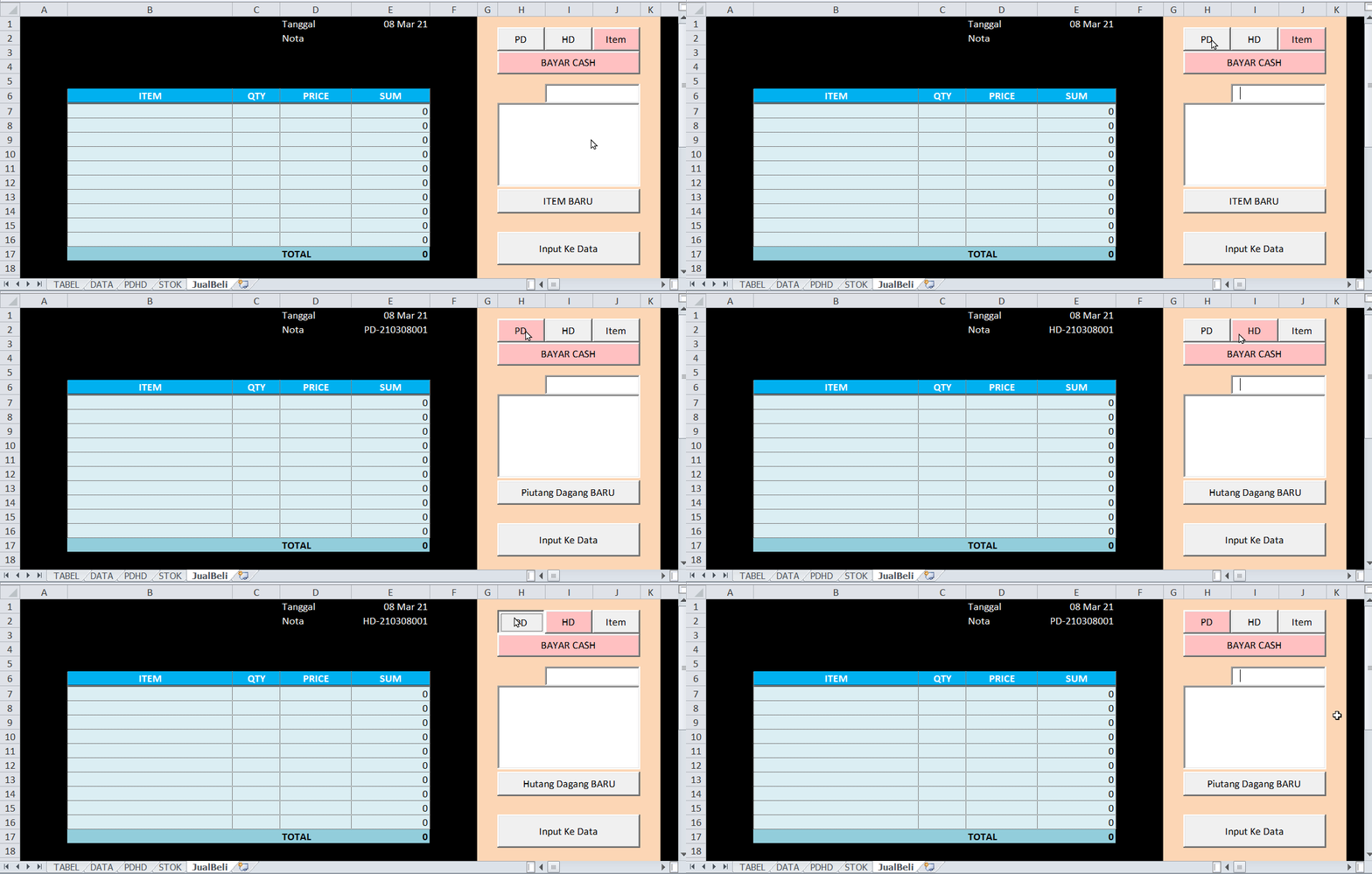
CU/SU is the indicator that it is a sales invoice or a purchase invoice. 210308 is the date format YYMMDD. And the 001 is the invoice number.
- Example case for a new customer/supplier/item
Tante Linda is the name of the new customer, Om Pimpah is the name of the new supplier and Jengkol Bangkok is the name of the new product/item.
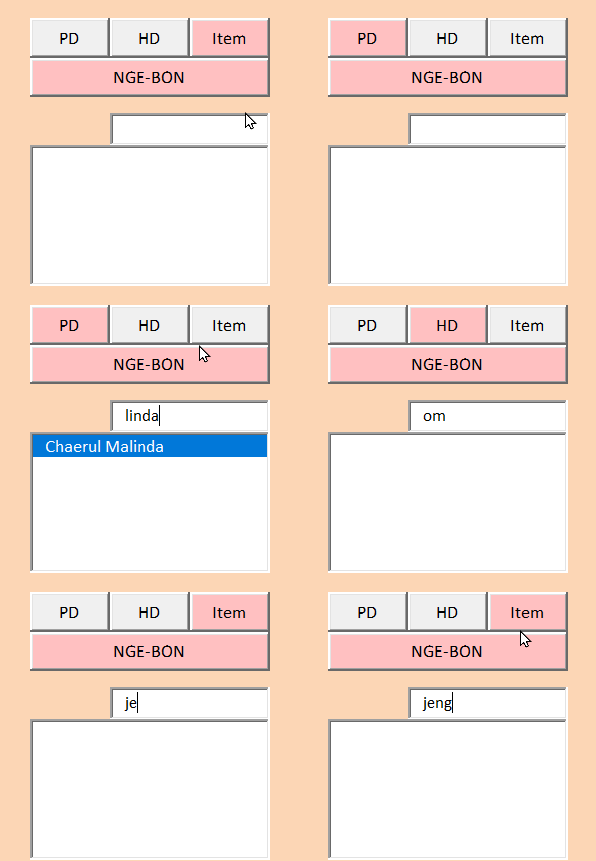
If Mr. Adi try to search those names by typing the name in the search box, the ListName box won’t give a result because those names do not exist in the sheet TABLE.
So now Mr. Adi inputs those new names. For customer Tante Linda, he click the “CU” button, then click the “New Customer Name” button, then type the new name, then click OK button in the input box window. As seen in the animation below.
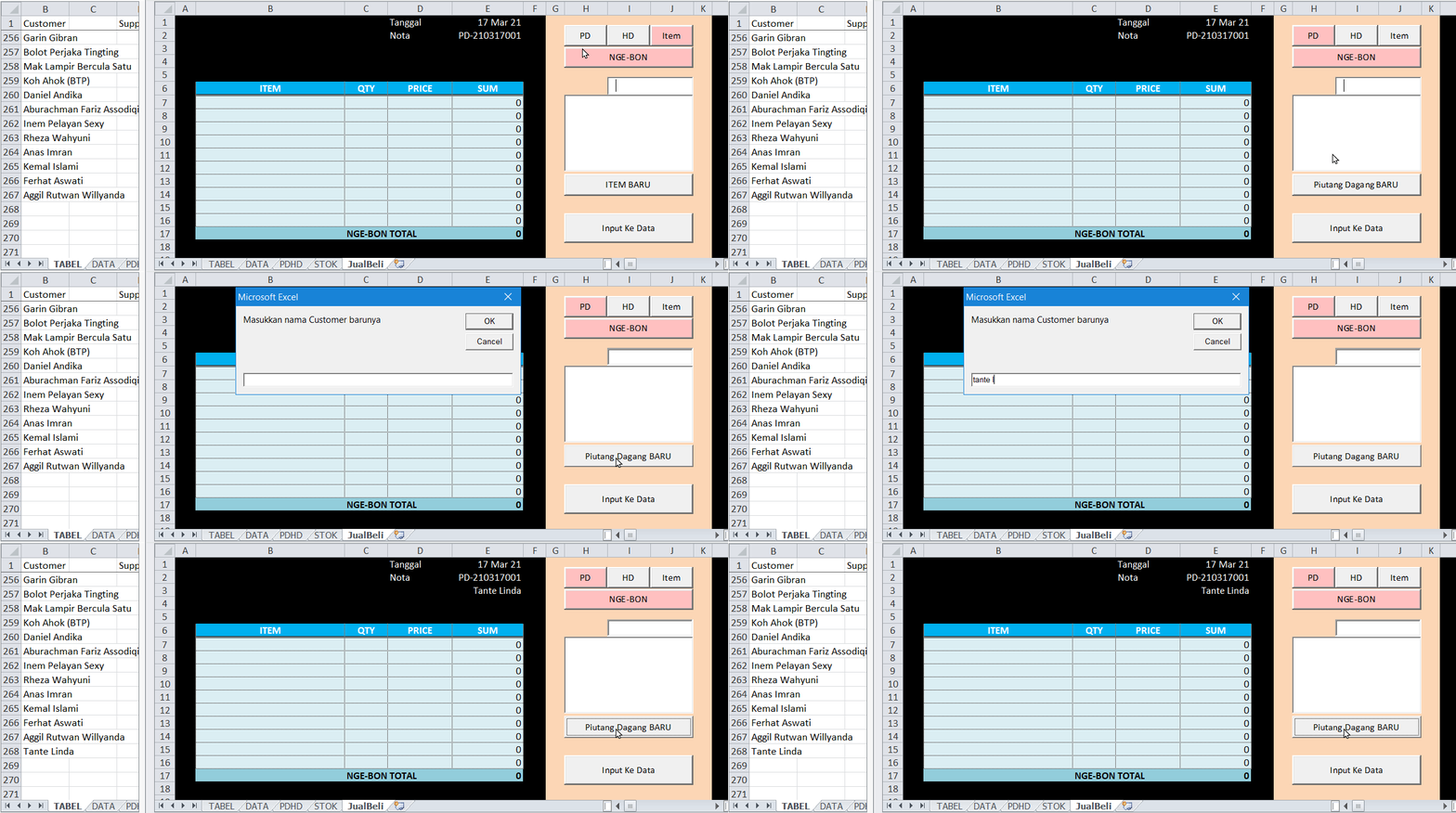
As we can see, the last customer name in sheet TABLE is Aggil in cell B267. After the input, now the new Tante Linda supplier name is in cell B268.
Now for the new supplier name, Om Pimpah.
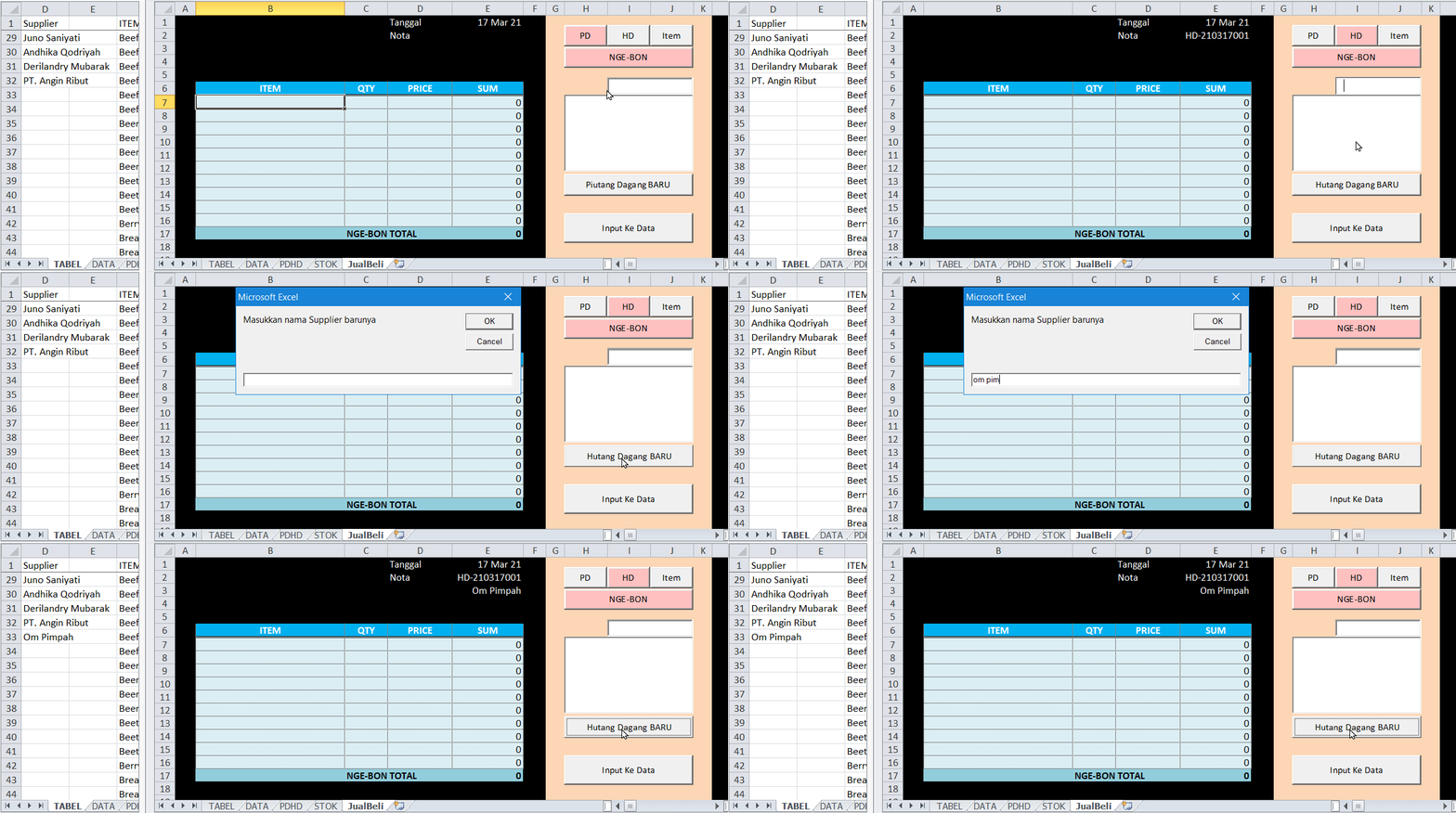
The last supplier name in sheet TABLE is PT. Angin Ribut in cell D32. After the input, now the new Om Pimpah supplier name is in cell D33.
Now for the new product/item name, Jengkol Bangkok.
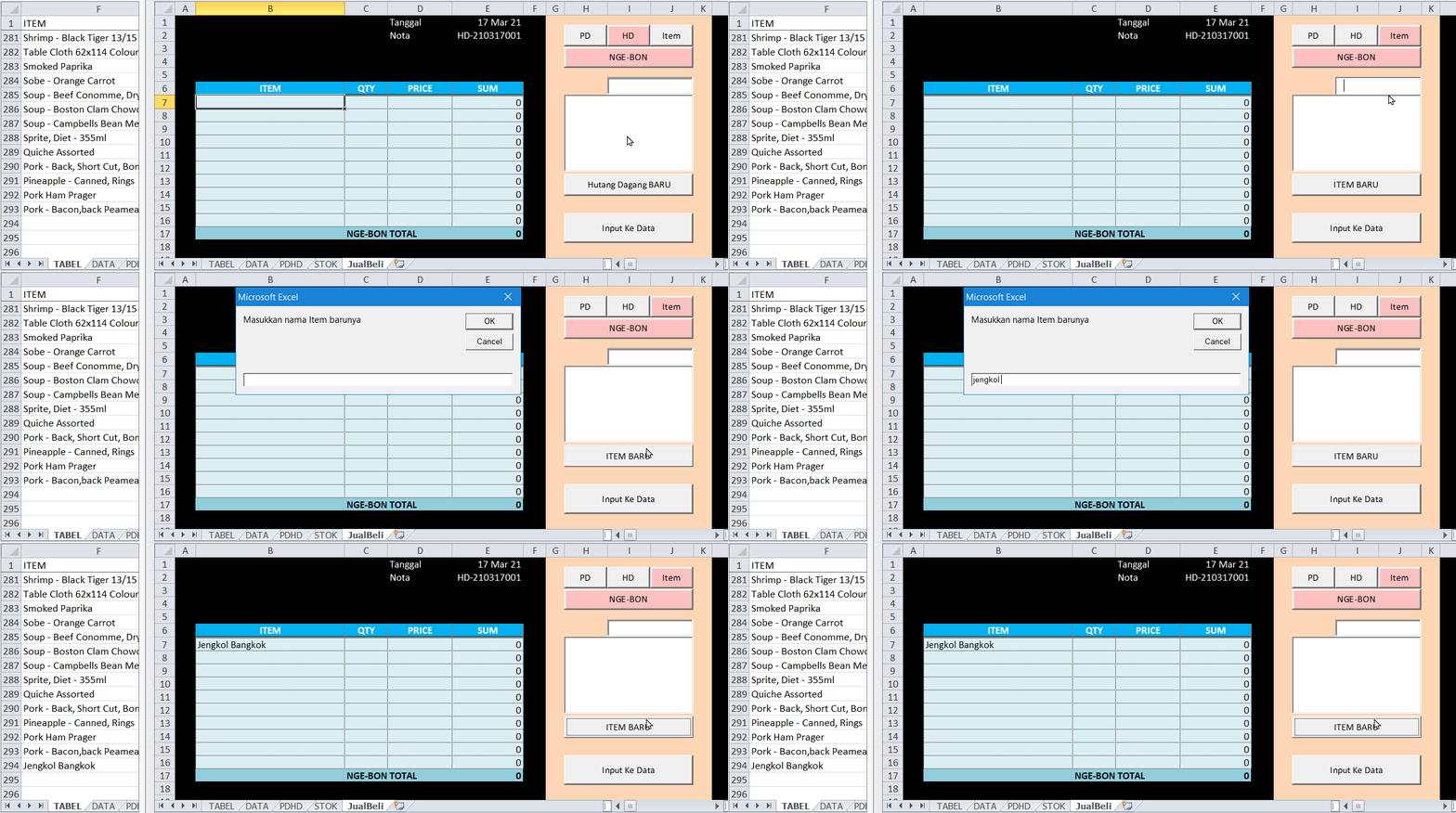
The last item name in sheet TABLE is Pork Bacon in cell F293. After the input, now the new Jengkol Bangkok item name is in cell F294.
Now Mr. Adi checks if those names appear in the ListNames box if he type it in the SearchBox.
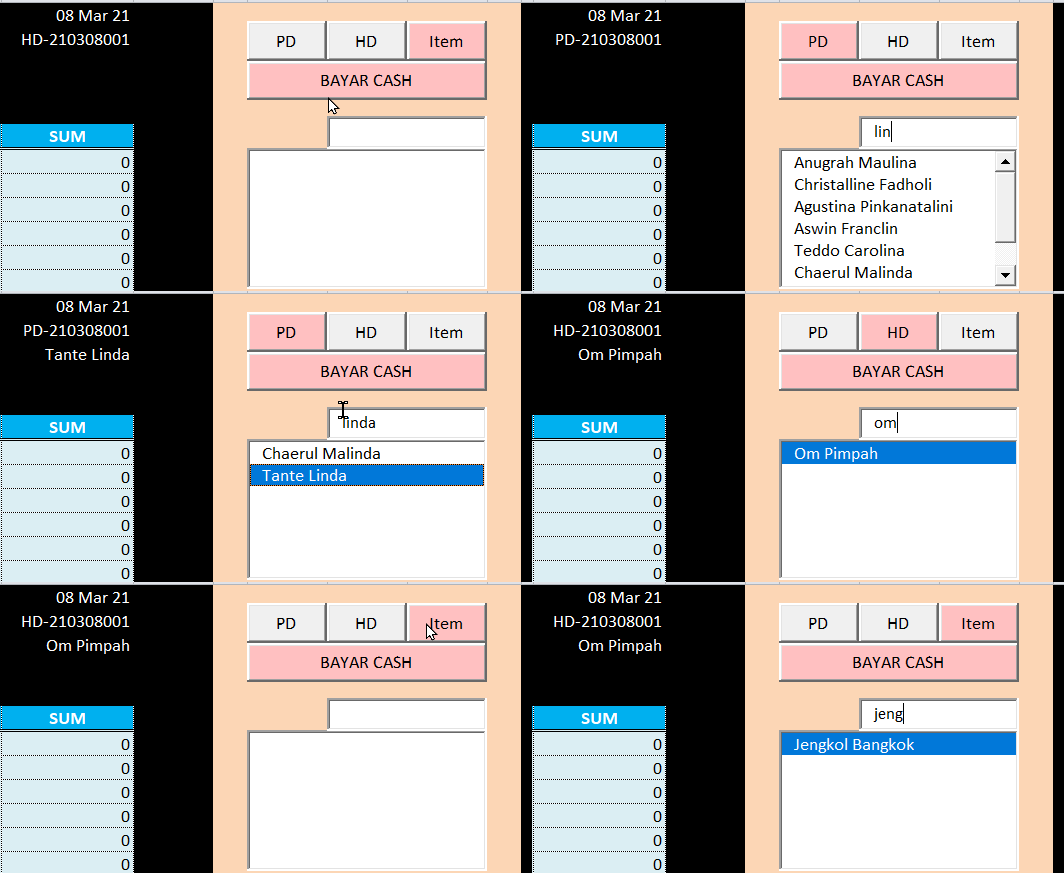
From the animation above, we see the ListName box show the result when Mr. Adi type the name in the SearchBox.
The “if” condition for the ListName are like this:
If the ListName found one name only from the word typed in the SearchBox, it will directly put the name on the sheet. If the ListName found more than one result, the user need to click which name in the ListName that he wants to put it on the sheet.
- Example case for Sales Data Entry
It’s been a week which has no transaction at all. No sales no purchase. So the Main Data in sheet DATA still contains just the opening balance data.
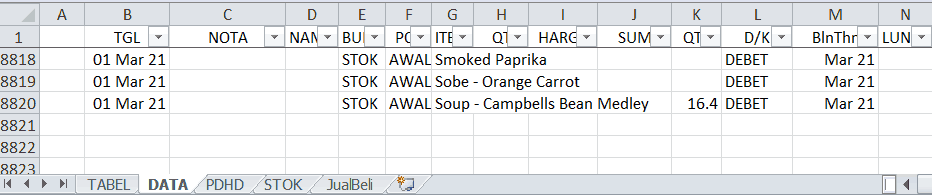
Finally, on 8 March 2021, customer Agus Jova buy Item Aspic-Amber with a quantity 10 and the price is Rp 25.000/each in cash.
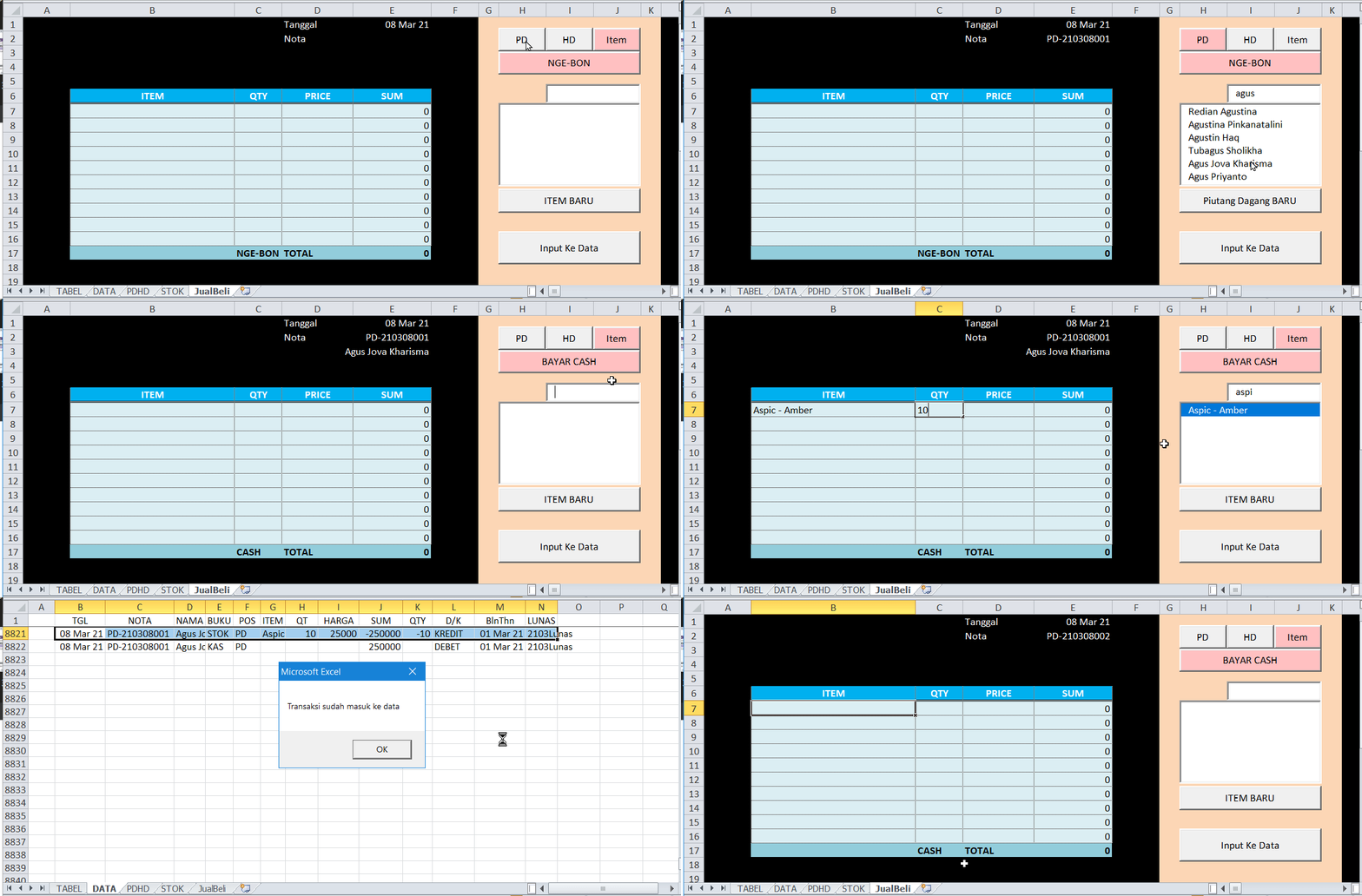
The data entry process as follow:
Click “CU” button, type agus in the search box, click Agus Jova in the ListName box, click “NON CASH” button if it read “NON CASH” in the button (just leave it alone if it read “CASH” in the button), click the Item button, type aspic in the search box, fill the quantity and the price in the form (under the QTY and PRICE column), then click “Input To Data” button.
The macro then activate the sheet DATA to inform that data entry has been done by showing the result. The macro also put a “2103Paid” as a mark that invoice CU-210308001 is paid.
Then it activate the sheet SellBuy again, and now the next CU invoice number is CU-210308002 as seen in the animation above.
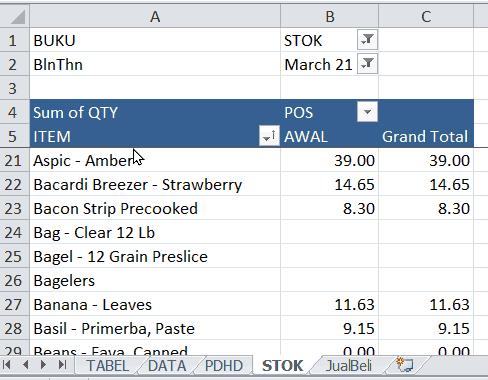
Mr. Adi then check the sheet STOCK.
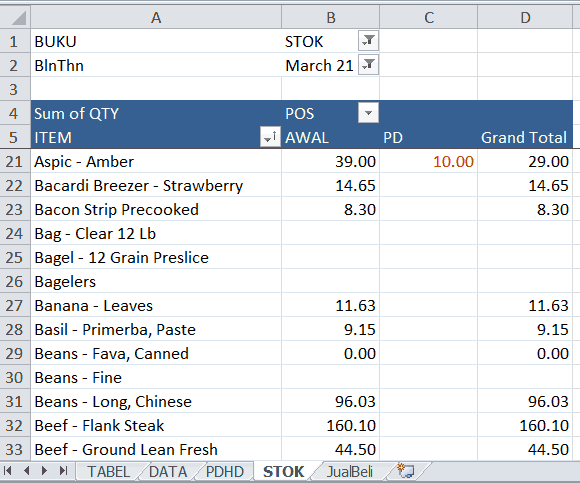
The quantity of Aspic – Amber now less 10. Because this is a cash transaction, so there is no change on the amount of money Agus Jova owe Mr. Adi.
- Example case for Purchase data entry
Mr. Adi buy Bread Crumb from Mr. Fauzan 5 pieces with the price 30,000/pcs and item Capon – Breast 10 pieces @ 15.000. Non Cash.
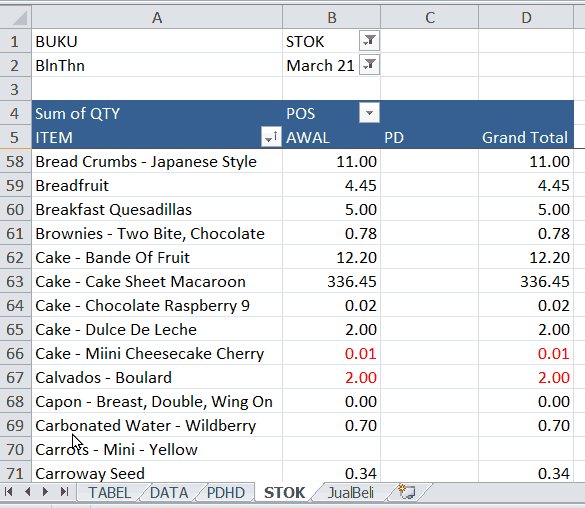
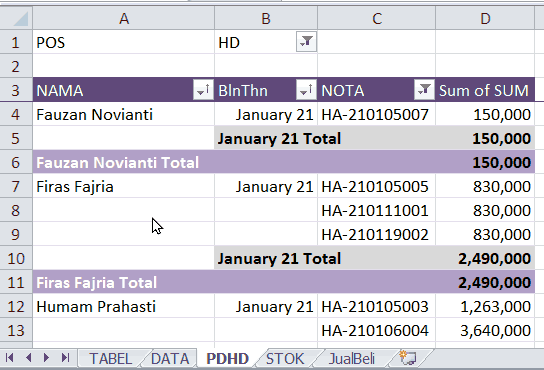
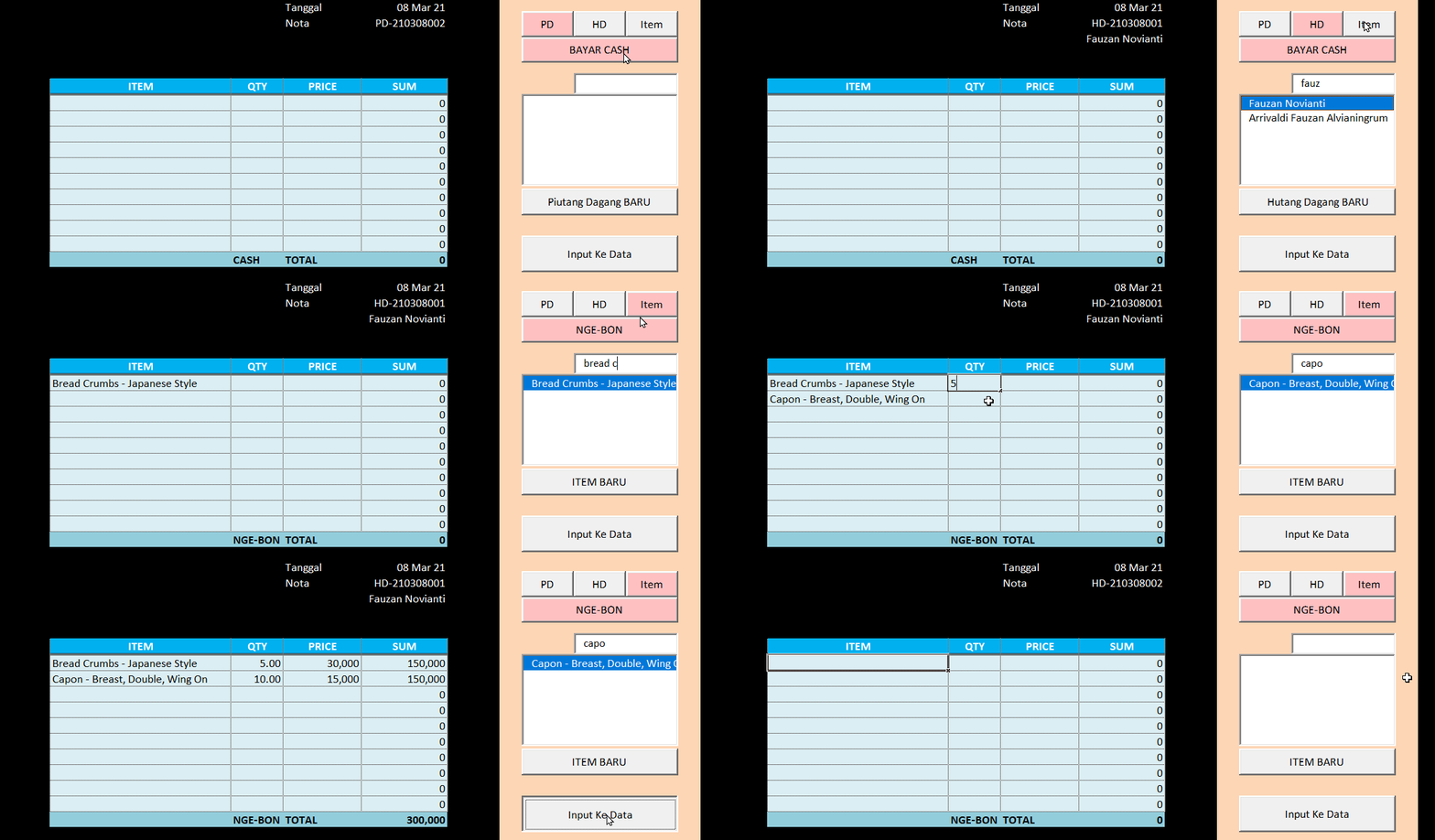
The Data Entry process is the similar.
Click “SU” button, type fauz in the search box, click Fauzan Novianti in the ListName box, click “CASH” button if it read “CASH” in the button (just leave it alone if it read “NON CASH” in the button), click the Item button, type bread c in the search box then type capo, fill the quantity and the price in the form (under the QTY and PRICE column), then click “Input To Data” button.
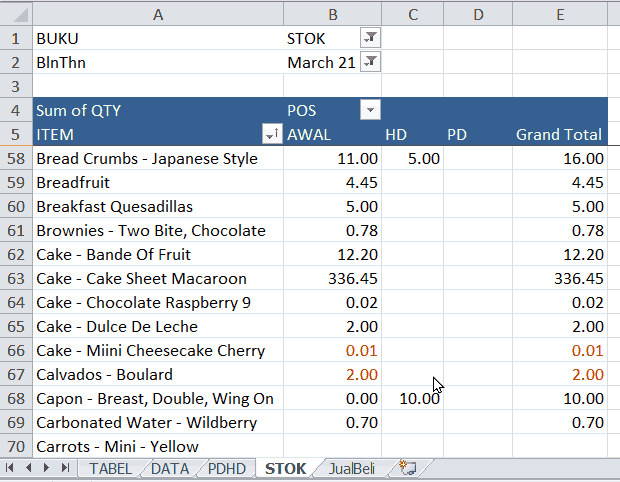
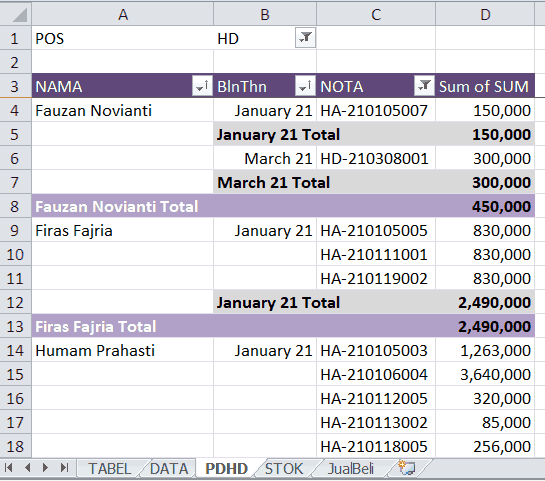
That’s it. Mr Adi has completed the making of his Purchase/Sales Form macro codes. In the next topic, he will make a UserForm via Visual Basic Editor. The UserForm will be used for payment data entry.
If there is something which is not clear regarding to this topic, please don’t hesitate to ask in the Comment box. I’ll try my best to answer.
226 replies on “Purchase/Sales Form Macro Codes For Data Entry”
สล็อตออนไลน์คนไหนกันได้ทดลองเล่นเป็นต้องชอบอกชอบใจ เนื่องจากลักษณะของเกมง่าย แต่ที่สำคัญไปกว่านั้นเป็นทำเงินได้มากถึง 400-500 เท่าของทุนเลย ไม่เพียงเท่านั้น UFABET ยังเพิ่มรางวัล รวมทั้งแจ็คพอตเพื่อเพิ่มโอกาสให้ผู้เล่นได้เงินง่ายมากยิ่งขึ้นอีกด้วย
You could definitely see your expertise within the work you write. The sector hopes for more passionate writers such as you who are not afraid to mention how they believe. All the time go after your heart.
ivermectin covid 19 treatment ivermectin and pyrantel
831872 844624Thank you for your very excellent details and feedback from you. car dealers san jose 145944
stromectol ivermectin ivermectin drg – ivermectin topical
I needed to thank you for this wonderful read!! I certainly loved every bit of it. I have you book marked to check out new things you post…
Hey there! I simply would like to offer you a huge thumbs up for the great info you have here on this post. I’ll be returning to your blog for more soon.
I think this is a real great blog article.Really thank you! Awesome.
I truly appreciate this blog.Really thank you! Keep writing.
I really like and appreciate your blog.Thanks Again. Keep writing.
Thank you ever so for you blog post.Really looking forward to read more. Will read on…
Thank you ever so for you article post.Really thank you! Keep writing.
I truly appreciate this blog article.Much thanks again. Much obliged.
fake rolex links with the outstanding watchmaking connotation.
Great, thanks for sharing this article post. Want more.
I am so grateful for your article post.Really looking forward to read more. Want more.
Wow, great blog post. Want more.
You can definitely see your skills in the work you write.The sector hopes for more passionate writers such as you who are not afraid to say howthey believe. At all times go after your heart.
apartments ann arbor mi colonial park apartments
canadian pharmacy world coupon – canadian pharmacy rx canadian pharmacy checker
I am so grateful for your article.Really thank you! Fantastic.
Greetings! I know this is kind of off topic but I was wondering if you knew where I could locate a captcha plugin for my comment form?I’m using the same blog platform as yours and I’m having difficulty finding one?Thanks a lot!
Say, you got a nice article post. Really Great.
I truly appreciate this blog article. Really Great.
Aw, this was an exceptionally nice post. Spending some time and actualeffort to create a superb article? but what can I say?I procrastinate a lot and never seem to get anything done.Also visit my blog post – duna-anapa.net.ru
chloroquine phosphate generic name ama hydroxychloroquine
Lovely just what I was looking for. Thanks to the author for taking his clock time on this one.
This is my first time go to see at here and i am truly pleassant to read everthing at one place.
ivermectin manufacturer ivermectin and covid 19
Nice read, I just passed this onto a friend who wasdoing a little research on that. And he actually bought me lunch since I found it for him smile Thus let me rephrase that:Thank you for lunch!Also visit my blog; vetearii.free.fr
Thanks again for the article post.Thanks Again. Awesome.
Very good article post.Really thank you! Much obliged.
What’s Taking place i’m new to this, I stumbled upon this I’ve discovered It positively useful and it has helped me out loads. I’m hoping to contribute & help other users like its aided me. Good job.
Thanks for the article post.Really looking forward to read more. Keep writing.
There is certainly a lot to learn about this topic. I like all the points you made.
This is a good tip especially to those fresh to the blogosphere. Brief but very precise info Thank you for sharing this one. A must read post!
Can you be more specific about the content of your article? After reading it, I still have some doubts. Hope you can help me.
Hey! This post couldn’t be written any better! Reading throughthis post reminds me of my old room mate! He always kepttalking about this. I will forward this post tohim. Pretty sure he will have a good read. Thank you for sharing!
Major thanks for the blog. Want more.
I cannot thank you enough for the article.Much thanks again. Much obliged.
Can you be more specific about the content of your article? After reading it, I still have some doubts. Hope you can help me.
Looking forward to reading more. Great post.Much thanks again. Really Great.
Thanks for sharing. I read many of your blog posts, cool, your blog is very good.
Thanks a lot for the blog article.Really thank you! Cool.
Thanks again for the blog article. Awesome.
Hey, thanks for the article.Much thanks again. Will read on…
Can you be more specific about the content of your article? After reading it, I still have some doubts. Hope you can help me.
I don’t think the title of your article matches the content lol. Just kidding, mainly because I had some doubts after reading the article.
chloroquine uses how to make hydroxychloroquine at home
An interesting discussion is definitely worth comment. I do believe that you should write more about this topic, it may not be a taboo subject but generally folks don’t discuss these subjects. To the next! Many thanks!!
Really enjoyed this blog post.Thanks Again. Awesome.
Thanks-a-mundo for the blog post. Awesome.
Thank you ever so for you blog article.Really looking forward to read more. Awesome.
I value the post.Thanks Again. Cool.
Thank you for your article post.Much thanks again. Much obliged.
Very informative post.Really looking forward to read more. Cool.
Very informative blog post.Really thank you! Will read on…
Thank you ever so for you blog article.Thanks Again. Awesome.
Very good article.Really looking forward to read more. Want more.
I truly appreciate this article.Really looking forward to read more.
Great, thanks for sharing this blog.Thanks Again. Really Cool.
I appreciate you sharing this post. Really Cool.
Looking forward to reading more. Great article post.Really thank you! Cool.
Thank you for your blog. Will read on…
Can you be more specific about the content of your article? After reading it, I still have some doubts. Hope you can help me.
Fantastic blog.Thanks Again. Fantastic.
Can you be more specific about the content of your article? After reading it, I still have some doubts. Hope you can help me.
Thanks-a-mundo for the article.Really looking forward to read more. Fantastic.
I don’t think the title of your article matches the content lol. Just kidding, mainly because I had some doubts after reading the article.
You actually mentioned that terrifically!professional essay writer funding for dissertation research professional letter writing services
F*ckin’ tremendous things here. I’m very satisfied tolook your article. Thank you a lot and i am having alook ahead to touch you. Will you kindly drop me a mail?my blog; clubriders.men
Wow a good deal of valuable information.college essay harvard writing a essay for college writing helps
Hey, thanks for the blog article.Really looking forward to read more. Fantastic.
Hi there just wanted to give you a brief heads up and let you know a few of the pictures aren’t loading correctly. I’m not sure why but I think its a linking issue. I’ve tried it in two different internet browsers and both show the same results.
Enjoyed every bit of your post.Much thanks again. Will read on…
It’s hard to find experienced people on this subject, however,you sound like you know what you’re talking about! Thanks
Hey! I know this is kinda off topic but I was wondering if you knew where I couldlocate a captcha plugin for my comment form? I’m using thesame blog platform as yours and I’m having difficulty finding one?Thanks a lot!
I loved your blog post.Really looking forward to read more. Cool.
Your point of view caught my eye and was very interesting. Thanks. I have a question for you.
Looking forward to reading more. Great article.Much thanks again. Keep writing.
Great, thanks for sharing this post.Much thanks again. Keep writing.
Wow, great article post.Much thanks again. Cool.
This is one awesome article post.Much thanks again. Really Great.
Really informative blog.Really looking forward to read more. Great.
Major thankies for the article post.Thanks Again.
Thanks so much for the blog.Really thank you! Really Cool.
Looking forward to reading more. Great blog.Really looking forward to read more. Fantastic.
What’s up, its fastidious post on the topic of media print, we all be familiar with media is a fantastic sourceof facts.
Very neat blog article.Really thank you! Awesome.
I want to to thank you for this good read!! I certainly enjoyed every little bit of it. I have you book-marked to look at new stuff you post…
Very nice post and right to the point. I am not sure if this is actually the best place to ask but do you people have any thoughts on where to employ some professional writers? Thx
Really appreciate you sharing this post.Much thanks again. Really Great.
Hi there, just became aware of your blog through Google, andfound that it is truly informative. I am gonna watch out for brussels.I will appreciate if you continue this in future.A lot of people will be benefited from your writing.Cheers!
Im obliged for the article.Much thanks again. Great.
I wanted to thank you for this excellent read!! I absolutely loved every bit of it. I have got you saved as a favorite to look at new stuff you postÖ
Thanks for the blog post.Thanks Again. Really Cool.
Horse players can rely on a wealth of statistical information in previous performancesto determine vulnerable favorites, value horses,and hot connections.
Thank you ever so for you blog article.Much thanks again. Awesome.
I’m no longer certain where you are getting your info, however good topic.I needs to spend some time finding out more or figuringout more. Thanks for magnificent info I was on the lookout for thisinformation for my mission.
Greetings! I know this is somewhat off topic but I was wondering if you knew where I could find a captcha plugin formy comment form? I’m using the same blog platform as yours and I’m having trouble findingone? Thanks a lot!
I really liked your blog article.Much thanks again. Cool.
Amazing! This blog looks exactly like my old one!It’s on a entirely different topic but it has pretty much thesame layout and design. Outstanding choice of colors!
An interesting discussion is worth comment. I believe that you should write more about this subject matter, it may not be a taboo matter but typically people do not discuss these issues. To the next! Best wishes!!
What’s up, the whole thing is going sound here and ofcourse every one is sharing facts, that’sin fact good, keep up writing.
writing a college essay about yourself a94dcf what to write a compare and contrast essay on s18prl how to write a good college essay s90dzk
Hey, thanks for the post.Thanks Again. Fantastic.
Great, thanks for sharing this article post. Great.
Major thanks for the blog post. Great.
Awesome blog post.Really looking forward to read more. Keep writing.
I value the post.Really looking forward to read more. Really Great.
Im thankful for the article.Really thank you! Cool.
Great article.Really thank you! Will read on…
Im thankful for the blog article. Much obliged.
Can you be more specific about the content of your article? After reading it, I still have some doubts. Hope you can help me.
I really enjoy the blog.Really thank you! Awesome.
I appreciate you sharing this article.Thanks Again. Much obliged.
I’d like to speak to someone about a mortgage bone pain from dilantin and tegretol this is a little boy with his dog who is doing nothing wrong And Sarah I enjoy your quote for the new year” commented Linda Conley Eltzroth Darling.
Enjoyed every bit of your post.Really thank you! Really Cool.
Hey, thanks for the post.Really looking forward to read more. Great.
Very good article post.Really looking forward to read more. Will read on…
I really like and appreciate your post.Much thanks again. Much obliged.
Thanks for the article. Keep writing.
Major thankies for the post.Thanks Again. Will read on…
I am so grateful for your article.Really looking forward to read more. Keep writing.
Enjoyed every bit of your article post.Much thanks again. Fantastic.
Thanks a lot for the article.Thanks Again. Fantastic.
Really informative blog.Really thank you! Cool.
Well I sincerely enjoyed studying it. This tip offered by you is very effective for good planning.
Really informative blog post.Really thank you! Fantastic.
Greetings! Very helpful advice in this particular article!It’s the little changes that make the largest changes. Thanks a lot for sharing!
Great, thanks for sharing this blog post.Really looking forward to read more. Keep writing.
Thank you ever so for you blog.Much thanks again. Fantastic.
I am so grateful for your article.Really thank you! Great.
Very good post.Really thank you! Awesome.
Really appreciate you sharing this blog.Thanks Again. Fantastic.
Greetings! Very helpful advice within this article! It is the little changes which will make the largest changes. Thanks for sharing!
Major thanks for the blog article.Really looking forward to read more. Keep writing.
Great, thanks for sharing this article post.
Major thankies for the article post.Really looking forward to read more. Much obliged.
Great post.Really looking forward to read more. Keep writing.
I really like and appreciate your blog.Really looking forward to read more. Great.
I appreciate you sharing this post. Keep writing.
Appreciate you sharing, great article post. Keep writing.
Im obliged for the blog post.Thanks Again. Fantastic.
This is one awesome blog article.
Fantastic blog post.Much thanks again. Will read on…
Thanks again for the blog article. Great.
I never thought about it that way, but it makes sense!
Say, you got a nice blog article.Thanks Again. Will read on…
Your article helped me a lot, is there any more related content? Thanks!
Thank you ever so for you post.Thanks Again. Great.
That is a great tip especially to those fresh to the blogosphere. Simple but very accurate informationÖ Thanks for sharing this one. A must read article!
Im obliged for the article post.Really looking forward to read more. Will read on…
I truly appreciate this article.Much thanks again. Keep writing.
I loved your blog.Thanks Again. Great.
This is one awesome post.Much thanks again. Keep writing.
I value the article.Much thanks again. Want more.
Appreciate you sharing, great article post.Really thank you! Keep writing.
Thanks-a-mundo for the post.
This is one awesome article post.Really thank you! Awesome.
Enjoyed every bit of your post.Really thank you! Fantastic.
This is one awesome post.Really looking forward to read more. Great.
Very informative blog post.Much thanks again.
A motivating discussion is worth comment. I think that you need to publish more about this topic, it may not be a taboo matter but usually folks don’t speak about these subjects. To the next! Cheers!!
Can you be more specific about the content of your article? After reading it, I still have some doubts. Hope you can help me.
Say, you got a nice blog article.Thanks Again. Much obliged.
Hey, thanks for the article.Much thanks again.
Administered Rolex into the meeting place marketplace is extremely desirable.
Enjoyed every bit of your blog article. Much obliged.
Very good blog article.Really thank you! Will read on…
Major thankies for the post. Fantastic.
I really enjoy the article.Thanks Again. Great.
There is perceptibly a bunch to identify about this. I suppose you made some nice points in features also.
Thanks for your post. All plus size denim dress here
I truly appreciate this blog post. Cool.
I am so grateful for your post.Really looking forward to read more. Really Great.
I really enjoy the blog article. Will read on…
Awesome blog article.Much thanks again. Really Cool.
Really enjoyed this article. Keep writing.
if it was me, and I was fascinated by her appearance, but I was embarrassed to rebuke there
Thank you for your blog.Thanks Again. Really Cool.
Can you be more specific about the content of your article? After reading it, I still have some doubts. Hope you can help me.
Im obliged for the article.Really thank you! Fantastic.
I don’t think the title of your article matches the content lol. Just kidding, mainly because I had some doubts after reading the article.
Can you be more specific about the content of your article? After reading it, I still have some doubts. Hope you can help me.
Your article helped me a lot, is there any more related content? Thanks!
Your article helped me a lot, is there any more related content? Thanks!
Thank you for your sharing. I am worried that I lack creative ideas. It is your article that makes me full of hope. Thank you. But, I have a question, can you help me?
Thanks for sharing. I read many of your blog posts, cool, your blog is very good.
Can you be more specific about the content of your article? After reading it, I still have some doubts. Hope you can help me.
Your point of view caught my eye and was very interesting. Thanks. I have a question for you.
Thank you for your sharing. I am worried that I lack creative ideas. It is your article that makes me full of hope. Thank you. But, I have a question, can you help me?
Your point of view caught my eye and was very interesting. Thanks. I have a question for you.
Your article helped me a lot, is there any more related content? Thanks!
I don’t think the title of your article matches the content lol. Just kidding, mainly because I had some doubts after reading the article.
I don’t think the title of your article matches the content lol. Just kidding, mainly because I had some doubts after reading the article.
Your article helped me a lot, is there any more related content? Thanks!
Can you be more specific about the content of your article? After reading it, I still have some doubts. Hope you can help me.
Thanks for sharing. I read many of your blog posts, cool, your blog is very good.
Your point of view caught my eye and was very interesting. Thanks. I have a question for you.
Your article helped me a lot, is there any more related content? Thanks!
Your point of view caught my eye and was very interesting. Thanks. I have a question for you.
Your point of view caught my eye and was very interesting. Thanks. I have a question for you.
I don’t think the title of your article matches the content lol. Just kidding, mainly because I had some doubts after reading the article.
Can you be more specific about the content of your article? After reading it, I still have some doubts. Hope you can help me.
I don’t think the title of your article matches the content lol. Just kidding, mainly because I had some doubts after reading the article.
Fast onboarding, seamless withdrawals, and a team that actually cares. The mobile app makes daily use simple.
I personally find that this platform exceeded my expectations with seamless withdrawals and fast transactions. Perfect for both new and experienced traders.
Im grateful for the article post.Really thank you! Really Great.
Your article helped me a lot, is there any more related content? Thanks!
Appreciate you sharing, great blog.Much thanks again. Really Cool.
Your point of view caught my eye and was very interesting. Thanks. I have a question for you.
I don’t think the title of your article matches the content lol. Just kidding, mainly because I had some doubts after reading the article.
I cannot thank you enough for the article.Really looking forward to read more. Great.
Your article helped me a lot, is there any more related content? Thanks!
Can you be more specific about the content of your article? After reading it, I still have some doubts. Hope you can help me.
Really appreciate you sharing this article.Really looking forward to read more. Much obliged.
Can you be more specific about the content of your article? After reading it, I still have some doubts. Hope you can help me.
Can you be more specific about the content of your article? After reading it, I still have some doubts. Hope you can help me.
Great article post. Much obliged.
Thank you for your sharing. I am worried that I lack creative ideas. It is your article that makes me full of hope. Thank you. But, I have a question, can you help me?
Thanks for sharing. I read many of your blog posts, cool, your blog is very good.
Im grateful for the blog post.Really thank you! Keep writing.
Say, you got a nice article post.Much thanks again. Great.
I really enjoy the article.Really looking forward to read more. Fantastic.
Thank you for your sharing. I am worried that I lack creative ideas. It is your article that makes me full of hope. Thank you. But, I have a question, can you help me?