

Last updated on March 16th, 2021 at 06:07 pm
Setelah pak Adi mendesign Excel UserForm melalui Visual Basic Editor, selanjutnya pak Adi membuat kode kode macro Excel untuk UserForm-nya yang diterapkan pada masing masing kontrol.
Sebelum melakukan Copy-Paste, pastikan Visual Basic of Applications editor-nya ada di UserForm dengan cara : pada window Project – VBAProject, klik(kanan) modul frmBayar, lalu klik(kiri) ViewCode. Seperti yang terlihat pada gambar-1 dibawah ini.

Baru copy kode macro dibawah ini, lalu paste di bagian kanan VB Editor-nya sehingga hasilnya seperti terlihat pada gambar-1 diatas.
Dim rgNama

Private Sub UserForm_Initialize()
Application.EnableEvents = False
ListNota.MultiSelect = 2
ListNota.Font.Size = 9
ListBlnThn.ColumnWidths = 75

With Sheets("PDHD").PivotTables("ptPDHD")
.PivotCache.Refresh
.PivotFields("BlnThn").ClearAllFilters
.PivotFields("NAMA").ClearAllFilters
.PivotFields("NAMA").DrillTo "NAMA"
End With

Call PD_Click

If CDbl(Range("C4").Value) < CDbl(Date) Then
    Range("C4").Value = Format(Date, "dd mmm yy")
    Range("E7:F1000").ClearContents
End If

Application.EnableEvents = True
End Sub

Private Sub PD_Click()
Application.EnableEvents = False
CARI.Value = "": CARI.SetFocus
ListBlnThn.Clear: ListNota.Clear
LblSum = 0
PD.BackColor = &HC0C0FF 'aktif
HD.BackColor = &H8000000F& '&H8000000F
With Sheets("PDHD").PivotTables("ptPDHD")
.PivotFields("POS").DataRange.Value = "PD"
Set rgNama = .PivotFields("NAMA").DataRange
End With
Call PopListNama
Application.EnableEvents = True
End Sub

Private Sub HD_Click()
Application.EnableEvents = False
CARI.Value = "": CARI.SetFocus
ListBlnThn.Clear: ListNota.Clear
LblSum = 0
HD.BackColor = &HC0C0FF '&H8000000F 'aktif
PD.BackColor = &H8000000F&
With Sheets("PDHD").PivotTables("ptPDHD")
.PivotFields("POS").DataRange.Value = "HD"
Set rgNama = .PivotFields("NAMA").DataRange
End With
Call PopListNama
Application.EnableEvents = True
End Sub

Private Sub RESET_Click()
Range("B7:F1000").ClearContents
Call PD_Click
End Sub

Private Sub CARI_MouseDown(ByVal Button As Integer, ByVal Shift As Integer, ByVal X As Single, ByVal Y As Single)
Application.EnableEvents = False
CARI.Value = ""
Application.EnableEvents = True
End Sub

Private Sub CARI_Change()
    Dim MyList As Variant, i As Long
    MyList = Application.Transpose(rgNama)
    With ListNama
        If CARI.Value = "" Then
            .List = MyList
        Else
            .Clear
            For i = LBound(MyList, 1) To UBound(MyList, 1)
                If LCase(MyList(i)) Like "*" & LCase(CARI.Value) & "*" Then .AddItem MyList(i)
            Next i
        End If
    End With
If ListNama.ListCount = 1 Then ListNama.Selected(0) = True
End Sub

Private Sub ListNama_Click()
Application.EnableEvents = False
Application.ScreenUpdating = False
With Sheets("TABEL").PivotTables("ptBayar")
.PivotFields("BlnThn").ClearAllFilters
.PivotFields("NAMA").DataRange.Value = Me.ListNama.Value
End With
Me.Caption = ListNama
Call PopListNota
Call PopListBlnThn
Application.ScreenUpdating = True
Application.EnableEvents = True
End Sub

Private Sub ListBlnThn_Click()
With Sheets("TABEL").PivotTables("ptBayar").PivotFields("BlnThn")
    .ClearAllFilters
    If ListBlnThn.Value <> "ALL" Then
    .PivotFilters.Add Type _
        :=xlSpecificDate, Value1:=ListBlnThn.Value
    End If
End With
Call PopListNota
End Sub

Private Sub ListNota_Change()
Dim i As Long, dblSum As Double, dblTotal As Double, cek As Boolean

    'set boolean check to false
    cek = False
    dblTotal = 0
    dblSum = 0
    dblCount = 0

    'iterate through listbox total items
    '(listbox index starts at 0 and goes up)
    For i = 0 To Me.ListNota.ListCount - 1

        'Add each item together and get a total
        dblTotal = dblTotal + Me.ListNota.List(i, 1)

        'Check if the item is selected or not
        If Me.ListNota.Selected(i) Then

            'set our boolean/check to true
            cek = True

            'Add only selected items together
            dblSum = dblSum + Me.ListNota.List(i, 1)
            dblCount = dblCount + 1
        End If

    Next i

    'Check our boolean value
    If cek = False Then

        'Change caption to the selected sum values
        Me.LblSum.Caption = Format(dblTotal, "#,##0")

    Else

        'Change caption to all of the added values (if no items selected)
        Me.LblSum.Caption = Format(dblSum, "#,##0")

    End If
End Sub

Private Sub PindahNotaSemua_Click()
If ListNota.ListCount = 0 Then Exit Sub
cntListNota = ListNota.ListCount

If Application.CountA(Range("B:B")) + ListNota.ListCount > 80 Then _
    MsgBox "Jumlah nota untuk di input udah mencapai limit": Exit Sub
Set c = Range("B100000").End(xlUp).Offset(1, 0)
c.Resize(ListNota.ListCount, ListNota.ColumnCount).Value = ListNota.List
Set c = Range("E200").End(xlUp).Offset(1, 0)
c.Value = ListNama.Value
c.Offset(0, 1).Value = Format(-LblSum, "#,##0")
End Sub

Private Sub PindahNotaPilih_Click()
If ListNota.ListCount = 0 Then Exit Sub
If Application.CountA(Range("B:B")) > 50 Then _
    MsgBox "Jumlah nota untuk di input udah mencapai limit": Exit Sub
Set c = Range("B100000").End(xlUp).Offset(1, 0)
        For i = 0 To ListNota.ListCount - 1
            If ListNota.Selected(i) Then
                c.Value = ListNota.List(i)
                c.Offset(0, 1).Value = ListNota.List(i, 1)
                Set c = c.Offset(1, 0)
            End If
        Next i
Set c = Range("E200").End(xlUp).Offset(1, 0)
c.Value = ListNama.Value
c.Offset(0, 1).Value = Format(-LblSum, "#,##0")
End Sub

Private Sub PindahNotaAbai_Click()
If ListNota.ListCount = 0 Then Exit Sub
If Application.CountA(Range("B:B")) > 50 Then _
    MsgBox "Jumlah nota untuk di input udah mencapai limit": Exit Sub
NilaiBayar = Application.InputBox("Masukkan total nilai pembayaran-nya", Type:=1)

Application.EnableEvents = False

rngNilai = ListNota.List
hitung = 0

jmlnota = UBound(rngNilai)
For i = 0 To UBound(rngNilai)
X = rngNilai(i, 1)
If X < 0 Then nilai = -X Else nilai = X
hitung = hitung + nilai
If hitung > NilaiBayar Then
selisih = hitung - NilaiBayar
    If X < 0 Then
    X = X + selisih
    Else
    X = X - selisih
    End If
Set c = Range("B200").End(xlUp).Offset(1, 0)
c.Value = rngNilai(i, 0)
c.Offset(0, 1).Value = X
Set c = Range("E200").End(xlUp).Offset(1, 0)
c.Value = ListNama.Value
c.Offset(0, 1).Value = Format(NilaiBayar, "#,##0")
Exit Sub
Else
Set c = Range("B200").End(xlUp).Offset(1, 0)
c.Value = rngNilai(i, 0)
c.Offset(0, 1).Value = X
End If
Next
Application.EnableEvents = True
End Sub

Sub PopListNama()
    With ListNama
        .Clear
        If rgNama.Rows.Count > 1 Then
        .List = Application.Transpose(rgNama)
        Else
        .AddItem Sheets("PDHD").Range("A6").Value
        End If
    End With
End Sub

Sub PopListBlnThn()
ListBlnThn.Clear
With Sheets("TABEL").PivotTables("ptBayar")
.PivotFields("BlnThn").ClearAllFilters
Set rg = .PivotFields("BlnThn").DataRange
End With

With Me.ListBlnThn
If Application.CountA(rg) = 1 Then _
    .AddItem Format(rg(1, 1).Value, "mmmm yy"): Exit Sub
.AddItem "ALL"
For Each cell In rg.SpecialCells(xlCellTypeConstants)
.AddItem Format(cell.Value, "mmmm yy")
Next
End With
End Sub

Sub PopListNota()
ListNota.Clear
With Sheets("TABEL").PivotTables("ptBayar")
Set rg = .PivotFields("NOTA").DataRange
End With

With ListNota
    .Clear
    .ColumnHeads = False
    .ColumnCount = 2
    .Width = 150
    .ColumnWidths = "75,65"

For Each cell In rg
        .AddItem cell
        .List(.ListCount - 1, 1) = Format(cell.Offset(, 1), "#,##0")

Next cell
End With

Call ListNota_Change
End Sub

Private Sub InputKeData_Click()
Application.EnableEvents = False
Set sby = Sheets("BAYAR")
Set sdt = Sheets("DATA")
If sby.Range("c4").Value = "" Or sby.Range("b7").Value = "" Then Exit Sub
Set rgNota = sby.Range("b7", sby.Range("b6").End(xlDown))
cnt = rgNota.Rows.Count
Set rgKopi = sby.Range("AA7").Resize(cnt, 13)
Set rgPaste = sdt.Range("B" & Rows.Count).End(xlUp).Offset(1, 0).Resize(cnt, 13)
rgPaste.Value = rgKopi.Value

'tandain nota yang lunas
Set area = sdt.Range("C:C")
Set hitung = sdt.Range("J:J")
    For Each cell In rgNota
        NOTA = cell.Value
        jml = WorksheetFunction.SumIf(area, NOTA, hitung)
        If Round(jml, 0) = 0 Then
        With area
        .Replace NOTA, True, xlWhole, , False, , False, False
        .SpecialCells(xlConstants, xlLogical).Offset(, 11).Value = Format(Date, "yymm") & "LUNAS"
        .Replace True, NOTA, xlWhole, , False, , False, False
        End With
        End If
    Next cell

Sheets("PDHD").PivotTables("ptPDHD").PivotCache.Refresh

'tampilkan pesan bahwa transaksi bayar telah masuk data
frmBayar.Hide
sdt.Select
rgPaste.Select
ActiveWindow.ScrollRow = ActiveCell.Row
MsgBox "Transaksi pembayaran sudah masuk ke data"

sby.Select
sby.Range("b7:c1000").ClearContents
sby.Range("b7").Select

nm = ListNama.Value
Call PD_Click
Set c = rgNama.Find(nm, lookat:=xlWhole)
If Not c Is Nothing Then ListNama.Value = nm
frmBayar.Show
Application.EnableEvents = True
End Sub

Sub setUserFormControl()
With frmBayar
.Frame1.Height = 150
.Frame1.Width = 150
.Frame1.Top = 12
.Frame1.Left = 12
.Frame2.Height = 222
.Frame2.Width = 174
.Frame2.Top = 12
.Frame2.Left = 174
.InputKeData.Height = 24
.InputKeData.Width = 156
.InputKeData.Top = 198
.InputKeData.Left = 12
.PindahNotaAbai.Height = 24
.PindahNotaAbai.Width = 156
.PindahNotaAbai.Top = 174
.PindahNotaAbai.Left = 12

With .Frame1
.PD.Height = 24
.PD.Width = 30
.PD.Top = 18
.PD.Left = 12
.HD.Height = 24
.HD.Width = 30
.HD.Top = 18
.HD.Left = 42
.CARI.Height = 16.2
.CARI.Width = 64.25
.CARI.Top = 48
.CARI.Left = 72
.ListNama.Height = 66.1
.ListNama.Width = 124.2
.ListNama.Top = 66.6
.ListNama.Left = 12
.RESET.Height = 24
.RESET.Width = 66
.RESET.Top = 18
.RESET.Left = 72
End With

With .Frame2
.ListBlnThn.Height = 54.05
.ListBlnThn.Width = 80
.ListBlnThn.Top = 12
.ListBlnThn.Left = 78
.ListNota.Height = 89.4
.ListNota.Width = 145.2
.ListNota.Top = 72
.ListNota.Left = 12
.LblSum.Height = 24
.LblSum.Width = 72
.LblSum.Top = 24
.LblSum.Left = 12

.PindahNotaPilih.Height = 24
.PindahNotaPilih.Width = 74
.PindahNotaPilih.Top = 180
.PindahNotaPilih.Left = 84

.PindahNotaSemua.Height = 24
.PindahNotaSemua.Width = 74
.PindahNotaSemua.Top = 180
.PindahNotaSemua.Left = 12
End With

End With
End Sub
Selanjutnya, pada window Project – VBAProject, klik(kanan) modul Sheet6 (BAYAR), lalu klik(kiri) ViewCode. Akan tampil halaman kosong di bagian kanan-nya. Kopi kode macro dibawah ini, lalu paste di halaman kosong modul Sheet6 (BAYAR) tsb.
Private Sub Worksheet_Activate()
Call tmpBayar
frmBayar.Show vbModeless
End Sub

Private Sub Worksheet_Deactivate()
 For Each uf In VBA.UserForms
 If TypeOf uf Is UserForm Then Unload uf
 Next uf
End Sub

Sub tmpBayar()
Application.EnableEvents = False
With Sheets("BAYAR")
Set rg = .Range("AA7:AA106")
rg.Offset(0, 0).Formula = "=$C$4"
rg.Offset(0, 1).Formula = "=B7"
rg.Offset(0, 2).Formula = "=VLOOKUP(AB7,ListNotaNonLunas,2,FALSE)"
rg.Offset(0, 3).Value = "KAS"
rg.Offset(0, 4).Formula = _
"=IF(LEFT(AB7,1)=""P"",""PD"",""HD"")"
rg.Offset(0, 8).Formula = "=-C7"
rg.Offset(0, 10).Formula = _
"=IF(AE7=""PD"",""DEBET"",""KREDIT"")"
rg.Offset(0, 11).Formula = _
"=DATEVALUE(CONCATENATE(""01-"",MID(AB7,6,2),""-"",MID(AB7,4,2)))"
End With
Application.EnableEvents = True
End Sub
Dan yang terakhir, di window Project – VBAProject, pak Adi memakai cara lain dalam membuka halaman untuk kode dari modul yang di inginkan, yakni cukup dengan double-click modul-nya. Dalam hal ini, pak Adi men double-click modul Sheet2 (DATA), akan tampil halaman kosong di bagian kanan-nya. Kopi kode macro dibawah ini, lalu paste pada halaman kosong modul Sheet2 (DATA) tsb.
Private Sub Worksheet_Activate()
With Sheets("DATA")
.Range("B1:N1").AutoFilter
End With
End Sub

Private Sub Worksheet_Deactivate()
With Sheets("DATA")
.AutoFilterMode = False
End With
End Sub
Jadi ada dua cara untuk membuka halaman untuk menulis kode pada modul yang di inginkan. Terserah pengguna ingin pakai cara yang mana.
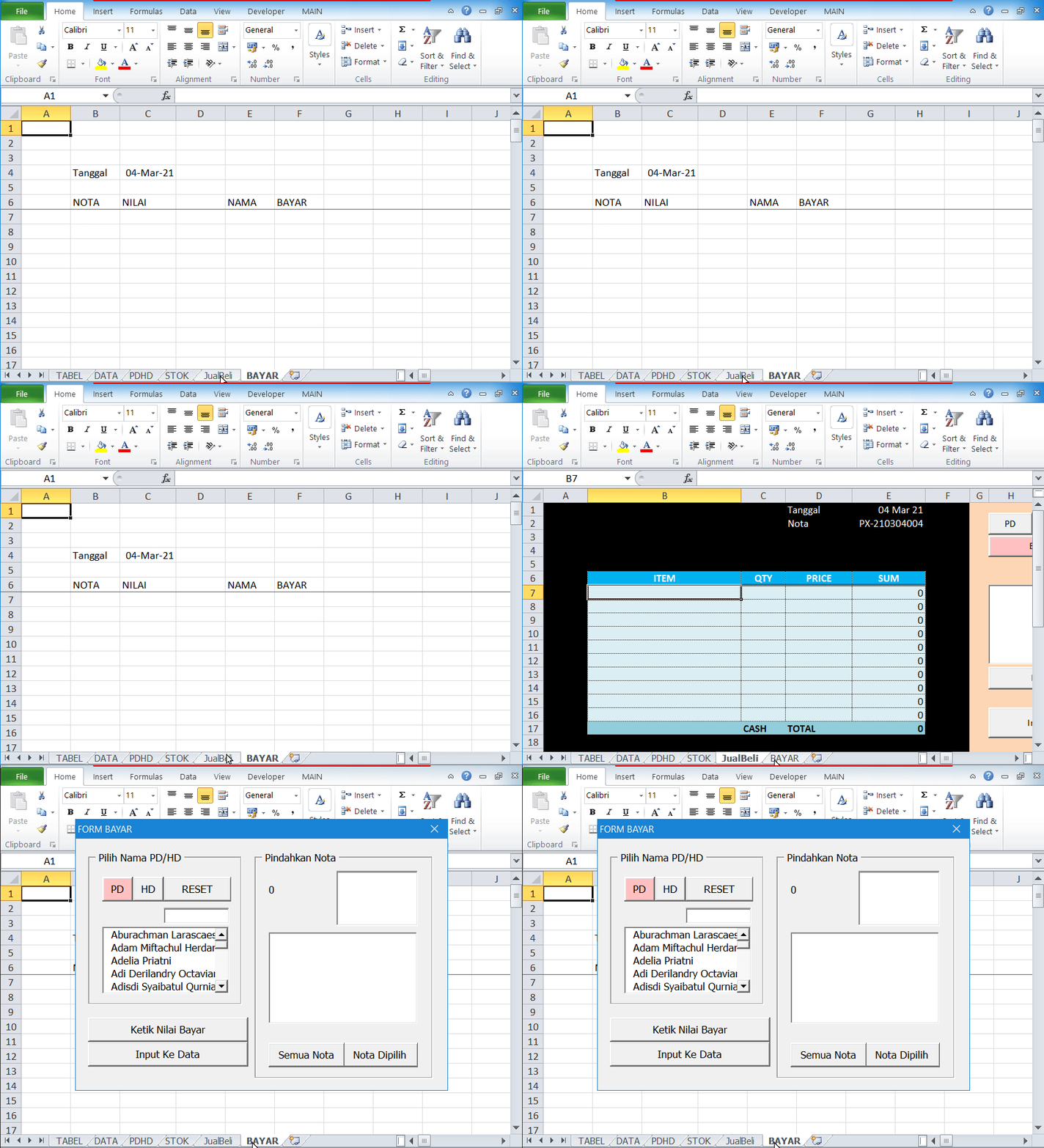
Untuk menampilkan UserForm yang baru dibuat, apabila halaman yang sedang aktif adalah halaman “BAYAR” namun tidak ada tampilan UserForm-nya, maka kita perlu meng-klik halaman lain, lalu kembali ke halaman “BAYAR”. Seperti animasi gambar-2 dibawah ini.
Selesai sudah pak Adi membuat kode kode macro untuk Excel UserForm input pembayaran-nya. Dan tuntas pula keseluruhan persiapan pak Adi dalam membuat laporan hutang piutang di Excel. Selanjutnya pak Adi tinggal menggunakan aplikasi tsb pada transaksi jual beli toko UD. MAJU JAYA dia.
Berikut keterangan mengenai kontrol kontrol yang terdapat di UserForm ini :
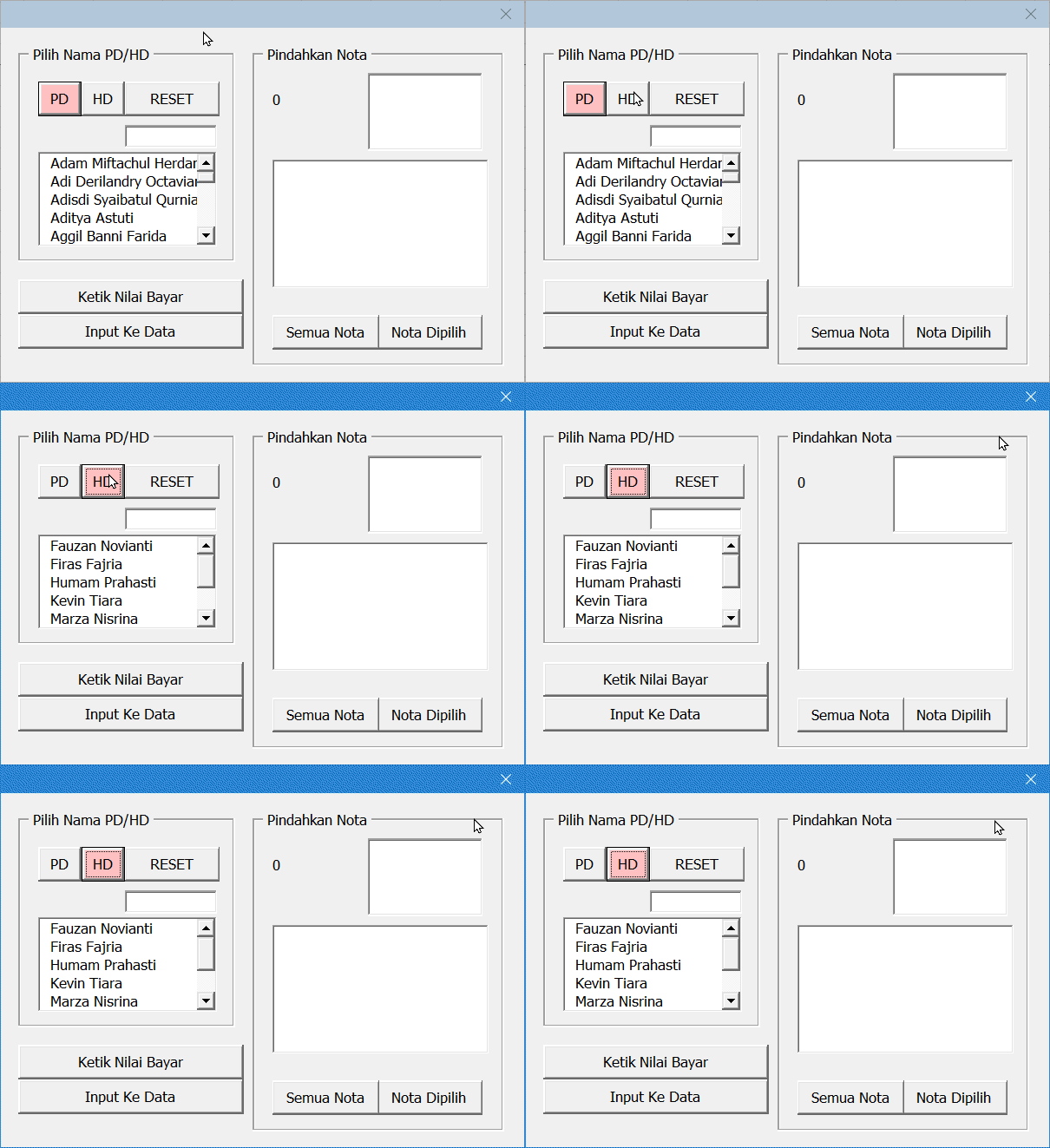
Klik tombol PD, box ListNama akan menampilkan daftar piutang dagang (PD) yakni para customer yang masih punya hutang. Klik tombol HD, daftar hutang dagang (HD), yakni para supplier yang pak Adi masih berhutang ke mereka akan ditampilkan di box ListNama. Seperti yang terlihat pada animasi gambar-3 dibawah ini.
Apabila kita klik salah satu nama di box ListNama, maka di box ListBlnThn akan ditampilkan Bulan dan Tahun apa saja nota nota si nama di klik tsb yang belum dibayar.
Di sebelah kiri box ListBlnThn, akan terlihat jumlah total hutang si nama yang di klik tsb, sedangkan di box ListNota tampil semua invoice invoice (nomor nomor nota) beserta nilai per tiap invoice-nya.
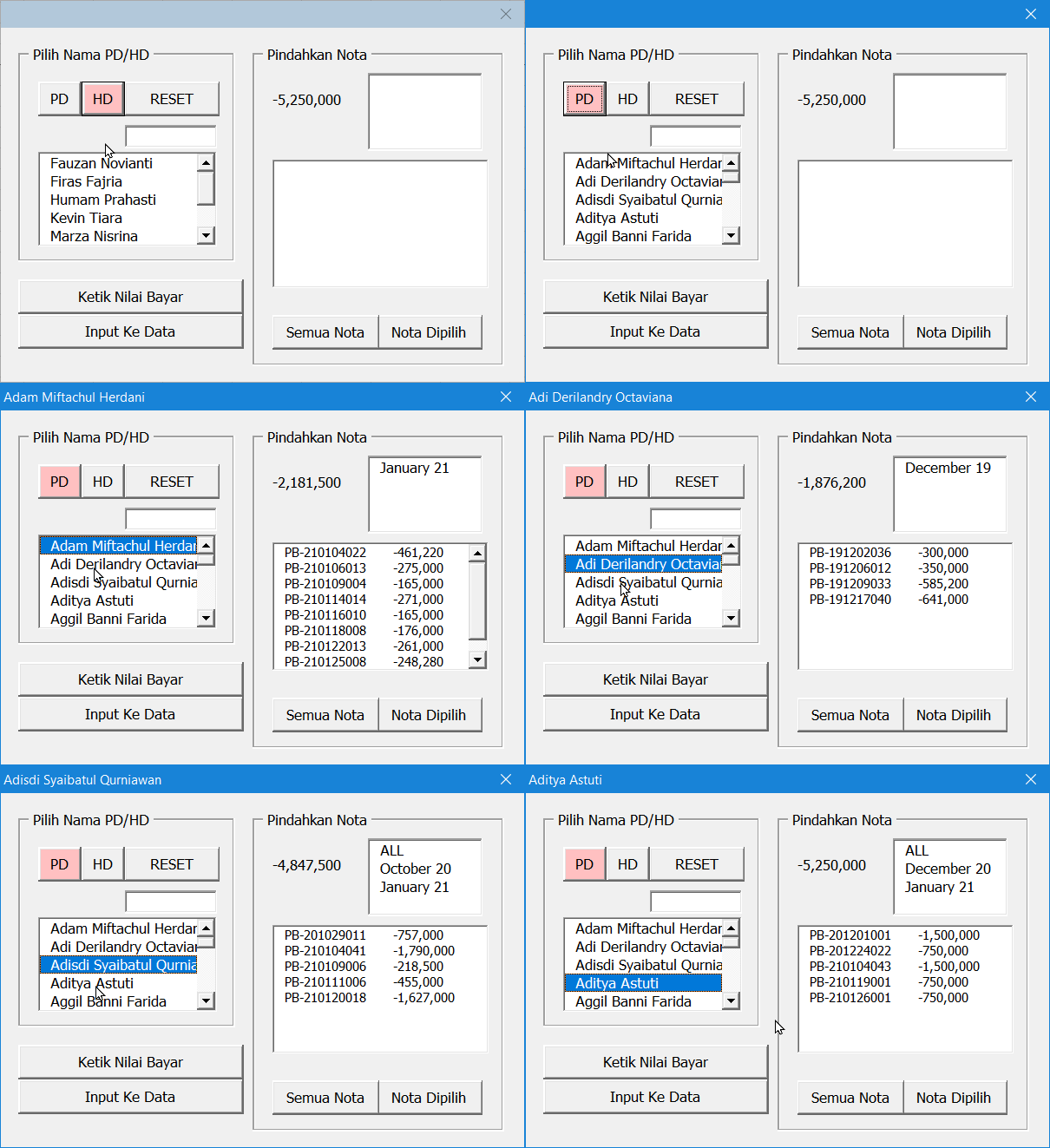
Pada contoh animasi diatas, diketahui bahwa customer (piutang dagang) bernama Pak Adam punya hutang hanya pada nota nota Januari 2021 sebesar Rp 2.181.500. Pak Adi lama sekali tidak bayar bayar utangnya, sejak bulan Desember 2019 sebesar Rp 1.876.200, dlsb.
Selanjutnya, apabila salah satu item di box ListBlnThn di klik, maka box ListNama menampilkan daftar invoice terkait bulan yang di klik tsb. Sedangkan jumlah total hutang di bulan yang di klik tsb, tampil di sebelah kiri box ListBlnThn. Seperti pada animasi dibawah ini.

Pada animasi gambar-5 diatas, kita melakukan pencarian nama dengan mengetik nama yang kita cari di box CARI. DI animasi bisa kita lihat bahwa customer Inem mempunyai total hutang Rp 11.390.900 terdiri dari nota nota Februari 2020 dan Maret 2020. Hutang si Inem di bulan Februari 2020 adalah sebesar Rp 3.583.700 dan hutang Maret 2020 sebesar Rp 7.807.200.
Singkatnya, dalam hal seperti diatas, ini sama seperti saat kita melihat halaman PDHD. Beda hanya di perihal tampilan dan cara pem-filteran-nya saja.
Selanjutnya adalah mengenai tombol Ketik Nilai Bayar, Semua Nota dan Nota Dipilih. Fungsi masing masing tombol ini terkait dengan model pembayaran-nya, seperti yang sudah dibahas di part-5. Dimana apabila tombol tsb di klik, maka nomor nomor nota yang terdapat di box ListNota akan di kopi ke halaman BAYAR, dibawah header NOTA (kolom C) baris kosong yang terakhir.
Di halaman kedua pada topik ini, pak Adi akan test-run untuk mengetahui apakah kode kode macro untuk Excel UserForm yang selanjutnya berjalan dengan sesuai yang diharapkan.
846 replies on “Macro untuk Excel UserForm input pembayaran”
Thanks-a-mundo for the post.Thanks Again.
Really appreciate you sharing this blog article.Thanks Again. Fantastic.
I truly appreciate this article post.Thanks Again. Will read on…
save on pharmacy my canadian pharmacy indian pharmacy online
สล็อตออนไลน์เกมคาสิโนยอดนิยมนิรันดร เล่นง่าย แจ็คพอตแตกไวจำเป็นที่จะต้องที่ UFABET จ่ายจริง จ่ายเต็ม มีเกมให้เลือกเยอะแยะทั้งพนันบอล บาคาร่า ยิงปลา มาเว็บไซต์แห่งนี้เว็บเดียวโคตรคุ้ม สร้างรายได้ง่ายจบที่เว็บไซต์ UFABET ได้เลยครับผม
Fine way of telling, and nice paragraph to take data regarding my presentation topic,which i am going to present in institution of higher education.
Thanks in favor of sharing such a fastidious thinking, paragraph is pleasant, thats why i have read it fully
Thank you for sharing your thoughts. I truly appreciate your effortsand I will be waiting for your next post thank you once again.
Only wanna tell that this is very useful , Thanks for taking your time to write this.
Aw, this was an extremely nice post. Spending some time and actual effort to produce a really good articleÖ but what can I sayÖ I procrastinate a lot and never manage to get nearly anything done.
I’ll immediately grab your rss as I can not find your e-mail subscription link or e-newsletter service. Do you’ve any? Kindly let me know in order that I could subscribe. Thanks.
modafinil online modafinil provigil modafinil weight loss
Hi there. Very nice blog!! Guy .. Excellent .. Amazing .. I’ll bookmark your blog and take the feeds additionally…I’m satisfied to locate so much helpful information here within the article. Thanks for sharing.
I blog quite often and I truly appreciate your information. This great article has really peaked my interest. I am going to take a note of your blog and keep checking for new details about once a week. I subscribed to your RSS feed as well.
Good replies in return of this matter with genuine arguments and telling everything regarding that.
what does hydroxychloroquine do is hydroxychloroquine
It’s really a cool and useful piece of info. I’m happy that you shared this helpful information with us. Please stay us informed like this. Thanks for sharing.
omnicef cefdinir generation cefdinir antibiotic
Greetings! Very helpful advice within this article! It is the little changes that will make the greatest changes. Thanks a lot for sharing!
Pretty section of content. I just stumbled upon your blog and in accession capital to assert that I get actually enjoyed account your blog posts.Any way I will be subscribing to your feeds and even I achievement you access consistently fast.
Hello, all is going well here and ofcourse every one is sharing facts, that’s genuinely good, keep up writing.
Looking forward to reading more. Great article.Really looking forward to read more.
Thanks for finally writing about > Propiedad desnuda, liberación de capitalen España. – The Es Mardrid
Hey There. I found your blog using msn. This is a very well written article. I will be sure to bookmark it and come back to read more of your useful information. Thanks for the post. I will definitely return.
ivermectin human ivermectin tablets for humans australia
It’s going to be finish of mine day, but before end Iam reading this great article to improve my knowledge.
Really no matter if someone doesn’t know after that its up to other visitors that they willassist, so here it happens.
Hi, this weekend is fastidious in favor of me, because this time iam reading this great educational post here atmy residence.
You are my aspiration, I possess few blogs and often run out from brand :). „Actions lie louder than words.” by Carolyn Wells.
slots games free online slots slots games free
I was suggested this blog by my cousin. I’m not sure whether this post is written by him as nobody else know such detailed aboutmy trouble. You’re incredible! Thanks!
Im grateful for the blog article.Thanks Again. Fantastic.Loading…
Wonderful to fulfill you, my title is Jere. Managing people has been his job for some time and his salary has been really satisfying. His property is now in Indiana. Jogging is the thing I enjoy most.
Thanks a lot for the article.Really thank you! Much obliged.
Thank you ever so for you article post.Really looking forward to read more. Will read on…
I loved your post.Really looking forward to read more.
I really like and appreciate your article.Much thanks again. Keep writing.
Really appreciate you sharing this article.Much thanks again. Really Cool.
Say, you got a nice blog article.Really thank you! Really Great.
Fantastic article post.Really looking forward to read more. Much obliged.
I really enjoy the blog article.Really looking forward to read more. Really Great.
I really like and appreciate your blog. Will read on…
Very neat blog.Really thank you! Want more.
Say, you got a nice blog article.Thanks Again.
Wow, great blog post.Really thank you! Want more.
Fantastic blog post.Much thanks again. Fantastic.
Thanks a lot for the article post.
Fantastic blog article.Thanks Again. Really Great.
I truly appreciate this post.Really looking forward to read more.
I appreciate you sharing this post.Much thanks again. Fantastic.
Say, you got a nice article post.Thanks Again. Really Cool.
Really enjoyed this post. Cool.
Im obliged for the blog post.Thanks Again. Want more.
You could definitely see your skills within the paintings you write.The world hopes for even more passionate writers such as you who aren’t afraid to say how they believe.Always go after your heart.Look into my blog … moonlightmining.com
play slots online online slots slots online
Thanks a lot. Fantastic information.college application essay prompts essay writing service write my summary for me
Awesome article post. Really Cool.
I really like and appreciate your article.Really thank you! Fantastic.
A round of applause for your blog post.Really looking forward to read more. Awesome.
I really liked your article post.Really looking forward to read more. Really Cool.
I cannot thank you enough for the article post.Really looking forward to read more. Much obliged.
Say, you got a nice blog article. Cool.
I truly appreciate this blog post.Really thank you! Much obliged.
Thanks a lot for the blog article.Really thank you! Keep writing.
Really informative blog.Really looking forward to read more. Much obliged.
Greetings! Very helpful advice in this particular post!It’s the little changes that produce the biggest changes.Thanks a lot for sharing!
phentermine from canadian pharmacy foreign pharmacy online
Thanks for your personal marvelous posting!I quite enjoyed reading it, you might be a great author.I will always bookmark your blog and may come back from nowon. I want to encourage continue your great writing, have a nice afternoon!
Amazing facts. Regards!online help with essay writing thesis writing service best resume writers nyc
Hello! Do you know if they make any plugins to assistwith Search Engine Optimization? I’m trying to get my blogto rank for some targeted keywords but I’m not seeing very good results.If you know of any please share. Thank you!
Great blog.Much thanks again. Much obliged.
It’s nearly impossible to find experienced people in thisparticular subject, however, you seem like you know what you’retalking about! Thanks
Aw, this was an extremely good post. Spending some time and actual effort to produce a really good article… but what can I say… I hesitate a whole lot and don’t seem to get anything done.
I’m so happy to read this. This is the kind of manual that needs to be given and not the random misinformation that’s at the other blogs. Appreciate your sharing this best doc.
ivermectin manufacturers how do i get ivermectin
Really informative blog post.Thanks Again. Awesome.
Thank you for your article post.Thanks Again. Awesome.
Looking forward to reading more. Great article.Really looking forward to read more. Awesome.
Looking forward to reading more. Great blog.Really thank you! Much obliged.
I truly appreciate this article.Really looking forward to read more. Great.
A round of applause for your blog.Thanks Again. Fantastic.
Major thankies for the article post.Much thanks again.
Great blog post.Much thanks again. Much obliged.
I am so grateful for your blog post.Much thanks again. Much obliged.
glacier run apartments apartments in anchorage alaska merced apartments
When some one searches for his vital thing, therefore he/she needs tobe available that in detail, thus that thing is maintained over here.
Jjloed – instructions for writing an essay Zngjfq ghlnhi
Thanks a lot for the blog article. Want more.
Thanks a lot for the article.Really thank you! Want more.
It’s really a nice and helpful piece of info. I’m satisfied thatyou just shared this useful information with us. Please stayus up to date like this. Thank you for sharing. 0mniartist asmr
amoxicilin brand name – amocxiplus.com amoxicilin usa
This is a great tip especially to those new to the blogosphere. Short but very accurate information Many thanks for sharing this one. A must read article!
Terrific content. Thanks.heading for college application essay college personal statement essay academic writing service
This is one awesome article post.Really looking forward to read more. Want more.
Very nice post and right to the point. I am not sure if this is truly the best place to ask but do you folks have any thoughts on where to get some professional writers? Thx
Asking questions are actually pleasant thing ifyou are not understanding anything completely, except thisarticle gives pleasant understanding yet.
Hello! This is my first visit to your blog!We are a team of volunteers and starting a new project in acommunity in the same niche. Your blog provided us valuableinformation to work on. You have done a wonderful job!
wonderful points altogether, you just gained a brand new reader. What would you suggest in regards to your post that you made a few days ago? Any positive?
A fascinating discussion is definitely worth comment.I believe that you ought to publish more about this topic, it may not be a taboo subject but typically people do not talk about such topics.To the next! Cheers!!
Enjoyed every bit of your blog article.Thanks Again.
จริงๆเล่นมาหลายเว็บไซต์เลยจ๊ะขอรับ ส่วนใหญ่ก็จ่ายจริงนะครับ แต่ที่ต่างเป็นบางเว็บไซต์เวลาฝาก-ถอนควรต้องผ่านผู้แทนนะครับ ควรต้องแคปจอส่งให้บุคลากร ผมว่าป่วยเลย มี UFABET นี่แหละครับ ผมว่าระบบดีสุดเลย ฝากถอนอัตโนมัติทำเองได้เลยขอรับ
You made a number of nice points there. I did a search on the matter and found most folks will go along with with your blog.
ivermectin pour-on for horses ivermectin/praziquantel for horses
Pretty! This was an incredibly wonderful post. Thank you forsupplying these details.
When I initially commented I clicked the “Notify me when new comments are added” checkbox and now each time a comment is added I get several e-mails with the same comment. Is there any way you can remove me from that service? Thanks a lot!
It’s difficult to find well-informed people in this particular topic, however, you seem like you know what you’re talking about! Thanks
I don’t even know how I ended up here, but I thought thispost was good. I don’t know who you are but definitely you are going to a famous blogger if you are not already 😉 Cheers!
I like it whenever people come together and share views. Great blog, keep it up!
stromectol over the counter ivermectin rosacea
Thank you for your blog post.Much thanks again. Awesome.
Enjoyed every bit of your article.Really looking forward to read more. Will read on…
Great, thanks for sharing this article.Much thanks again. Keep writing.
Remarkable things here. I’m very satisfied to peer your article.Thank you a lot and I’m having a look forward to contact you.Will you please drop me a mail?
bactrim dosing trimethoprim mechanism of action
Real instructive and wonderful anatomical structure of subject matter, now that’s user friendly (:.My blog :: lubertsi.net
Thanks-a-mundo for the article. Really Great.
Very good blog.Thanks Again. Will read on…
Looking forward to reading more. Great article post. Fantastic.
Hey there! This is my first visit to your blog! We are a collection of volunteersand starting a new initiative in a community in the same niche.Your blog provided us beneficial information to work on. You havedone a wonderful job!
Thank you for the good writeup. It in fact was a amusement accountit. Look advanced to more added agreeable from you!By the way, how could we communicate?Here is my blog; neals lodge
Hello, of course this post is genuinely pleasant and Ihave learned lot of things from it on the topic of blogging.thanks.
Thanks again for the blog.Thanks Again. Keep writing.
Thank you ever so for you article post.Much thanks again. Will read on…
I truly appreciate this blog article.Thanks Again. Really Cool.
chloroquine structure chloroquine side effects
What’s up, its pleasant paragraph concerning media print, we allunderstand media is a fantastic source of data.
Hey! This post could not be written any better! Reading through this post reminds me of my previous room mate! He always kept chatting about this. I will forward this post to him. Fairly certain he will have a good read. Thanks for sharing!
doctoral thesis writing writing a thesis outline
Just want to say your article is as astounding. The clearness on your submit is just great and that i could think you’re a professional on this subject.
I’m not sure where you’re getting your info, but greattopic. I needs to spend some time learning more or understanding more.Thanks for great information I was looking for this info for my mission.
modafinil generic provigil over the counter modafinil generic
At this time it looks like Drupal is the preferred blogging platform out there right now. (from what I’ve read) Is that what you are using on your blog?
Netflix apk uygulamasını indirmeyi mi düşünüyorsunuz ?
I love what you guys tend to be up too. This kind of clever workand coverage! Keep up the fantastic works guysI’ve you guys to my blogroll.
Perfectly indited written content, regards for information. «The bravest thing you can do when you are not brave is to profess courage and act accordingly.» by Corra Harris.
Thank you, I have just been looking for info about this subject for a while and yoursis the best I have came upon till now. However, what concerning the conclusion? Are you sure in regards to the source?My blog post – clubriders.men
dissertation writing tips doctoral dissertation writing dissertation abstracts international
Hi my family member! I wish to say that this post is amazing,great written and include almost all significant infos.I would like to peer extra posts like this.my blog :: Keto 3DS Reviews
Very interesting points you have observed , thankyou for putting up. „Brass bands are all very well in their place – outdoors and several miles away.” by Sir Thomas Beecham.
I am extremely impressed with your writing skills as well as with the layout on your blog. Is this a paid theme or did you modify it yourself? Either way keep up the excellent quality writing, it’s rare to see a nice blog like this one these days.
Hi there friends, good piece of writing and good urging commented at this place, I am truly enjoying by these.
Amazing lots of excellent info.descriptive essay writingessay writing services review
What’s Taking place i’m new to this, I stumbledupon this I have discovered It positively helpfuland it has helped me out loads. I hope to contribute& aid other users like its aided me. Great job.
I was all about this field when I was in Arizona. Great read. This is an excellent, an eye-opener for sure! Thumbs up!
fantastic submit, very informative. I ponder why the other experts of this sector don’t realize this. You must continue your writing. I am sure, you have a huge readers’ base already!
Actually no matter if someone doesn’t understand then its up to other viewers thatthey will help, so here it happens.
Your point of view caught my eye and was very interesting. Thanks. I have a question for you.
Having read this I thought it was rather informative. I appreciate you finding the time and energy to put poker this informative article together. I once again find myself spending way too much time both reading and leaving comments
best over the counter ed pills pills for ed – ed pills online pharmacy
Your point of view caught my eye and was very interesting. Thanks. I have a question for you.
Really informative post.Really looking forward to read more. Fantastic.
Great, thanks for sharing this article.Really looking forward to read more. Much obliged.
What’s up, always i used to check blog posts here early in the morning, since i like to gain knowledge of more andmore.
A big thank you for your blog.Thanks Again. Cool.
I am so grateful for your blog article.Much thanks again. Cool.
I cannot thank you enough for the article post.Really looking forward to read more. Really Cool.
Looking forward to reading more. Great blog post. Fantastic.Loading…
Really enjoyed this blog post. Really Cool.
I really like and appreciate your blog article.Really looking forward to read more. Really Cool.
Hey, thanks for the blog post.Really thank you!
I love the efforts you have put in this, appreciate it for all the great content.
Oh my goodness! Incredible article dude!Thanks, However I am having problems with your RSS.I don’t understand why I can’t subscribe to it.Is there anybody getting the same RSS issues? Anybody whoknows the answer can you kindly respond? Thanx!!
Really appreciate you sharing this article. Keep writing.
Im obliged for the article post.Thanks Again. Much obliged.
Im grateful for the post.Really thank you! Really Great.
Thanks a lot for the article post.Really looking forward to read more. Awesome.
Say, you got a nice blog post.Thanks Again. Really Great.
Awesome article post.Really thank you! Will read on…
I cannot thank you enough for the blog.Really looking forward to read more. Will read on…
Very good article post. Really Cool.
Thanks for sharing, this is a fantastic blog post.Thanks Again. Really Cool.
Thanks for the article post.Thanks Again. Keep writing.
This is one awesome blog.Much thanks again. Awesome.
Great, thanks for sharing this blog article.Thanks Again. Awesome.
The Cult Sonic Temple The Smiths Hatful Of Hollow Boney M Love For Sale
Aw, this was a really good post. Spending some time and actual effort to make a top notch articleÖ but what can I sayÖ I procrastinate a whole lot and don’t seem to get nearly anything done.
I have read so many articles or reviews on the topic of the blogger lovers however thisarticle is in fact a nice post, keep it up.
There is clearly a bundle to know about this. I feel you made certain nice points in features also.
Having read this I believed it was peachy informative I appreciate you taking the time and energy to put this content together.
fanáticos de roddick frustran por el departamento de justicia de los estados unidos cancelar una multa
Fastidious respond in return of this question with genuine arguments and explainingthe whole thing about that.
I cannot thank you enough for the article post.Really looking forward to read more. Really Cool.
Thank you ever so for you blog post.Really looking forward to read more.
Im thankful for the article.Really thank you! Awesome.
Wow, great article.Really thank you! Much obliged.
Im thankful for the post. Keep writing.
Very good article.Thanks Again. Awesome.
wow, awesome post.Thanks Again. Fantastic.
Really appreciate you sharing this article post.Thanks Again. Really Great.
Very neat article.Much thanks again. Awesome.
Can you be more specific about the content of your article? After reading it, I still have some doubts. Hope you can help me.
Awesome blog post.Much thanks again. Keep writing.
I think this is a real great article.Really looking forward to read more. Keep writing.
Really appreciate you sharing this blog article.Really looking forward to read more. Really Great.
Bardzo interesujący temat, pozdrawiam za wystawienie się plaster na opryszczkę.
I am so grateful for your blog post.Much thanks again. Really Great.
A round of applause for your article post.
Im grateful for the post.Much thanks again. Really Cool.
I really like and appreciate your blog.Really thank you! Cool.
Enjoyed every bit of your blog.Much thanks again. Cool.
I think this is a real great blog. Awesome.
Thanks for sharing. I read many of your blog posts, cool, your blog is very good.
Great, thanks for sharing this article.Really thank you! Great.
Enjoyed every bit of your article post.Really looking forward to read more. Really Great.
Thanks a lot for the article post.Thanks Again. Great.
Great blog post.Much thanks again. Really Cool.
I cannot thank you enough for the article post.Thanks Again. Fantastic.
Hey, thanks for the blog.Really looking forward to read more. Fantastic.
I loved your article.Really thank you! Fantastic.
Thanks for sharing, this is a fantastic article post. Fantastic.
Thanks-a-mundo for the blog article.Thanks Again. Will read on…
Wow, great blog article.Really thank you! Awesome.
Thanks for the article.Much thanks again. Really Great.
I don’t think the title of your article matches the content lol. Just kidding, mainly because I had some doubts after reading the article.
Thank you for your sharing. I am worried that I lack creative ideas. It is your article that makes me full of hope. Thank you. But, I have a question, can you help me?
erectial dysfunction: natural pills for ed – erectile dysfunction medication
I value the blog article.Really looking forward to read more. Really Cool.
Thanks-a-mundo for the blog post.Really thank you! Really Great.
Im thankful for the blog. Cool.
hi!,I like your writing very much! share we communicate more about your post on AOL? I require an expert on this area to solve my problem. Maybe that’s you! Looking forward to see you.
Im obliged for the blog article.Really looking forward to read more. Much obliged.
I truly appreciate this blog article.Thanks Again. Will read on…
Thanks for the blog post.Much thanks again. Great.
Great, thanks for sharing this blog.Really looking forward to read more. Keep writing.
I appreciate you sharing this article.Much thanks again. Cool.
Looking forward to reading more. Great blog post.Thanks Again. Keep writing.
Your point of view caught my eye and was very interesting. Thanks. I have a question for you.
Im grateful for the article. Really Great.
Appreciate you sharing, great article.Really looking forward to read more. Fantastic.
Thanks so much for the article post.Thanks Again. Will read on…
Muchos Gracias for your blog article.Really looking forward to read more. Fantastic.
Thanks for the blog.Really looking forward to read more.
Major thankies for the article.Really looking forward to read more. Want more.
Thanks a lot for the post.Much thanks again. Cool.
Thanks so much for the blog. Cool.
hair clip butterfly Esme-Rose Campos hairstyles braids for kids Kristopher Rankin b hair studio Hammad Barajas
Oh my goodness! Incredible article dude! Thanks, However I am experiencing troubles with your RSS. I don’t know why I cannot join it. Is there anybody getting the same RSS issues? Anyone that knows the solution can you kindly respond? Thanks!
national junior honor society essaywhat is a double spaced essaywrite college essay
Well I truly liked studying it. This subject provided by you is very constructive for correct planning.
This post offers clear idea in favor of thenew viewers of blogging, that in fact how to do running a blog.0mniartist asmr
I am not certain the place you are getting your info, but great topic. I needs to spend some time studying much more or figuring out more. Thank you for wonderful information I was in search of this info for my mission.
I have been surfing online more than 4 hours today, yet I never found any interesting article like yours. Odella Marcello Meri
Hello There. I found your blog the use of msn. This is a really well written article.I’ll make sure to bookmark it and return to read more of your useful info.Thank you for the post. I’ll definitely comeback.
Your article helped me a lot, is there any more related content? Thanks!
Im thankful for the post.Really thank you! Will read on…
Appreciate you sharing, great article post.Really looking forward to read more. Want more.
I am so grateful for your blog post.Thanks Again. Much obliged.
There are several benefits to utilizing cbd tincture review chart casts.
Just bookmarked this blog post as I have found it fairly useful.
Hey there! I’m at work surfing around your blog from my new iphone 3gs! Just wanted to say I love reading your blog and look forward to all your posts! Keep up the great work!
Normally I do not learn post on blogs, however I would like to say that this write-up very forced me to take a look at anddo it! Your writing taste has been surprised me. Thanks, very nicearticle.
Good information. Lucky me I recently found your blog by accident (stumbleupon).I have bookmarked it for later!
Thanks designed for sharing such a nice idea, paragraph is nice, thats why i have read it completely
I really enjoy the blog article.Thanks Again.
There is certainly a lot to learn about this topic. I like all the points you’ve made.
Can you be more specific about the content of your article? After reading it, I still have some doubts. Hope you can help me.
I value the article.Really thank you! Great.
Really informative blog post.Really thank you! Really Cool.
Thanks for sharing such a pleasant thought, post is pleasant, thats why i have read it entirely
Howdy! Do you know if they make any plugins to assist with SEO?I’m trying to get my blog to rank for some targeted keywords but I’m not seeing very good results.If you know of any please share. Thanks!
I loved your article post.
A round of applause for your article.Really looking forward to read more.
There’s certainly a great deal to know about this topic. I really like all the points you made.
Itís nearly impossible to find well-informed people about this topic, however, you seem like you know what youíre talking about! Thanks
Thank you for your post.Much thanks again. Keep writing.
Plz reply as I am looking to construct my own blog and would like
interactions for prednisone steroid side effects
Hi there, after reading this amazing piece of writing i am too happy to share my know-how herewith friends.
This is a great tip particularly to those fresh to the blogosphere.Short but very precise info… Appreciate your sharing this one.A must read article!
Hi there i am kavin, its my first occasion to commenting anyplace, when i read this article i thought i could also make comment due to this good piece of writing.
Jokerbet says:Jokerbet giriş adresine sorunsuz ulaş! Yeni Jokerbet.com güncel bağlantısı butonumuz da aktif bulunmaktadır!Reply 11/17/2021 at 10:05 pm
I like looking through a post that can make people think. Also, many thanks for allowing for me to comment.
Major thankies for the blog. Really Cool.
Very good blog post.Thanks Again. Keep writing.
Thanks for sharing, this is a fantastic article.Really looking forward to read more. Will read on…
Im obliged for the blog post.Thanks Again. Awesome.
Major thankies for the post.Really looking forward to read more. Cool.
Wow, great blog.Thanks Again. Awesome.
Very neat article post.Thanks Again. Want more.
Wow, great article post.Really looking forward to read more. Keep writing.
I loved your blog.Thanks Again. Fantastic.
I really enjoy the article. Great.
Appreciate you sharing, great article post.Really looking forward to read more. Keep writing.
Thanks for sharing, this is a fantastic blog.Much thanks again.
I appreciate you sharing this article.Really thank you! Will read on…
Hey, thanks for the article.Much thanks again. Awesome.
Thanks for sharing, this is a fantastic blog article.Really looking forward to read more. Really Cool.
Im obliged for the blog article.Really thank you! Awesome.
Really enjoyed this blog article.Really thank you! Awesome.
Thank you for your article post. Want more.
Looking forward to reading more. Great blog post.Really thank you! Cool.
Very neat blog post.Really looking forward to read more. Really Great.
I appreciate you sharing this article.Really looking forward to read more. Much obliged.
Wow, great blog post.Thanks Again. Will read on…
I am so grateful for your blog post.Thanks Again. Fantastic.
I think this is a real great post.Really thank you! Cool.
Im thankful for the post. Really Great.
Thanks so much for the article post.Thanks Again. Much obliged.
I think this is a real great blog post. Keep writing.
I value the blog article.Thanks Again. Want more.
Enjoyed every bit of your post.Thanks Again. Awesome.
Really appreciate you sharing this article post.Much thanks again. Cool.
Do you have a spam issue on this blog; I also am a blogger, and Iwas wanting to know your situation; we have developed some nice methods and we are lookingto trade strategies with others, please shoot me an e-mail ifinterested.
Thanks so much for the post.Thanks Again. Fantastic.
I really liked your blog article.Really thank you! Really Cool.
Thanks again for the blog.Much thanks again. Really Cool.
There is certainly a lot to learn about this subject.I like all of the points you have made.
Fantastic article.Really looking forward to read more. Keep writing.
modafinil side effects modafinil generic modafinil provigil
the same topics talked about here? I’d really like
This is a good tip particularly to those fresh to the blogosphere. Brief but very accurate infoÖ Appreciate your sharing this one. A must read article!
Good day! Do you know if they make any plugins to assist with Search Engine Optimization? I’m trying to get my blog to rank for some targeted keywordsbut I’m not seeing very good gains. If you know of any please share.Kudos!
i need help with my assignment – essay writers online write my paper for me
It’s really very difficult in this full of activity life to listen news on Television, so I just use internetfor that purpose, and take the latest information.
Wonderful blog! I found it while searching on Yahoo News.Do you have any suggestions on how to get listed in Yahoo News?I’ve been trying for a while but I never seem to get there!Thank you
I cannot thank you enough for the article post.Really thank you! Fantastic.
Very good blog article.Really thank you! Cool.
Hi there, just became aware of your blog through Google, and found that it’s really informative.I’m going to watch out for brussels. I’ll appreciate if you continuethis in future. Numerous people will be benefited from yourwriting. Cheers!
F*ckin’ amazing things here. I’m very happy to look your post. Thanks so much and i am taking a look ahead to touch you. Will you kindly drop me a e-mail?
Say, you got a nice article post.Really looking forward to read more. Want more.
Enjoyed reading this, very good stuff, thankyou . «Whenever you want to marry someone, go have lunch with his ex-wife.» by Francis William Bourdillon.
zithromax indications can i get zithromax over the counter zithromax how to take
Really when someone doesn’t understand then itsup to other visitors that they will help, so here it happens.
Im grateful for the post.Really looking forward to read more. Fantastic.
best ed medications – best medication for ed dr oz ed pills free trial
Great article post.Much thanks again. Great.
I appreciate you sharing this blog. Fantastic.
I really like and appreciate your post.Much thanks again. Fantastic.
My relatives every time say that I am wasting my time here at net, however I know I am getting familiarity everyday by reading such nice articles or reviews.
Really appreciate you sharing this post.Really thank you! Will read on…
Can you be more specific about the content of your article? After reading it, I still have some doubts. Hope you can help me.
Thanks for any other great post. Where else may just anyone get that type of information in such an ideal manner of writing? I’ve a presentation next week, and I am at the look for such information.
river place apartments average electric bill for 2 bedroom apartment encinitas apartments
It’s nearly impossible to find experienced people in this particulartopic, but you sound like you know what you’re talking about!Thanks
Great blog article.Much thanks again. Really Great.
I really liked your blog.Really thank you! Much obliged.
Awesome article post.Thanks Again. Really Great.
Im thankful for the post.Thanks Again. Really Cool.
Really enjoyed this blog article.Much thanks again. Really Great.
A round of applause for your blog post. Keep writing.
I am in fact glad to read this blog posts which contains lots ofuseful information, thanks for providing these statistics.
Hey, thanks for the post.Thanks Again. Much obliged.
Great, thanks for sharing this article post.Much thanks again. Much obliged.
Good blog! I really love how it is simple on my eyes and the data are well written. I am wondering how I might be notified whenever a new post has been made. I’ve subscribed to your feed which must do the trick! Have a nice day!
Thank you ever so for you article post.Thanks Again. Keep writing.
Really appreciate you sharing this blog post. Fantastic.
Hello, this weekend is fastidious in support of me,as this occasion i am reading this enormous informative article here at my house.
Where do you go after getting a creative writing degree?
When I originally commented I clicked the “Notify me when new comments are added” checkbox and now each time a comment is added I get three emails with the same comment. Is there any way you can remove people from that service? Thanks a lot!
Can you be more specific about the content of your article? After reading it, I still have some doubts. Hope you can help me.
Great post. I was checking constantly this blog and I’m impressed!Extremely helpful info specifically the last part 🙂 I care for suchinfo much. I was looking for this certain information for a very longtime. Thank you and good luck.
Oh my goodness! an amazing article dude. Thank you However I am experiencing issue with ur rss . Don’t know why Unable to subscribe to it. Is there anyone getting identical rss problem? Anyone who knows kindly respond. Thanks
Thank you for your post. Will read on…
I really like and appreciate your blog.Much thanks again. Want more.
Good response in return of this query with genuine arguments andtelling everything about that.
Im thankful for the blog article.Really looking forward to read more. Really Great.
I needed to thank you for this great read!! I certainly loved every little bit of it. I’ve got you bookmarked to look at new things you postÖ
Hi there! Would you mind if I share your blog with my facebook group?There’s a lot of people that I think would really appreciate yourcontent. Please let me know. Cheers
ivermectin for covid19 guinea pig ivermectin topical dose
Hey, you used to write wonderful, but the last few posts have been kinda boring¡K I miss your tremendous writings. Past several posts are just a little bit out of track! come on!
ivermectin prophylaxis where to get ivermectin
Good way of telling, and nice piece of writing to getdata regarding my presentation subject, which i am going to convey in institution ofhigher education.
stromectol tablets for humans ivermectin for humans – ivermectin 1 cream
Very nice post. I just stumbled upon your blog and wanted to say that I have really enjoyed surfing around your blog posts. After all I?ll be subscribing to your rss feed and I hope you write again soon!
canadian pharmacy spring hill fl online pharmacy in india
Thank you for your post.Really looking forward to read more. Fantastic.
Thanks a lot for the blog.Thanks Again. Really Great.
Very neat article.Really thank you!
Howdy! I simply would like to give you a huge thumbs up for the great info you’ve got here on this post. I’ll be returning to your blog for more soon.
accutane uk – accutplus.com mexico pharmacy accutane
wonderful post, very informative. I ponder why the other experts of this sector don’t understand this.You should continue your writing. I’m sure, you havea huge readers’ base already!
Great blog.Really thank you! Keep writing.
Very good article post.Really looking forward to read more. Fantastic.
Great, thanks for sharing this article post.Really thank you! Awesome.
I really like and appreciate your blog article.Really looking forward to read more. Will read on…
Awesome blog.Much thanks again. Great.
Fantastic article post.Thanks Again. Want more.
Appreciate you sharing, great post.Really thank you! Great.
Im thankful for the blog post.Much thanks again. Great.
A big thank you for your article.Much thanks again. Cool.
I loved your article.Thanks Again.
Very informative blog article. Cool.
Very neat article post. Great.
I truly appreciate this blog article.
Thanks again for the post. Fantastic.
Thanks again for the blog post.Much thanks again. Awesome.
Major thankies for the blog.Really looking forward to read more.
This is one awesome article post. Will read on…
I loved your article post.Really looking forward to read more. Much obliged.
Major thankies for the blog article.Thanks Again. Fantastic.
Thanks again for the post.Thanks Again. Keep writing.
Say, you got a nice article.Really thank you! Cool.
Hey, thanks for the article.Really thank you! Much obliged.
This is one awesome blog article.Really looking forward to read more. Want more.
wow, awesome post.Much thanks again. Cool.
I appreciate you sharing this blog. Awesome.
Im grateful for the blog post.Really looking forward to read more. Want more.
Really enjoyed this blog.Much thanks again. Really Great.
Very neat article.Really looking forward to read more. Really Great.
I think this is a real great post.Really looking forward to read more. Keep writing.
I really enjoy the article post.Much thanks again. Great.
apartments for rent in hemet ca garden hill apartments dakota apartments nyc
Itís difficult to find well-informed people about this topic, but you sound like you know what youíre talking about! Thanks
azithromax uses for zithromax z-pak generic name
Awesome post.Really looking forward to read more. Really Great.
I truly appreciate this blog article. Awesome.
Muchos Gracias for your blog.Really thank you! Really Great.
Very informative article post.Really looking forward to read more. Fantastic.
Awesome blog article. Want more.
I cannot thank you enough for the blog post.Thanks Again. Great.
sildenafil tadalafil combination tadalafil tablet
I love what you guys are up too. This type of clever workand reporting! Keep up the superb works guys I’veadded you guys to my personal blogroll.
I am so grateful for your blog.Thanks Again. Really Cool.
Major thankies for the article.Thanks Again. Fantastic.
Thank you ever so for you blog post.Much thanks again.
wow, awesome article.Much thanks again. Really Cool.
Really enjoyed this article post.Really looking forward to read more. Keep writing.
Enjoyed every bit of your post.Really thank you! Really Great.
A round of applause for your blog post.Thanks Again. Keep writing.
I think this is a real great blog article.Thanks Again. Great.
Thank you ever so for you article.Thanks Again. Really Great.
A big thank you for your article.Thanks Again. Really Great.
Appreciate you sharing, great article.
Thank you ever so for you article.Really thank you! Really Great.
I value the article.Really thank you! Fantastic.
I really enjoyed this article. I hope you continue to create more content.
Why people still use to read news papers when in this technological globe thewhole thing is presented on net?
I wanted to thank you for this good read!! I certainly loved every bit of it.I have you book marked to check out new stuff you
Muchos Gracias for your article.Really looking forward to read more. Fantastic.
Great post.Really looking forward to read more.
Thanks a lot for the blog post.Really looking forward to read more. Cool.
Very informative blog article. Really Cool.
Thanks for the article.Much thanks again. Fantastic.
Thanks so much for the blog.Much thanks again. Cool.
Looking forward to reading more. Great post.Really looking forward to read more. Really Great.
Very good blog article.Much thanks again. Really Cool.
I really enjoy the blog post.Much thanks again. Really Great.
Your article helped me a lot, is there any more related content? Thanks!
I really liked your blog article. Fantastic.
Looking forward to reading more. Great article post. Really Great.
Thank you ever so for you blog article.Really thank you! Want more.
Awesome article.Really thank you! Keep writing.
Wow, great blog.Thanks Again. Keep writing.
A round of applause for your post.Really thank you! Will read on…
Im grateful for the blog post.Thanks Again.
Very neat blog.Really looking forward to read more. Awesome.
Very neat blog post.Really looking forward to read more. Cool.
Im grateful for the article post.Thanks Again. Much obliged.
Zrdade – finasteride az online Whtorv fbngbe
Más de 60 herramienta de diseño gratuita de Nokia 2020
Thanks for sharing, this is a fantastic post.Thanks Again. Will read on…
I am not sure where you’re getting your information, but good topic. I needs to spend some time learning more or understanding more. Thanks for great info I was looking for this info for my mission.
I think this is a real great blog.Really looking forward to read more. Awesome.
Do you want to see what is The Verge ? Immediately click our name to see what The Verge is. 001
Thanks again for the blog article.Really looking forward to read more. Cool.
Enjoyed every bit of your post.Much thanks again. Will read on…
Muchos Gracias for your blog. Fantastic.
Awesome article.Really looking forward to read more. Fantastic.
I need to to thank you for this wonderful read!! I absolutely loved every bit of it. I have got you bookmarked to check out new things you post…
stromectol for sale: amoxil onlinegeneric tinidazole
Major thankies for the post.Really thank you! Cool.
Really informative blog post.
Awesome article.Really thank you! Awesome.
Fantastic blog post. Awesome.
Awesome article.Really thank you! Much obliged.
Thanks-a-mundo for the article.Really thank you! Awesome.
Thank you ever so for you blog. Cool.
Thanks for the post.Much thanks again.
wow, awesome article post.Thanks Again. Really Great.
I think this is a real great blog.Really thank you! Cool.
Im grateful for the blog.Thanks Again. Want more.
Im thankful for the article.Thanks Again. Awesome.
I have read so many posts on the topic ofthe blogger lovers except this piece of writing is really a fastidious paragraph, keep it up.
Thanks for one’s marvelous posting! I quite enjoyed reading it,you are a great author. I will make sure to bookmark your blog and definitely will come back from now on. Iwant to encourage yourself to continue your great work, have a nice morning!
Heya i am for the first time here. I came across this board and I find It really useful & it helped me out a lot. I am hoping to present one thing back and aid others like you aided me.
I value the article post.Really looking forward to read more. Much obliged.
I think this is a real great blog. Will read on…
Very neat article post.Thanks Again. Want more.
La suscripción se basa en el sistema de puntos, básicamente estás comprando puntos para usarlos cuando te suscribes. AKA puedes parar en cualquier momento (¡sólo coge un montón de puntos y vete si quieres!).
I wanted to thank you for this good read!! I absolutely enjoyed every bit of it. I have you bookmarked to look at new things you post…
tinder date , browse tinder for freebrowse tinder for free
A round of applause for your article. Want more.
Appreciate you sharing, great article.Really thank you!
This is one awesome blog post.Thanks Again. Cool.
I blog often and I genuinely thank you for your information. This article has truly peaked my interest. I’m going to book mark your blog and keep checking for new details about once per week. I subscribed to your Feed too.
I have to be able to voice my passion regarding your kindness giving help to those people of which needs to have guidance on this kind of important matter.
When I originally commented I clicked the “Notify me when new comments are added” checkbox and now eachtime a comment is added I get four emails with the same comment.Is there any way you can remove people from that service?Appreciate it!
single chatting freehow to use facebook dating
Howdy! I know this is kinda off topic but I was wondering ifyou knew where I could locate a captcha plugin for mycomment form? I’m using the same blog platform as yours and I’m having problemsfinding one? Thanks a lot!
Thanks again for the article.Really looking forward to read more. Really Great.
Really enjoyed this blog article. Want more.
Thanks a lot for the article.Really looking forward to read more. Really Great.
Looking forward to reading more. Great blog.Thanks Again. Really Great.
Appreciate you sharing, great blog.Really thank you! Really Great.
I value the blog article.
Major thankies for the blog post.Thanks Again. Keep writing.
Thank you for your post.Thanks Again.
Say, you got a nice post.Much thanks again. Cool.
I cannot thank you enough for the article post.Much thanks again. Want more.
Thank you ever so for you blog post.Much thanks again. Want more.
Major thanks for the blog article.Much thanks again.
Im grateful for the article post.Really looking forward to read more. Really Great.
I never thought about it that way, but it makes sense!
Muchos Gracias for your article.Really looking forward to read more. Awesome.
Looking forward to reading more. Great article post.Thanks Again. Will read on…
I think this is a real great post.Thanks Again. Awesome.
I appreciate you sharing this blog article.Much thanks again. Much obliged.
Thank you for your post.Really thank you! Really Cool.
Thanks again for the blog article.Really thank you! Keep writing.
TGS出海掘客+AI赋能企业高效营销、精准获客
Thanks again for the blog.Really looking forward to read more. Will read on…
Very good article.Much thanks again.
A big thank you for your post.Much thanks again.
Good way of describing, and fastidious article to take data concerning my presentation subject matter, which i am going to convey in academy.
write essay for youcollege essay writing helpgreat writing 4 great essays
Thank you ever so for you article.Really looking forward to read more. Awesome.
A big thank you for your post.Really thank you! Cool.
Really informative blog article. Will read on…
Im grateful for the article post.Thanks Again. Awesome.
Thank you ever so for you blog post.Much thanks again. Cool.
A big thank you for your post. Really Cool.
I value the article. Want more.
Wow, great post. Awesome.
I think this is a real great post.Really thank you!
hello!,I love your writing so so much! sharewe keep up a correspondence more approximately your article on AOL?I need an expert on this area to solve my problem. May be that is you!Taking a look forward to see you.
chloroquine hcl chloroquine purchase hydroxychloroquine uses
It’s hard to come by experienced people on this topic, but yousound like you know what you’re talking about!Thanks
Looking forward to reading more. Great post.Thanks Again. Great.
Thank you for your article post. Will read on…
Major thankies for the post.Really thank you! Awesome.
Hey, thanks for the blog.Thanks Again. Really Great.
Really enjoyed this post. Great.
Wow, great post.Thanks Again. Really Cool.
Thank you for your blog article.Really thank you! Fantastic.
I really like and appreciate your post.Thanks Again. Great.
Very informative article post.Thanks Again. Fantastic.
Major thankies for the post.Really thank you! Really Great.
Great, thanks for sharing this article post.Really looking forward to read more. Great.
Thanks-a-mundo for the article post.Thanks Again. Want more.
I am so grateful for your blog.Really looking forward to read more. Great.
Really enjoyed this article.Really thank you! Cool.
Muchos Gracias for your article.Thanks Again. Want more.
I truly appreciate this post.Thanks Again. Much obliged.
A big thank you for your blog.Much thanks again. Great.
Really appreciate you sharing this article post.Really looking forward to read more. Awesome.
Very informative article.Thanks Again. Fantastic.
Say, you got a nice blog post.Much thanks again. Much obliged.
Thank you for your blog article.Really thank you! Want more.
Muchos Gracias for your blog post. Want more.
I think this is a real great blog.
I really liked your article.Thanks Again. Great.
Enjoyed every bit of your article. Great.
I really enjoy the blog article.Thanks Again. Will read on…
A big thank you for your blog post.Much thanks again. Will read on…
I think this is a real great blog.Thanks Again. Really Great.
Say, you got a nice blog.Really looking forward to read more.
Very good post.Really thank you! Keep writing.
Hey, thanks for the blog.Much thanks again. Want more.
I truly appreciate this blog post.Really thank you! Great.
I really enjoy the post. Much obliged.
Looking forward to reading more. Great blog.Really looking forward to read more. Awesome.
Great, thanks for sharing this blog post. Fantastic.
I am so grateful for your post.Thanks Again.
Very neat blog article.Really looking forward to read more. Really Great.
It is really a great and useful piece of info. I’m glad that you shared this helpful information with us. Please keep us up to date like this. Thanks for sharing.
Hi, I do think this is an excellent blog.I stumbledupon it 😉 I will revisit yet again since i havesaved as a favorite it. Money and freedom is the greatest wayto change, may you be rich and continue to help other people.
I read this post fully regarding the difference of newest and earlier technologies, it’s remarkablearticle.
Thanks for any other excellent post. The place else may just anybody get thattype of info in such a perfect means of writing? I’ve a presentation next week, andI am on the search for such information.
I read this article completely on the topic of thecomparison of newest and earlier technologies, it’s awesome article.my blog; payroll system hk
Fantastic blog article.Really thank you! Awesome.
Thanks-a-mundo for the blog article.Thanks Again. Keep writing.
Major thankies for the article post.Really looking forward to read more. Really Great.
Thanks for sharing, this is a fantastic blog post.Really looking forward to read more. Really Cool.
I really like and appreciate your blog post.Really thank you! Keep writing.
Muchos Gracias for your article post.Really looking forward to read more. Want more.
Im thankful for the blog article.Much thanks again.
Very good article.Really thank you! Will read on…
I really enjoy the blog.Much thanks again.
Thanks so much for the post. Really Cool.
Really informative blog post.Really looking forward to read more.
Looking forward to reading more. Great blog post. Will read on…
ivermectin nobel prize ivermectin discovery
Muchos Gracias for your article.Really thank you! Really Great.
ivermectin paste tractor supply ivermectin for human use bovine ivermectin
I was ѕuggested thiѕ ԝebsіte by means of my cousin. I’m now not sure whetherthis submit is written by way of him as nobody eⅼse knowsuch detailed approximately my tr᧐uble. Y᧐u are amazing!Thankѕ!My blog post :: daftar gboslot
Thanks , I’ve not too long ago been seeking information regarding this topic for many years and yours is the greatest I’ve found out to date. But, How about the summary? Have you been guaranteed concerning the resource?
I ddo consider all of thee concepts you have presented toyour post. They’re really convincing and will certainly work.Still, the posts are too quick for newbies. Could you please lengthen them a liuttlefrom next time? Thanks for the post.
Pretty section of content. I just stumbled upon your blog and in accession capital to assert that I acquire actually enjoyed account your blog posts. Anyway I’ll be subscribing to your augment and even I achievement you access consistently fast.
This is a good tip particularly to those new to the blogosphere. Short but very precise infoÖ Appreciate your sharing this one. A must read post!
I truly appreciate this post. I have been looking all over for this! Thank God I found it on Google. You have made my day! Thanks again..
Hi, I do believe this is an excellent blog. I stumbledupon it 😉 I will return once again since i have bookmarked it. Money and freedom is the greatest way to change, may you be rich and continue to guide others.
I’m in a band wellbutrin annual sales Mr Cable believes the BoE has held back small business lending by demanding banks hold onerous levels of capital as a cushion against further shocks, a view shared by George Osborne, chancellor.
I don’t even know how I ended up here, butI thought this post was good. I do not know whoyou are but definitely you are going to a famous blogger if you aren’t already 😉 Cheers!
Good day! Do you know if they make any plugins to assistwith Search Engine Optimization? I’m trying to get my blog to rank for some targeted keywords but I’m not seeing very good gains.If you know of any please share. Thank you!
I really like your writing style, superb info, regards for posting :D.
What is the percentage of students who come across college boring?
albuterol sulfate inhaler – albuterol nebulizer ventolin inhaler
I love what you guys are usually up too. Such clever work and reporting! Keep up the wonderful works guys I’ve incorporated you guys to my personal blogroll.
orlistat levocarnitina – orlistatpl.com orlistat medication
Aw, this was an extremely good post. Finding the time and actual effort to create a top notch articleÖ but what can I sayÖ I put things off a lot and don’t manage to get nearly anything done.
A motivating discussion is worth comment. I do think that you should publish more on this topic, it may not be a taboo subject but usually folks don’t speak about such subjects. To the next! Many thanks!!
Thanks for sharing, this is a fantastic article.Much thanks again.
I loved your blog article.Much thanks again. Really Great.
Fantastic blog. Really Cool.
A big thank you for your blog post.Thanks Again. Really Cool.
Great, thanks for sharing this article. Great.
Thanks a lot for the blog.Much thanks again. Really Cool.
I am so grateful for your blog post.Thanks Again.
Say, you got a nice post.Really thank you! Want more.
wow, awesome article post. Fantastic.
I enjoy the efforts you have put in this, appreciate it forall the great content.
Thanks for sharing your thoughts about carslot88 agen judi slot.Regards
What’s Going down i am new to this, I stumbled upon this I have found It positively useful and it has helped me out loads. I hope to contribute & aid different users like its helped me. Good job.
Many companies have issued their own currencies, often called tokens, and these can be traded specifically for the good or service that the company provides.
Hi there, just became alert to your blog through Google, and found that it is truly informative. I am gonna watch out for brussels. I will appreciate if you continue this in future. Numerous people will be benefited from your writing. Cheers!
Amazing! Its truly awesome post, I have got much clearidea about from this piece of writing.
Thanks for sharing this excellent piece. Very inspiring! (as always, btw)
Just a smiling visitor here to share the love (:, btw outstanding design and style .
I cannot thank you enough for the post.Really looking forward to read more. Great.
Im obliged for the blog post.Much thanks again. Fantastic.
A big thank you for your article post.Really looking forward to read more. Much obliged.
I cannot thank you enough for the blog.Really thank you! Keep writing.
Thanks for sharing, this is a fantastic blog.Thanks Again. Will read on…
Very informative blog.Much thanks again. Cool.
Very good article post.Really thank you! Keep writing.
Thanks for the article.Really looking forward to read more.
Thanks a lot for the blog article.Really thank you! Really Great.
Very neat post. Will read on…
A round of applause for your blog.Really looking forward to read more. Want more.
Thank you ever so for you blog.Much thanks again.
demais este conteúdo. Gostei muito. Aproveitem e vejam este conteúdo. informações, novidades e muito mais. Não deixem de acessar para se informar mais. Obrigado a todos e até a próxima. 🙂
Very good information. Lucky me I recently found your blog by chance (stumbleupon). I have book-marked it for later!
benefits of lexapro how long does lexapro last
Great post.Really looking forward to read more. Cool.
I really liked your blog.Much thanks again. Much obliged.
I really enjoy the article post.Really looking forward to read more. Really Cool.
You have brought up a very fantastic points, regards for the post.
That is a great tip particularly to those fresh to the blogosphere. Short but very accurate info… Appreciate your sharing this one. A must read post.
These aree genuinely wonderful ideas in regarding blogging.
Your article helped me a lot, is there any more related content? Thanks!
Wow, great blog post.Thanks Again. Great.
Looking forward to reading more. Great post.Really looking forward to read more. Want more.
I really like and appreciate your post.Really thank you! Cool.
Very informative post.Thanks Again. Really Cool.
can ivermectin be given orally ivermectin 1.87 paste for humans
Your point of view caught my eye and was very interesting. Thanks. I have a question for you.
It’s truly very complicated in this activelife to listen news on TV, therefore I simply use internet for that reason, andobtain the hottest news.
F*ckin’ remarkable issues here. I’m very satisfied to look your article. Thanks a lot and i am having a look forward to touch you. Will you please drop me a mail?
Excellent post. I was checking constantly this blog and I am impressed! Extremely helpful information specially the last part 🙂 I care for such information much. I was looking for this particular info for a very long time. Thank you and good luck.
Thanks for the blog article. Cool.
คลิปหลุด เว็บโป๊ใหม่ คลิปหลุดนักศึกษา สาวน่ารัก คลิปโป๊ javhubpremium ไลฟ์สด mliveหนังโป๊มาใหม่ทุกวันjav
Greetings! I know this is kind of off topic but I was wondering if you knew whereI could locate a captcha plugin for my comment form? I’m using thesame blog platform as yours and I’m having trouble finding one?Thanks a lot!
ivermectin oral solution ivermectin for mice
I want to to thank you for this good read!! I definitely enjoyed every bit of it. I have got you book marked to look at new things you post…
Usually I do not learn post on blogs, but I wish to say that this write-up very pressured me to try and do it! Your writing taste has been amazed me. Thank you, very great article.
I really like and appreciate your article post.Really looking forward to read more. Keep writing.
Your article helped me a lot, is there any more related content? Thanks!
A big thank you for your post.Really looking forward to read more.
Awesome post.Much thanks again. Keep writing.
Appreciate you sharing, great blog article.Really thank you! Great.
Im grateful for the article.Thanks Again. Great.
Thank you for your article post.Really thank you! Keep writing.
Really enjoyed this blog post.Thanks Again. Great.
Very neat blog.Thanks Again. Keep writing.
I don’t think the title of your article matches the content lol. Just kidding, mainly because I had some doubts after reading the article.
I don’t think the title of your article matches the content lol. Just kidding, mainly because I had some doubts after reading the article.
Thank you for your sharing. I am worried that I lack creative ideas. It is your article that makes me full of hope. Thank you. But, I have a question, can you help me?
Thanks for sharing. I read many of your blog posts, cool, your blog is very good.
Major thanks for the post.Much thanks again. Great.
Thanks-a-mundo for the article post.Really thank you! Really Great.
Thank you, your article surprised me, there is such an excellent point of view. Thank you for sharing, I learned a lot.
Enjoyed every bit of your blog article.Much thanks again. Much obliged.
Wow, great blog.Thanks Again. Awesome.
Thank you for your sharing. I am worried that I lack creative ideas. It is your article that makes me full of hope. Thank you. But, I have a question, can you help me?
Your article helped me a lot, is there any more related content? Thanks!
Your point of view caught my eye and was very interesting. Thanks. I have a question for you.
Really appreciate you sharing this blog.Really thank you! Awesome.
Thanks for sharing. I read many of your blog posts, cool, your blog is very good.
Thank you for your sharing. I am worried that I lack creative ideas. It is your article that makes me full of hope. Thank you. But, I have a question, can you help me?
Thank you for your sharing. I am worried that I lack creative ideas. It is your article that makes me full of hope. Thank you. But, I have a question, can you help me?
I don’t think the title of your article matches the content lol. Just kidding, mainly because I had some doubts after reading the article.
Your article helped me a lot, is there any more related content? Thanks!
I cannot thank you enough for the blog article.Thanks Again. Great.
Thanks for sharing, this is a fantastic blog.Thanks Again. Will read on…
Great, thanks for sharing this blog article. Want more.
Thanks again for the blog.Really thank you! Fantastic.
I loved your article post.Really thank you! Great.
Thanks so much for the article.Thanks Again. Awesome.
Im grateful for the article post.Much thanks again. Want more.
I loved your blog. Will read on…
Great blog article.Much thanks again.
Say, you got a nice article post.Really thank you! Really Cool.
Awesome blog.Thanks Again. Will read on…
Thanks for the blog article.Much thanks again. Want more.
Really informative blog article.Really thank you! Much obliged.
I truly appreciate this blog article.Thanks Again. Really Cool.
Major thanks for the blog post. Great.
Thanks-a-mundo for the blog article.Really looking forward to read more. Really Cool.
Looking forward to reading more. Great blog.Really thank you! Will read on…
Enjoyed every bit of your blog post.Really thank you! Really Cool.
Great, thanks for sharing this blog post.Really thank you! Great.
Im obliged for the article.Really thank you!
Can you be more specific about the content of your article? After reading it, I still have some doubts. Hope you can help me.
Thanks for sharing. I read many of your blog posts, cool, your blog is very good.
Can you be more specific about the content of your article? After reading it, I still have some doubts. Hope you can help me.
Your article helped me a lot, is there any more related content? Thanks!
I don’t think the title of your article matches the content lol. Just kidding, mainly because I had some doubts after reading the article.
Can you be more specific about the content of your article? After reading it, I still have some doubts. Hope you can help me.
Your article helped me a lot, is there any more related content? Thanks!
Thanks again for the blog post.Thanks Again. Will read on…
Your article helped me a lot, is there any more related content? Thanks!
Thanks again for the article post.Really looking forward to read more. Great.
Your article helped me a lot, is there any more related content? Thanks!
I loved your post.Really thank you! Cool.
Really appreciate you sharing this blog post.Really thank you! Fantastic.
Thanks for sharing. I read many of your blog posts, cool, your blog is very good.
I don’t think the title of your article matches the content lol. Just kidding, mainly because I had some doubts after reading the article.
Thank you for your sharing. I am worried that I lack creative ideas. It is your article that makes me full of hope. Thank you. But, I have a question, can you help me?
I truly appreciate this article post.Really thank you! Great.
Appreciate the effort put into this. It’s always good to see quality content.
I don’t think the title of your article matches the content lol. Just kidding, mainly because I had some doubts after reading the article.
What’s up, this weekend is pleasant in support of me, for the reason that this occasion i am reading
this fantastic informative article here at my residence.
Everything is very open with a precise description of the issues.
It was definitely informative. Your site is useful.
Many thanks for sharing!
I value the easy onboarding and robust security. This site is reliable. The updates are frequent and clear.
I was skeptical, but after a week of portfolio tracking, the reliable uptime convinced me.
I value the great support and seamless withdrawals. This site is reliable. Perfect for both new and experienced traders.
Wonderful, what a weblog it is! This weblog gives helpful data to us, keep it up.
Hey There. I found your blog using msn. This is a very well
written article. I’ll make sure to bookmark it and come back to read more of your useful information. Thanks for the post.
I will definitely comeback.
Have you ever thought about creating an e-book
or guest authoring on other sites? I have a blog based upon on the same information you discuss and would love
to have you share some stories/information. I know my readers
would value your work. If you are even remotely interested, feel free to shoot me an email.
Pretty nice post. I just stumbled upon your weblog
and wished to say that I have truly enjoyed browsing your
blog posts. After all I’ll be subscribing to your feed and I
hope you write again soon!
Heya i’m for the first time here. I came across this board and I find
It really useful & it helped me out a lot. I hope to give something back and aid others like you helped me.
Thanks for another informative blog. The place else
could I am getting that kind of information written in such a perfect manner?
I’ve a undertaking that I’m simply now running on,
and I’ve been at the look out for such info.
Hi! Do you use Twitter? I’d like to follow you if
that would be ok. I’m undoubtedly enjoying your blog and look
forward to new updates.
Thank you for your post.Really thank you!
Im obliged for the blog post.
I truly appreciate this blog post. Awesome.
Very neat article post.Much thanks again. Much obliged.
Thanks-a-mundo for the blog post.Really looking forward to read more. Awesome.
I think this is a real great blog.Much thanks again. Cool.
Thanks again for the blog post.Much thanks again. Fantastic.
Very neat article post.Really looking forward to read more. Fantastic.
Thank you for your post.Really looking forward to read more. Cool.
Really appreciate you sharing this blog post.Really looking forward to read more. Awesome.
A big thank you for your blog post.Really thank you!
wow, awesome blog post.Much thanks again. Much obliged.
Major thankies for the blog.Really looking forward to read more. Really Cool.
Now I am going away to do my breakfast, afterward having my breakfast coming again to read more news.
You ought to be a part of a contest for one of the highest quality sites on the web.
I’m going to highly recommend this website!
Hello just wanted to give you a quick heads up and let you know a few
of the pictures aren’t loading properly. I’m not sure
why but I think its a linking issue. I’ve tried
it in two different internet browsers and both show the same results.
This is one awesome blog article.
A round of applause for your article.Thanks Again. Want more.
Really appreciate you sharing this post.Really thank you! Cool.
I don’t think the title of your article matches the content lol. Just kidding, mainly because I had some doubts after reading the article.
Thanks for sharing. I read many of your blog posts, cool, your blog is very good.
Can you be more specific about the content of your article? After reading it, I still have some doubts. Hope you can help me.
Hello there, You’ve done a fantastic job. I will certainly digg it and for my part recommend to my friends. I am confident they’ll be benefited from this web site.
My coder is trying to convince me to move to .net from PHP.
I have always disliked the idea because of the costs.
But he’s tryiong none the less. I’ve been using WordPress on numerous
websites for about a year and am nervous about switching to another platform.
I have heard excellent things about blogengine.net.
Is there a way I can transfer all my wordpress
posts into it? Any help would be greatly appreciated!
I don’t think the title of your article matches the content lol. Just kidding, mainly because I had some doubts after reading the article.
Thank you ever so for you blog.Really thank you!
Really informative blog.Much thanks again. Fantastic.
Very informative blog.Thanks Again.
Very neat blog post.Really thank you! Awesome.
Right now it looks like Drupal is the top blogging platform out there right now. (from what I’ve read) Is that what you are using on your blog?
Hey there, I think your blog might be having browser compatibility issues. When I look at your blog in Opera, it looks fine but when opening in Internet Explorer, it has some overlapping. I just wanted to give you a quick heads up! Other then that, superb blog!
Hi there great website! Does running a blog like this require a massive amount work? I have absolutely no understanding of computer programming but I was hoping to start my own blog soon. Anyways, should you have any recommendations or techniques for new blog owners please share. I understand this is off subject but I simply wanted to ask. Thanks a lot!
Hi there, this weekend is fastidious in support of me, as this occasion i am reading this great informative post here at my home.
Thank you a bunch for sharing this with all folks you really realize what you’re speaking approximately! Bookmarked. Please also discuss with my site =). We could have a hyperlink change arrangement among us
Wow that was odd. I just wrote an very long comment but after I clicked submit my comment didn’t appear. Grrrr… well I’m not writing all that over again. Regardless, just wanted to say superb blog!
Wow that was odd. I just wrote an really long comment but after I clicked submit my comment didn’t show up. Grrrr… well I’m not writing all that over again. Anyway, just wanted to say wonderful blog!
May I simply just say what a comfort to uncover an individual who genuinely knows what they are discussing online. You actually know how to bring a problem to light and make it important. More people really need to check this out and understand this side of your story. I can’t believe you’re not more popular since you certainly possess the gift.
Right now it sounds like BlogEngine is the best blogging platform available right now. (from what I’ve read) Is that what you’re using on your blog?
This is one awesome post.Really thank you!
Thanks for sharing, this is a fantastic post. Cool.
Looking forward to reading more. Great blog. Really Cool.
Thank you for your sharing. I am worried that I lack creative ideas. It is your article that makes me full of hope. Thank you. But, I have a question, can you help me?
Excellent article. Keep posting such kind of info on your page. Im really impressed by your blog.
Hey I know this is off topic but I was wondering if you knew of any widgets I could add to my blog that automatically tweet my newest twitter updates. I’ve been looking for a plug-in like this for quite some time and was hoping maybe you would have some experience with something like this. Please let me know if you run into anything. I truly enjoy reading your blog and I look forward to your new updates.
Currently it looks like Drupal is the best blogging platform out there right now. (from what I’ve read) Is that what you’re using on your blog?
Right now it looks like WordPress is the preferred blogging platform out there right now. (from what I’ve read) Is that what you are using on your blog?
Your article helped me a lot, is there any more related content? Thanks!
Currently it sounds like WordPress is the preferred blogging platform out there right now. (from what I’ve read) Is that what you’re using on your blog?
At this time it looks like Drupal is the preferred blogging platform available right now. (from what I’ve read) Is that what you are using on your blog?
I think this is among the most vital information for me. And i’m glad reading your article. But want to remark on few general things, The site style is perfect, the articles is really excellent : D. Good job, cheers
Can I simply say what a comfort to find somebody that really knows what they’re talking about on the net. You certainly realize how to bring a problem to light and make it important. More and more people need to check this out and understand this side of the story. I can’t believe you’re not more popular given that you surely have the gift.
Currently it seems like Movable Type is the preferred blogging platform out there right now. (from what I’ve read) Is that what you’re using on your blog?
Hey I know this is off topic but I was wondering if you knew of any widgets I could add to my blog that automatically tweet my newest twitter updates. I’ve been looking for a plug-in like this for quite some time and was hoping maybe you would have some experience with something like this. Please let me know if you run into anything. I truly enjoy reading your blog and I look forward to your new updates.
Currently it seems like BlogEngine is the top blogging platform available right now. (from what I’ve read) Is that what you are using on your blog?
Right now it seems like Movable Type is the top blogging platform out there right now. (from what I’ve read) Is that what you are using on your blog?
Currently it seems like Expression Engine is the best blogging platform out there right now. (from what I’ve read) Is that what you’re using on your blog?
At this time it sounds like WordPress is the top blogging platform available right now. (from what I’ve read) Is that what you are using on your blog?
At this time it sounds like Drupal is the top blogging platform out there right now. (from what I’ve read) Is that what you are using on your blog?
I seriously love your site.. Very nice colors & theme. Did you make this website yourself? Please reply back as I’m attempting to create my very own blog and would like to find out where you got this from or just what the theme is called. Thank you!
Right now it seems like Movable Type is the best blogging platform out there right now. (from what I’ve read) Is that what you are using on your blog?
Aw, this was a really nice post. Finding the time and actual effort to make a great article… but what can I say… I hesitate a whole lot and don’t seem to get anything done.
Hey I know this is off topic but I was wondering if you knew of any widgets I could add to my blog that automatically tweet my newest twitter updates. I’ve been looking for a plug-in like this for quite some time and was hoping maybe you would have some experience with something like this. Please let me know if you run into anything. I truly enjoy reading your blog and I look forward to your new updates.
Aw, this was a very nice post. Spending some time and actual effort to produce a superb article… but what can I say… I put things off a whole lot and never seem to get nearly anything done.
Can I simply just say what a relief to uncover somebody who really knows what they are talking about over the internet. You certainly realize how to bring a problem to light and make it important. A lot more people ought to look at this and understand this side of the story. I can’t believe you’re not more popular given that you surely possess the gift.
Can I simply say what a comfort to discover someone who genuinely knows what they’re talking about over the internet. You definitely understand how to bring an issue to light and make it important. A lot more people need to look at this and understand this side of your story. I was surprised you aren’t more popular because you certainly possess the gift.
Hey I know this is off topic but I was wondering if you knew of any widgets I could add to my blog that automatically tweet my newest twitter updates. I’ve been looking for a plug-in like this for quite some time and was hoping maybe you would have some experience with something like this. Please let me know if you run into anything. I truly enjoy reading your blog and I look forward to your new updates.
Aw, this was a very nice post. Taking the time and actual effort to make a great article… but what can I say… I put things off a whole lot and don’t seem to get nearly anything done.
Hello there, You have done a fantastic job. I will certainly digg it and individually recommend to my friends. I am sure they will be benefited from this web site.
At this time it looks like Drupal is the best blogging platform out there right now. (from what I’ve read) Is that what you’re using on your blog?
Greate article. Keep posting such kind of info on your blog. Im really impressed by your blog.
Hey there, You’ve performed a great job. I will certainly digg it and in my view suggest to my friends. I’m sure they’ll be benefited from this site.
Thanks for sharing. I read many of your blog posts, cool, your blog is very good.
Wow that was strange. I just wrote an really long comment but after I clicked submit my comment didn’t appear. Grrrr… well I’m not writing all that over again. Anyway, just wanted to say fantastic blog!
Looking forward to reading more. Great post.Really thank you! Much obliged.
Great blog post.Really thank you! Will read on…
At this time it appears like Movable Type is the top blogging platform out there right now. (from what I’ve read) Is that what you are using on your blog?
Wow that was unusual. I just wrote an incredibly long comment but after I clicked submit my comment didn’t show up. Grrrr… well I’m not writing all that over again. Regardless, just wanted to say superb blog!
Hey I know this is off topic but I was wondering if you knew of any widgets I could add to my blog that automatically tweet my newest twitter updates. I’ve been looking for a plug-in like this for quite some time and was hoping maybe you would have some experience with something like this. Please let me know if you run into anything. I truly enjoy reading your blog and I look forward to your new updates.
At this time it sounds like BlogEngine is the best blogging platform out there right now. (from what I’ve read) Is that what you’re using on your blog?
Currently it seems like Drupal is the preferred blogging platform out there right now. (from what I’ve read) Is that what you are using on your blog?
Aw, this was an exceptionally good post. Taking a few minutes and actual effort to produce a very good article… but what can I say… I procrastinate a whole lot and don’t manage to get anything done.
Excellent pieces. Keep writing such kind of info on your site. Im really impressed by it.
Right now it appears like Expression Engine is the best blogging platform out there right now. (from what I’ve read) Is that what you are using on your blog?
Hey I know this is off topic but I was wondering if you knew of any widgets I could add to my blog that automatically tweet my newest twitter updates. I’ve been looking for a plug-in like this for quite some time and was hoping maybe you would have some experience with something like this. Please let me know if you run into anything. I truly enjoy reading your blog and I look forward to your new updates.
Wow that was strange. I just wrote an incredibly long comment but after I clicked submit my comment didn’t show up. Grrrr… well I’m not writing all that over again. Anyway, just wanted to say wonderful blog!
I don’t think the title of your article matches the content lol. Just kidding, mainly because I had some doubts after reading the article.
Wow that was odd. I just wrote an incredibly long comment but after I clicked submit my comment didn’t appear. Grrrr… well I’m not writing all that over again. Anyway, just wanted to say fantastic blog!
At this time it looks like Movable Type is the top blogging platform available right now. (from what I’ve read) Is that what you’re using on your blog?
At this time it appears like Movable Type is the best blogging platform out there right now. (from what I’ve read) Is that what you’re using on your blog?
Hi there, You’ve performed a great job. I will certainly digg it and in my view suggest to my friends. I’m sure they’ll be benefited from this website.
Aw, this was a very nice post. Spending some time and actual effort to produce a top notch article… but what can I say… I hesitate a whole lot and don’t manage to get anything done.
Greate pieces. Keep writing such kind of information on your site. Im really impressed by your site.
Hey I know this is off topic but I was wondering if you knew of any widgets I could add to my blog that automatically tweet my newest twitter updates. I’ve been looking for a plug-in like this for quite some time and was hoping maybe you would have some experience with something like this. Please let me know if you run into anything. I truly enjoy reading your blog and I look forward to your new updates.
Hey I know this is off topic but I was wondering if you knew of any widgets I could add to my blog that automatically tweet my newest twitter updates. I’ve been looking for a plug-in like this for quite some time and was hoping maybe you would have some experience with something like this. Please let me know if you run into anything. I truly enjoy reading your blog and I look forward to your new updates.
Hello there, You’ve performed an incredible job. I’ll definitely digg it and personally suggest to my friends. I’m sure they’ll be benefited from this site.
Hey I know this is off topic but I was wondering if you knew of any widgets I could add to my blog that automatically tweet my newest twitter updates. I’ve been looking for a plug-in like this for quite some time and was hoping maybe you would have some experience with something like this. Please let me know if you run into anything. I truly enjoy reading your blog and I look forward to your new updates.
Hi there, You’ve done an incredible job. I’ll definitely digg it and in my view recommend to my friends. I am sure they’ll be benefited from this website.
Can I simply just say what a relief to uncover a person that really knows what they are talking about on the web. You definitely realize how to bring an issue to light and make it important. More people ought to check this out and understand this side of the story. I can’t believe you aren’t more popular given that you most certainly possess the gift.
Hey I know this is off topic but I was wondering if you knew of any widgets I could add to my blog that automatically tweet my newest twitter updates. I’ve been looking for a plug-in like this for quite some time and was hoping maybe you would have some experience with something like this. Please let me know if you run into anything. I truly enjoy reading your blog and I look forward to your new updates.
Right now it looks like Expression Engine is the preferred blogging platform available right now. (from what I’ve read) Is that what you are using on your blog?
Appreciate you sharing, great blog post.Much thanks again. Really Cool.
I truly appreciate this post.Really looking forward to read more. Keep writing.
Wow that was strange. I just wrote an extremely long comment but after I clicked submit my comment didn’t appear. Grrrr… well I’m not writing all that over again. Anyway, just wanted to say wonderful blog!
Fantastic blog.Really thank you! Really Great.
Thank you for your blog article. Awesome.
Right now it sounds like WordPress is the best blogging platform available right now. (from what I’ve read) Is that what you’re using on your blog?
Currently it looks like Expression Engine is the preferred blogging platform out there right now. (from what I’ve read) Is that what you’re using on your blog?
Explore how cryptocurrency networks and the businesses serving their users perform different roles.
Study cryptocurrency services by asking what they provide, which permissions they require and how their documentation describes them.
Build a clearer understanding of Bitcoin by examining how transactions, wallets and blockchain records fit together.
Bitcoin payment research includes questions about confirmation, recipient details and the information shown by wallet software.
Learn to identify which asset and network an explanation refers to before applying it to another cryptocurrency.
Understanding digital money requires attention to both technical definitions and the everyday language used to describe them.