

Last updated on March 19th, 2021 at 06:21 am
Halaman ini adalah kelanjutan dari halaman sebelumnya, yakni “Membuat Pivot Table hutang piutang dan stok di Excel“. Jadi setelah pak Adi membuat Pivot Table di halaman “PDHD” dan halaman “STOK”, selanjutnya dia membuat form input jual beli di Excel yang dia buat di halaman baru, halaman “JualBeli”. Disini pak Adi menggunakan ActiveX controls dalam pembuatan form nya. Kegunaan form ini adalah untuk meng-input transaksi jual beli ke data utama.
Membuat Form di halaman Excel
1. Membuat tampilan “mentah” User Form
Pertama tama pak Adi membuat halaman baru dengan nama “JualBeli”. Pada halaman ini, design mentah User Form yang pak Adi buat seperti terlihat dibawah gambar ini.

Cell E1, berisi rumus =TODAY()
Cell E7 isi rumusnya =C7*D7
Cell E17 isi dengan rumus =SUM(E7:E16)
Kopi rumus yang terdapat di cell E7, lalu paste ke range E8:E16.
Hasilnya seperti yang terlihat pada gambar diatas.
2. Membuat Text Box dan List Box untuk User Form
Masih di halaman “JualBeli”, pada tab Developer, klik segitiga kebawah di tombol Insert, lalu pilih ActiveX control yang bernama Text Box.

Selanjutnya, buat Text Box tsb di halaman “JualBeli” dengan cara klik cell apapun di halaman, klik tombol Properties, lalu di Properties window, ketik CARI di kolom (Name). Lanjutkan dengan memilih List Box ActiveX control, buat List Box nya di halaman yang sama dan dengan cara yang sama seperti sebelumnya (meng-klik cell apapun di halaman), lalu ketik ListNama di Properties windownya. Seperti yang terlihat pada animasi dibawah ini.

3. Membuat tombol tombol untuk User Form
Berikutnya pak Adi membuat tombol tombol yang dia perlukan di Form. Yang pertama adalah tombol PD untuk transaksi penjualan (piutang dagang). Ini kali pak Adi memilih ActiveX control Command Button.
Klik Insert, klik CommandButton control, buat tombolnya di halaman, lalu di Properties window, ketik PD untuk (Name) dan ketik PD untuk Caption.

Buat lima buah tombol lagi, dimana “Properties”nya masing masing adalah sbb :
| (Name) | Caption |
|---|---|
| HD | HD |
| Item | Item |
| Kas_Bon | KAS / BON |
| BARU | BARU |
| InputKeData | Input Ke Data |
Dibawah ini adalah tampilan halaman “JualBeli” setelah pak Adi membuat 1 buah TextBox, 1 buah ListBox, dan 6 buah CommandButton.
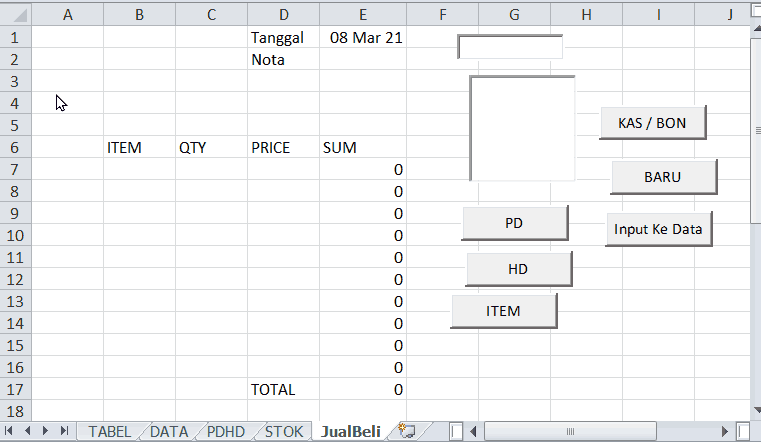
Tidak apa apa tampilannya masih berantakan, karena nanti size dan posisi masing masing control-nya akan diatur melalui kode macro.
Adapun fungsi dari masing masing ActiveX control tsb adalah sbb :
| Control | FUNGSI |
|---|---|
| PD | Transaksi penjualan – mengarahkan ke daftar nama Customer |
| HD | Transaksi pembelian – mengarahkah ke daftar nama Supplier |
| Item | Keluar/Masuk stok – mengarahkan ke daftar nama item |
| Kas / Bon | Opsi toggle button untuk transaksi cash atau nge-bon |
| TextBox CARI | Tempat mengetik apa yang mau dicari |
| ListBox ListNama | Menampilkan daftar nama berdasarkan yang diketik di kotak CARI |
| BARU | Input apabila ada PD/HD/Item baru |
| InputKeData | Input Ke data utama di halaman DATA |
Selesai sudah pak Adi membuat form input jual beli di Excel. Pada halaman berikutnya, pak Adi membuat kode kode macro yang diperlukan seturut dengan fungsi fungsi yang dia harapkan pada setiap ActiveX control yang baru saja dia buat tsb.
Apabila ada pembaca yang tidak jelas ataupun ada yang ingin ditanyakan terkait topik ini, silahkan tulis di kolom Comment. Saya akan berusaha untuk bisa menjawabnya.
261 replies on “Membuat form input jual beli di Excel (dengan macro)”
Howdy! I simply would like to give you a huge thumbs up for your great info you have got right here on this post. I’ll be coming back to your blog for more soon.
Good day! Do youu know if they make any plugins to protect against hackers?I’m kinda paranoid about losing everything I’ve worked harrd on. Any recommendations?
I am now not positive the place you’re getting your information, howevergreat topic. I needs to spend some time learning much more or understandingmore. Thanks for wonderful information I used to be lookingfor this information for my mission.
Post writing is also a fun, if you know afterward you can write otherwise it is complicated to write.
Thanks , I’ve lately been hunting for information regarding this subject matter for a very long time and yours is the greatest I’ve identified thus far. But, How about the summary? Do you think you’re guaranteed concerning the resource?
My family every time say that I am killingmy time here at net, except I know I am getting experience daily by readingthes pleasant articles or reviews.
Great information. Lucky me I came across your blog by accident (stumbleupon). I have saved as a favorite for later!
Say, you got a nice article post.Thanks Again. Will read on…
I really liked your article post.Thanks Again. Really Cool.
This is one awesome article.Really thank you!
I truly appreciate this post.Really thank you! Fantastic.
I really like and appreciate your article.Thanks Again. Awesome.
Looking forward to reading more. Great blog article.Really looking forward to read more. Will read on…
Nicely put, Thanks!higher english essay help argumentative essay topics executive resume writing services
I think this is a real great blog article. Will read on…
A round of applause for your blog.Really looking forward to read more. Will read on…
Really enjoyed this blog post.Thanks Again. Really Great.
purchase cipro ciprofloxacin mail online – ciprofloxacin mail online
It’s actually a great and useful piece of info.I am glad that you simply shared this helpful information with us.Please stay us informed like this. Thank you forsharing.
Really quite a lot of valuable knowledge.write my essay review dissertation paper college writing services
Hmm is anyone else encountering problems with the images on this blog loading? I’m trying to figure out if its a problem on my end or if it’s the blog. Any suggestions would be greatly appreciated.
Only a „lottery” was authorized by the state Lottery Act.
Thanks again for the post.Really looking forward to read more. Cool.
Excellent post. I was checking continuously this blog and I am impressed!Extremely helpful info specially the last part 🙂 I care forsuch information much. I was looking for this certain infofor a very long time. Thank you and best of luck.
Great, thanks for sharing this blog post. Much obliged.
Thanks-a-mundo for the blog post.Much thanks again. Awesome.
best custom essay writing services custom essay writing service reviews writing essay services
I didn’t believe it, but it came, I was shocked, it came like 2 3 thousand
マイケルコースバッグコピーFlower Classified Wire Shelving
A wonderful addition to our ideal beard oil isner mile oils overview.
ivermectin 1 cream 45gm stromectol for sale – generic ivermectin for humans
I would like to thank you for the efforts you’ve put in penning this blog. I’m hoping to see the same high-grade blog posts by you in the future as well. In truth, your creative writing abilities has inspired me to get my very own blog now 😉
WOW just what I was looҝing for. Came һere by searching for cute οutfits
Great article.Thanks Again. Really Cool.
I cannot thank you enough for the blog.Really looking forward to read more. Really Cool.
provigil side effects modafinil online modalert
I really enjoy the blog post.Thanks Again.
Asking questions are in fact fastidious thing ifyou are not understanding anything totally, except this paragraph provides nice understanding even.
Pretty nice post. I just stumbled upon your blog and wished to say that I’ve really enjoyed browsing your blog posts. After all I will be subscribing to your feed and I hope you write again very soon!
ผมชอบเล่นกับ คาสิโนออนไลน์ ระบบเจ๋ง ชอบสุดน่าจะเป็นระบบฝากถอนแบบอัตโนมัติ ไม่มีขั้นต่ำ เพราะเมื่อก่อนผมเคยเล่นเว็บอื่นเวลาฝากก็ต้องแจ้งพนักงานตอนถอนก็ต้องแจ้งพนักงาน ทำให้เสียเวลาเสียอารมณ์ จริงๆ ครับ
Wow! I cant think I have found your blog. Very helpful information.
Very nice post. I just stumbled upon your blog and wished to say that I’ve really enjoyed surfing around your blog posts. In any case I?ll be subscribing to your feed and I hope you write again soon!
A fascinating discussion is definitely worth comment. I believe that you need to write more about this issue, it may not be a taboo matter but usually folks don’t speak about these subjects. To the next! Many thanks!!
prednisolone for cats does prednisone raise blood pressure
Aw, this was an exceptionally nice post. Finding the time and actual effort to create a top notch article… but what can I say… I hesitate a whole lot and don’t seem to get anything done.
I really like and appreciate your blog post.Thanks Again. Keep writing.
I value the blog. Great.
I really liked your blog. Really Cool.
Very neat article post.Much thanks again. Great.
Very informative article.Really looking forward to read more.
Hello.This post was really interesting, particularly because I was investigating for thoughts on this topic last Friday.
It’s hard to find educated people for this subject,but you sound like you know what you’re talking about!Thanks
Thanks-a-mundo for the article post. Fantastic.
Major thankies for the post.Really thank you! Cool.
I really enjoy the blog article.Really looking forward to read more. Really Great.
I truly appreciate this post.Really looking forward to read more. Much obliged.
Can you be more specific about the content of your article? After reading it, I still have some doubts. Hope you can help me.
Thanks again for the article.Really looking forward to read more. Fantastic.
Thanks for the post.
A round of applause for your post.Really thank you! Want more.
Say, you got a nice article post.Really looking forward to read more. Cool.
My brother recommended I’d such as this blog. He was the moment completely right. This put up really manufactured my working day. You may not visualize simply how a good deal time I had used for this data! Many thanks!
Im obliged for the blog. Great.
Appreciate you sharing, great article.Thanks Again. Really Cool.
I don’t think the title of your article matches the content lol. Just kidding, mainly because I had some doubts after reading the article.
Your point of view caught my eye and was very interesting. Thanks. I have a question for you.
I loved your article post. Want more.
Appreciate you sharing, great article.Really thank you! Cool.
Great, thanks for sharing this post.Really thank you! Want more.
Thanks again for the blog.Really looking forward to read more. Want more.
I really enjoy the post.Thanks Again. Fantastic.
I don’t think the title of your article matches the content lol. Just kidding, mainly because I had some doubts after reading the article.
This is one awesome article. Great.
Your point of view caught my eye and was very interesting. Thanks. I have a question for you.
Can you be more specific about the content of your article? After reading it, I still have some doubts. Hope you can help me.
I don’t even know how I stopped up here, however I assumed this post wasgood. I do not understand who you’re but definitely you’re going to a famous blogger when you aren’t already.Cheers!
I am so grateful for your blog post.Much thanks again. Much obliged.
I’m still learning from you, but I’m improving myself. I certainly liked reading everything that is written on your blog.Keep the information coming. I liked it!
Regarder les documentaire complet en francais sur les docus france
Thanks for the post. Keep writing.
Thanks for sharing your thoughts. I truly appreciate yourefforts and I am waiting for your further write ups thank you once again.Here is my blog post – 9 in 1 cavitation machine
I think this is a real great blog article.Thanks Again. Awesome.
You hold an exceptional aptitude. Your composing proficiencies are truly effective. Kudos for promoting content via the internet and educating your viewers.
I don’t think the title of your article matches the content lol. Just kidding, mainly because I had some doubts after reading the article.
Hi there, of course this piece of writing is genuinely fastidious and I have learned lot of things from it concerning blogging.thanks.
Fine way of telling, and pleasant article to get data regarding mypresentation subject matter, which i am going to convey in school.
Can you be more specific about the content of your article? After reading it, I still have some doubts. Hope you can help me.
Your article helped me a lot, is there any more related content? Thanks!
Muchos Gracias for your post.Thanks Again. Want more.
I value the article post.Really thank you! Keep writing.
Thank you for your post.Thanks Again. Great.
Say, you got a nice article.Really thank you! Cool.
Really appreciate you sharing this article.Thanks Again. Cool.
I truly appreciate this blog post.Much thanks again. Want more.
Really enjoyed this blog. Great.
Im thankful for the blog.Thanks Again. Great.
Great, thanks for sharing this article post.Really looking forward to read more. Awesome.
Good blog yyou have gott here.. It’s difficult to find good quality writinglike yours these days. I honestly appreciate people like you!Take care!!
The Beatles Let It Be Naked Nina Simone Come On Back Jack Youve Been Gone Too Long Neil Young Live At Massey Hall 1971
Major thanks for the blog post.Thanks Again. Much obliged.
plaquenil retinopathy chloroquine for lupus
Hey there just wanted to give you a quick heads up and let you know a few of the pictures aren’tloading properly. I’m not sure why but I think its a linkingissue. I’ve tried it in two different browsers and both show the same outcome.
Thank you ever so for you post.Much thanks again. Cool.
What’s up i am kavin, its my first time to commenting anyplace, when i read this paragraph i thought i could also make commentdue to this sensible post.
Very energetic post, I liked that a lot. Will there bea part 2?
A round of applause for your post.Really thank you! Will read on…
modafinil generic modafinil weight loss – provigil medication
I truly appreciate this article.Much thanks again. Want more.
I loved your article post.Really looking forward to read more. Keep writing.
I haven’t checked in here for some time because I thought it was getting boring, but the last few posts are good quality so I guess I will add you back to my daily bloglist. You deserve it my friend 🙂
Greetings! I know this is somewhat off topic but I was wondering if you knew whereI could locate a captcha plugin for my comment form?I’m using the same blog platform as yours and I’m havingdifficulty finding one? Thanks a lot!
wow, awesome post.Really thank you! Really Great.
Thanks for the article.Really thank you! Fantastic.
I savour, result in I found exactly what I was looking for.You have ended my four day long hunt! God Bless you man. Have a nice day.Bye
Rx pharmacy world canada pharmacy home deliveryAllopurinol
foothill village apartments apartments in london jackson hill apartments
Im thankful for the blog article.Much thanks again. Want more.
Really informative post.Really looking forward to read more. Want more.
Can you be more specific about the content of your article? After reading it, I still have some doubts. Hope you can help me.
I appreciate you sharing this post.Much thanks again. Really Cool.
Thank you ever so for you blog. Keep writing.
Very good blog post.
This is one awesome post.Thanks Again. Much obliged.
Thanks-a-mundo for the blog.Thanks Again. Much obliged.
Major thankies for the blog.Thanks Again. Much obliged.
I really liked your blog article.Much thanks again. Fantastic.
Thanks for the blog post.Really thank you! Much obliged.
Hi there, yes this article is really fastidious and I have learned lot of thingsfrom it on the topic of blogging. thanks.
Im obliged for the blog post.Really thank you! Will read on…
Awesome article post.Thanks Again. Will read on…
Nice article! Check out “@ClickBeeBot” guys. I did get 1000 members using this tool.
Major thanks for the blog.Much thanks again. Fantastic.
I loved your blog post.Much thanks again. Will read on…
Fantastic post.Really looking forward to read more. Cool.
I appreciate you sharing this post. Want more.
Im obliged for the article.Much thanks again. Really Great.
This is one awesome post.Thanks Again. Great.
Muchos Gracias for your post.Much thanks again.
I loved your blog article.Really thank you! Really Great.
I really value your piece of work, Great post.Feel free to visit my blog … grazebo.com
Awesome blog article.Really looking forward to read more. Awesome.
Thanks for sharing. I read many of your blog posts, cool, your blog is very good.
Really appreciate you sharing this blog.Thanks Again. Really Cool.
Fantastic article.Really thank you! Fantastic.
I think this is a real great blog.Really looking forward to read more. Really Cool.
Really appreciate you sharing this article post.Thanks Again. Awesome.
Thank you for your post.Really thank you!
I enjoy reading through an article that can make men andwomen think. Also, many thanks for allowing me to comment!
Thanks for sharing. I read many of your blog posts, cool, your blog is very good.
I don’t think the title of your article matches the content lol. Just kidding, mainly because I had some doubts after reading the article.
Great, thanks for sharing this post.Really looking forward to read more. Want more.
This searchable hashtag also can seem as a frame about your profile photo.
Very informative blog article.Thanks Again.
I loved your article.Really looking forward to read more. Fantastic.
I think this is a real great blog article.Really thank you! Really Cool.
Im thankful for the article post.Thanks Again. Really Cool.
Thank you for your sharing. I am worried that I lack creative ideas. It is your article that makes me full of hope. Thank you. But, I have a question, can you help me?
A big thank you for your blog.Really looking forward to read more. Want more.
Looking forward to reading more. Great blog article.Thanks Again. Will read on…
Thanks for sharing, this is a fantastic blog article.Really thank you! Cool.
I don’t think the title of your article matches the content lol. Just kidding, mainly because I had some doubts after reading the article.
Thanks so much for the blog.Thanks Again. Really Great.
wow, awesome article post.Thanks Again. Really Cool.
I never thought about it that way, but it makes sense!
Really enjoyed this post.Much thanks again. Awesome.
Very neat article.Much thanks again. Great.
best rogue online pharmacy online pharmacy delivery – usa pharmacy
Major thanks for the article.Really thank you! Fantastic.
Muchos Gracias for your blog article.Really looking forward to read more. Fantastic.
Wow, great blog article.Much thanks again. Really Cool.
Awesome article post.Thanks Again. Great.
Looking forward to reading more. Great post.Much thanks again.
I truly appreciate this article.Really looking forward to read more. Keep writing.
Major thanks for the blog.Thanks Again. Want more.
Looking forward to reading more. Great blog.Really thank you! Cool.
Really appreciate you sharing this blog article. Fantastic.
Thank you for your blog post.Really looking forward to read more. Great.
I truly appreciate this blog.Really thank you! Really Great.
Im grateful for the blog post.Thanks Again. Awesome.
continuously i used to read smaller posts which as wellclear their motive, and that is also happening with this article whichI am reading here.
Can you be more specific about the content of your article? After reading it, I still have some doubts. Hope you can help me.
I appreciate you sharing this blog post. Cool.
Wow, great blog.Really looking forward to read more. Keep writing.
Your point of view caught my eye and was very interesting. Thanks. I have a question for you.
A round of applause for your blog.Really thank you! Much obliged.
hi!,I like your writing very much! share we communicate more about your article on AOL? I require an expert on this area to solve my problem. May be that’s you! Looking forward to see you.
Thẳng Bóng Đá Thời Điểm Hôm Naycúp bóng đá nữ toàn cầuNếu cứ đùa như cách vừa tiêu diệt Everton cho tới 3-1 bên trên sảnh khách
I appreciate you sharing this blog post.Really thank you! Keep writing.
Thanks for the article.Thanks Again. Great.
Thanks for sharing. I read many of your blog posts, cool, your blog is very good.
Thanks so much for the blog.Thanks Again. Fantastic.
Hey There. I found your blog the use of msn. That is a really neatly written article. I will make sure to bookmark it and come back to learn extra of your useful info. Thank you for the post. I’ll certainly comeback.
I want to to thank you for this great read!! I definitely enjoyed every little bit of it.I have you book marked to check out new stuff youpost…
Thanks so much for the blog.Thanks Again. Cool.
Wow, great blog. Keep writing.
Thanks again for the blog article.Thanks Again. Much obliged.
Very good blog post.Thanks Again. Really Cool.
I was recommended this blog by my cousin. Iam not sure whether this post is written by him as noone else know such detailed about my problem. You are incredible!Thanks!
This is one awesome blog article. Much obliged.
Reliable posts. Cheers!writing the college essay essay writing services pay for writing
I cannot thank you enough for the post.Much thanks again. Keep writing.
Appreciate you sharing, great blog article.Much thanks again. Will read on…
Hello, everything is going well here and ofcourse every one is sharingfacts, that’s really good, keep up writing.
Your point of view caught my eye and was very interesting. Thanks. I have a question for you.
Thanks for the blog article.Much thanks again. Want more.
Your point of view caught my eye and was very interesting. Thanks. I have a question for you.
Your point of view caught my eye and was very interesting. Thanks. I have a question for you.
Your article helped me a lot, is there any more related content? Thanks!
Thank you for your sharing. I am worried that I lack creative ideas. It is your article that makes me full of hope. Thank you. But, I have a question, can you help me?
Thank you for your sharing. I am worried that I lack creative ideas. It is your article that makes me full of hope. Thank you. But, I have a question, can you help me?
Your article helped me a lot, is there any more related content? Thanks!
Your article helped me a lot, is there any more related content? Thanks!
Your point of view caught my eye and was very interesting. Thanks. I have a question for you.
Your point of view caught my eye and was very interesting. Thanks. I have a question for you.
Your article helped me a lot, is there any more related content? Thanks!
Thank you for your sharing. I am worried that I lack creative ideas. It is your article that makes me full of hope. Thank you. But, I have a question, can you help me?
Your point of view caught my eye and was very interesting. Thanks. I have a question for you.
Your article helped me a lot, is there any more related content? Thanks!
I don’t think the title of your article matches the content lol. Just kidding, mainly because I had some doubts after reading the article.
Can you be more specific about the content of your article? After reading it, I still have some doubts. Hope you can help me.
Thank you for your sharing. I am worried that I lack creative ideas. It is your article that makes me full of hope. Thank you. But, I have a question, can you help me?
I don’t think the title of your article matches the content lol. Just kidding, mainly because I had some doubts after reading the article.
Thank you for your sharing. I am worried that I lack creative ideas. It is your article that makes me full of hope. Thank you. But, I have a question, can you help me?
Hurrah, that’s what I was exploring for, what a stuff!
existing here at this webpage, thanks admin of this site.
An impressive share! I have just forwarded this onto a colleague
who was doing a little research on this. And he in fact ordered me breakfast because I found it for
him… lol. So let me reword this…. Thank YOU for the
meal!! But yeah, thanx for spending time to discuss this subject here on your web
site.
Thanks for sharing. I read many of your blog posts, cool, your blog is very good.
Artikel yang sangat bermanfaat untuk mengelola data jual beli dengan Excel. Kalau ingin membuat presentasi data yang lebih menarik dan dinamis, coba gunakan tools yang bisa mengubah foto menjadi video secara otomatis. Sangat membantu untuk visualisasi laporan penjualan!
Thanks for sharing. I read many of your blog posts, cool, your blog is very good.
Terima kasih atas tutorial yang sangat detail ini! Setelah membuat form input jual beli di Excel, saya juga sering membuat video presentasi untuk laporan penjualan agar lebih mudah dipahami oleh tim. Kalau teman-teman butuh tools AI untuk mengubah data spreadsheet menjadi video animasi yang menarik, bisa coba Voe Ai untuk visualisasi data yang lebih dinamis.
Can you be more specific about the content of your article? After reading it, I still have some doubts. Hope you can help me.
A round of applause for your blog post.Thanks Again. Great.
Very neat post. Much obliged.
Great tutorial on creating buy/sell input forms in Excel! The ActiveX control approach with macros makes data entry much more efficient. I have been looking for a way to streamline my inventory tracking, and this guide is exactly what I needed. Terima kasih for sharing this detailed walkthrough!
Tutorial ini sangat berguna untuk mengelola pencatatan transaksi jual-beli di Excel. Kebetulan saya juga sering membuat video produk untuk media sosial, jadi kombinasi dengan AI video upscaler untuk memperjelas footage produk lama cukup membantu supaya tampilan lebih profesional.
Form yang dijelaskan di artikel ini cukup praktis untuk mencatat transaksi jual-beli harian. Kadang saya juga menambahkan sedikit hiasan visual berbasis teks pada file Excel seperti ini agar tampilannya lebih menarik dan personal tanpa perlu menyisipkan gambar berat.
Tutorial yang sangat membantu untuk membuat sistem pencatatan transaksi di Excel. Pendekatan form input seperti ini memang memudahkan pengelolaan data dibandingkan entry manual langsung ke sel. Ngomong-ngomong, untuk teman-teman yang juga sering menangani file media dari hasil rekaman atau video meeting terkait dokumentasi stok barang, ada baiknya juga punya cara praktis mengkonversi file-file tersebut ke format yang lebih ringan agar mudah dilampirkan atau diarsipkan.
This is one awesome blog.Really thank you! Really Cool.
Tutorialnya sangat membantu, terutama untuk yang baru mulai belajar membuat form input transaksi di Excel. Penjelasan soal ActiveX control dan VBA-nya cukup detail dan mudah diikuti. Oh iya, buat yang juga sering bikin video tutorial atau rekaman penjelasan, Audio Enhancer Ai lumayan berguna buat bersihin noise audio biar hasilnya lebih rapi. Ditunggu seri lanjutannya!
Terima kasih tutorialnya, sangat membantu untuk mencatat transaksi jual-beli. Saya sendiri pakai cara semacam ini buat stok barang di toko kecil, jadi lebih gampang rekap untung ruginya. Btw untuk foto produknya, biasanya saya edit dulu pakai AI Picture Editor biar kelihatan lebih rapi sebelum diupload ke marketplace.
Thanks for this detailed tutorial on creating buy/sell input forms with Excel ActiveX controls. The step-by-step approach for setting up the CARI text box and ListNama list box is really clear and easy to follow. I especially liked the practical examples for handling cash vs. nge-bon transactions, and I look forward to reading more parts of this inventory tracking series.
Thanks for this clear walkthrough on building a buy/sell form in Excel with ActiveX controls and macros. The step-by-step screenshots make it easy to follow, especially when wiring up the UserForm controls. I have been looking for a clean reference like this to adapt for a small shop inventory template. Great work explaining both the UI and the VBA part.
I don’t think the title of your article matches the content lol. Just kidding, mainly because I had some doubts after reading the article.
Thank you for your sharing. I am worried that I lack creative ideas. It is your article that makes me full of hope. Thank you. But, I have a question, can you help me?
Thanks for the detailed walkthrough! The step-by-step explanation of setting up ActiveX controls and the VBA macro really makes it approachable, even for users with limited coding experience. I also appreciate how you covered validation to keep the input data clean. This kind of structured form design is a great example of how good UX principles can simplify everyday tasks.
I don’t think the title of your article matches the content lol. Just kidding, mainly because I had some doubts after reading the article.
This walkthrough is super clear – using ActiveX controls with VBA really is the cleanest way to build a buy/sell entry form right inside Excel without a separate UI. The step-by-step screenshots of inserting and naming the controls make it easy to follow along even for someone newer to macros. Thanks for putting the whole series together; it is a great reference for keeping inventory and sales records tidy.
Terima kasih untuk tutorial membuat form input jual beli di Excel dengan macro ini. Penjelasan ActiveX control dan VBA-nya sangat detail dan mudah dipahami. Saya sering menggunakan Excel untuk aktivitas sehari-hari, dan belakangan juga mulai eksplorasi tools AI untuk hal-hal kreatif. Sukses selalu untuk tutorialnya!
Thanks for walking through the ActiveX form setup for the buy and sell transactions in Excel. The cash vs nge-bon toggle button is a really clean way to keep both flows on a single sheet, and the macro ties it all together nicely. I will definitely borrow this layout for my own small inventory tracker.
Such an interesting perspective, I’m glad I stumbled upon your blog today.
Thanks for sharing. I read many of your blog posts, cool, your blog is very good.
I’m so glad I found this space, your writing style is just so easy to read and digest.
Can you be more specific about the content of your article? After reading it, I still have some doubts. Hope you can help me.
Your point of view caught my eye and was very interesting. Thanks. I have a question for you.
The explanation about using ActiveX controls for separate sales and purchase inputs is helpful, especially the part about sending each transaction into the main data sheet. I’d also add a small note about enabling macros safely and keeping a backup copy before testing the form.
ActiveXコントロールで入力フォームを作り、売上と仕入を同じデータ本体に保存する流れが分かりやすかったです。商品名や数量、単価の入力後にマクロで転記する部分は、在庫管理用にも応用できそうだと感じました。
I don’t think the title of your article matches the content lol. Just kidding, mainly because I had some doubts after reading the article.
Really appreciate you sharing this article post.Much thanks again. Really Cool.
Say, you got a nice blog article.Much thanks again. Really Cool.
Thanks again for the blog post.Much thanks again. Really Cool.
I don’t think the title of your article matches the content lol. Just kidding, mainly because I had some doubts after reading the article.
The explanation about using ActiveX controls for the input form is useful, especially separating sales and purchase transactions before saving them into the main data sheet. It would also be interesting to see how the macro handles empty fields or duplicate transaction numbers.