

Last updated on March 19th, 2021 at 06:18 am
Halaman ini adalah kelanjutan dari contoh kasus pak Adi yang terdapat di halaman “Membuat laporan hutang piutang dan stok di Excel”. Jadi setelah pak Adi selesai membuat data saldo saldo awal untuk hutang, piutang dan stok toko-nya, selanjutnya pak Adi membuat Pivot Table hutang, piutang dan stok-nya di halaman Excel lainnya.
Langkah langkah yang pak Adi lakukan adalah sbb:
1. Membuat halaman baru
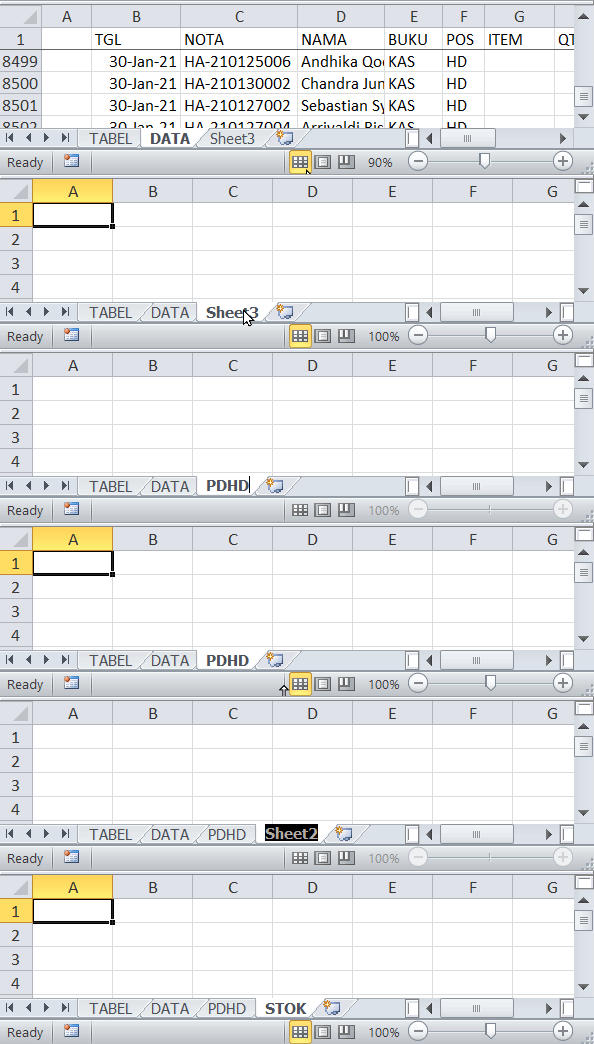
Disini pak Adi membuat dua buah halaman, masing masing dengan nama “PDHD” dan “STOK.
2. Menyisipkan Pivot Table
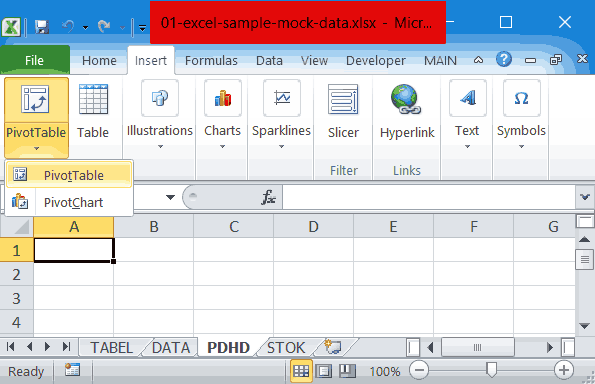
Setelah memastikan di halaman PDHD cell A1 sedang aktif, pada menu tab Insert, klik PivotTable, lalu klik PivotTable, seperti yang terlihat pada gambar diatas. Selanjutnya akan terbuka window “Create Pivot Table”.
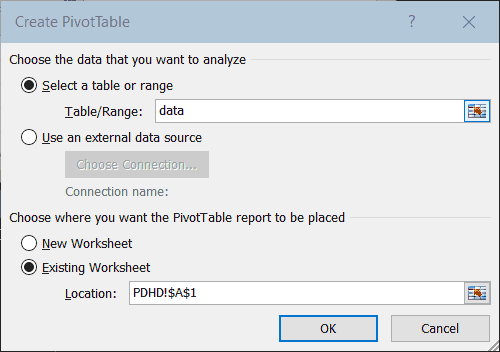
Isi kolom Table/Range: dengan mengetik : data, lalu klik OK.
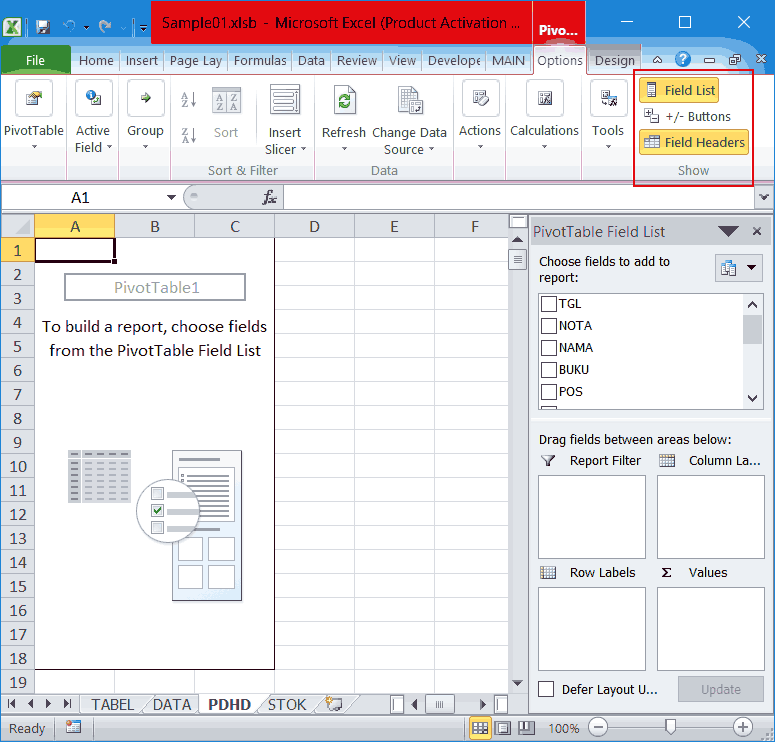
Karena dalam hal ini tombol toggle +/- didalam Pivot Table tidak pak Adi butuhkan, maka dia mematikan tombol ini dengan cara mengklik tombol +/- Buttons yang terdapat di pojok kanan atas (seperti yang terlihat pada gambar-4 diatas).
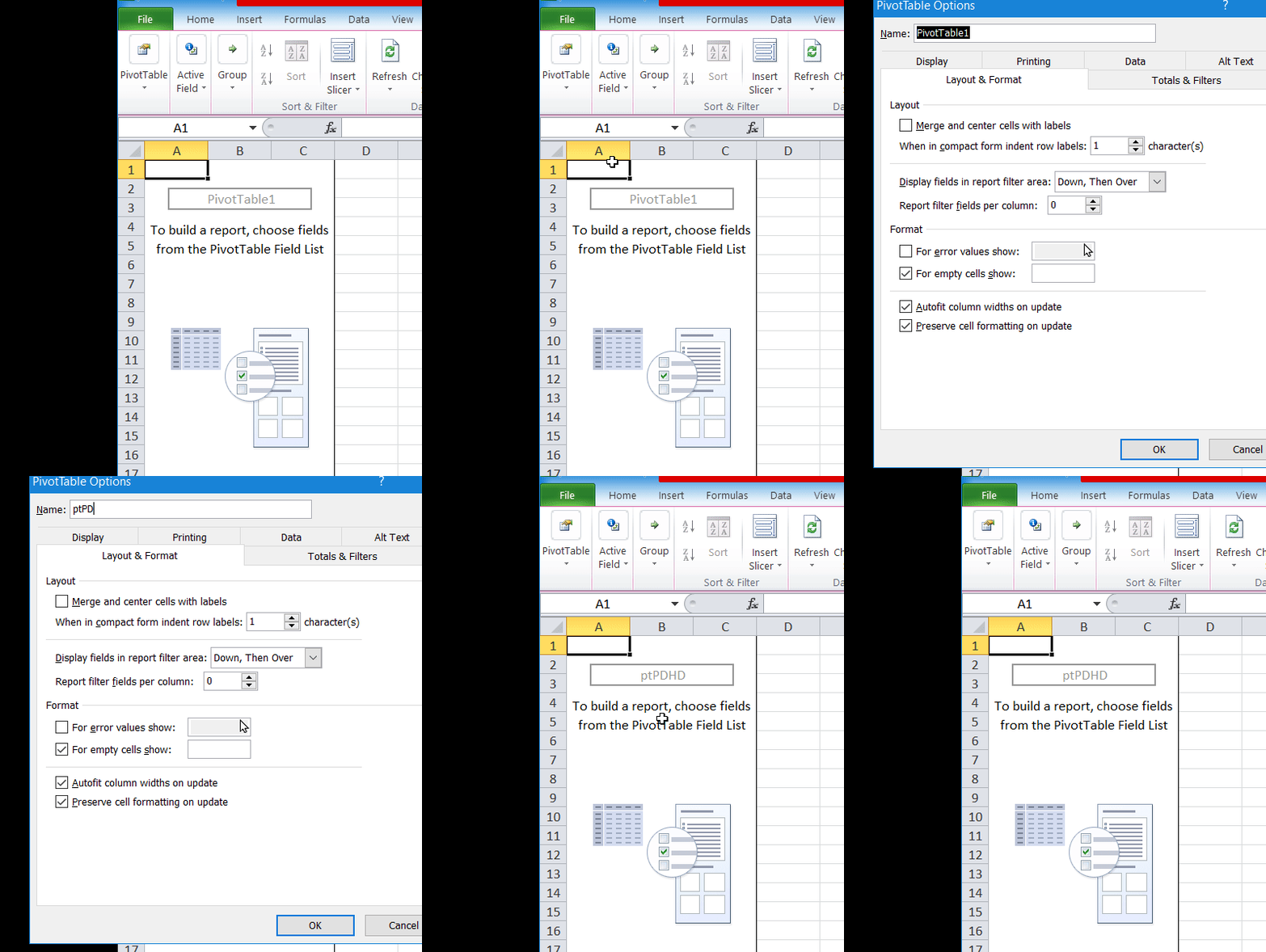
Untuk menamai Pivot Table, klik kanan area Pivot Table (yg saat ini masih kosong) —> klik PivotTable Options, lalu ketik ptPDHD di kolom Name: Seperti yang terlihat pada animasi dibawah ini.
3. Meletakkan kolom kolom yang diperlukan pada Pivot Table
Di halaman PDHD bagian kanan, di PivotTable Field List pak Adi mengklik NAMA yang terdapat di kotak Choose fields to add to report: lalu menyeretnya ke kotak Row Labels. Demikian pula hal yang sama dia lakukan pada NOTA. Sedangkan BlnThn diletakkan diantara NAMA dan NOTA. Seperti yang terlihat pada animasi dibawah ini:
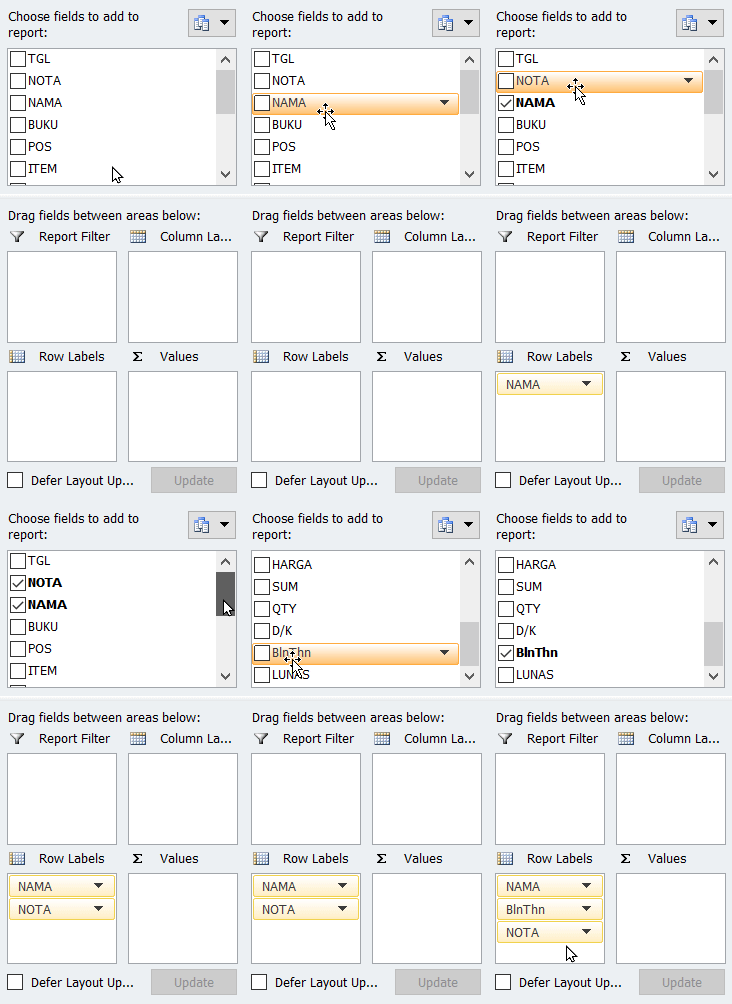
Selanjutnya POS diseret ke kotak Report Filter, dan kolom SUM diseret ke kotak Values.

4. Memformat kolom kolom Pivot Table
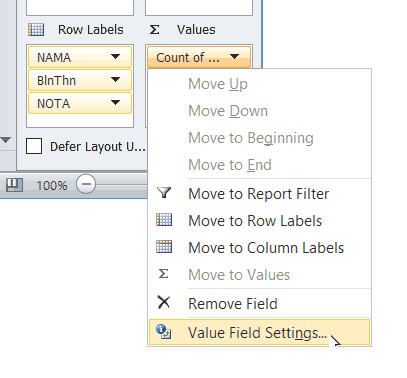
Pada kotak Values, klik Count of .., klik Value Field Settings….
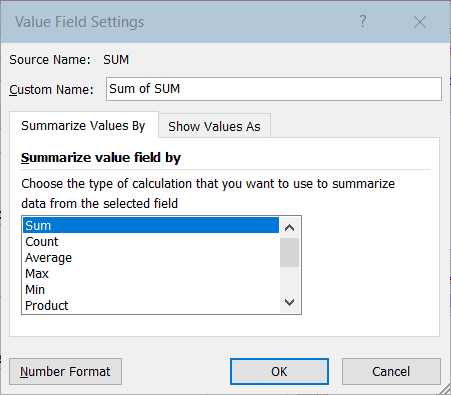
Pada window Value Field Setting, klik Sum pada tab Summarize Values By, lalu klik tombol Number Format
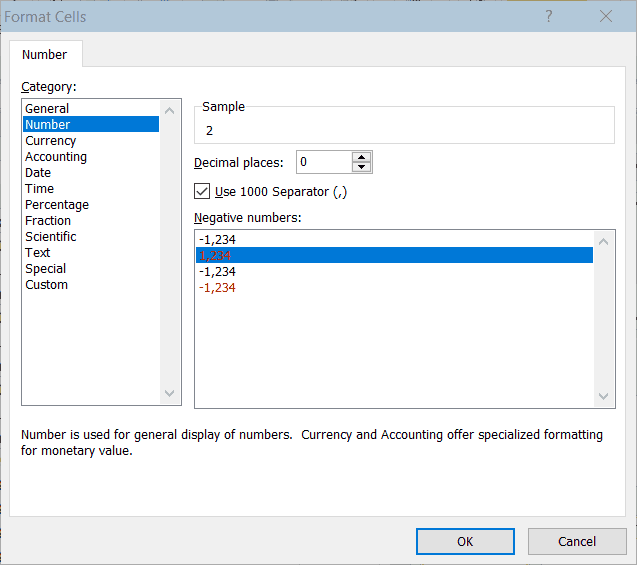
Pada window Format Cells, di kotak Category pilih Number, centang Use 1000 Separator dan pilih baris kedua pada Negative numbers. Klik OK.
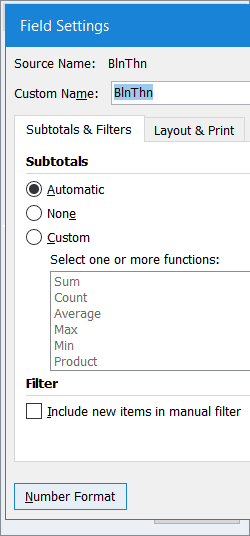
Selanjutnya pak Adi memformat kolom BlnThn. Pada kotak Row, klik BlnThn, klik Field Settings….

Pada window Field Settings, pilih Automatic pada tab Subtotals & Filters, lalu klik Number Format
Pada window Format Cells, pilih Custom di kolom Category:, ketik mmmm yy di kolom Type: lalu klik OK dan klik OK pada window Value Field Setting

Pivot table telah selesai dibuat, lokasinya terlihat di kolom A dan B pada halaman PDHD.

5. Mendesign Pivot Table
Namun karena pak Adi tidak suka tampilan Pivot Table nya seperti diatas, pak Adi merubah nya dengan cara meng klik menu tab Design, lalu klik Report Layout dan memilih Show in Tabular Form. Seperti yang terlihat pada gambar dibawah ini.


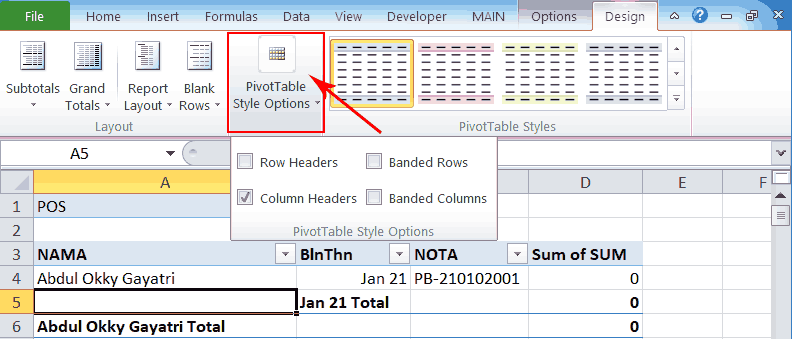
Pada PivotTable Style Options, ikuti gambar dibawah ini:
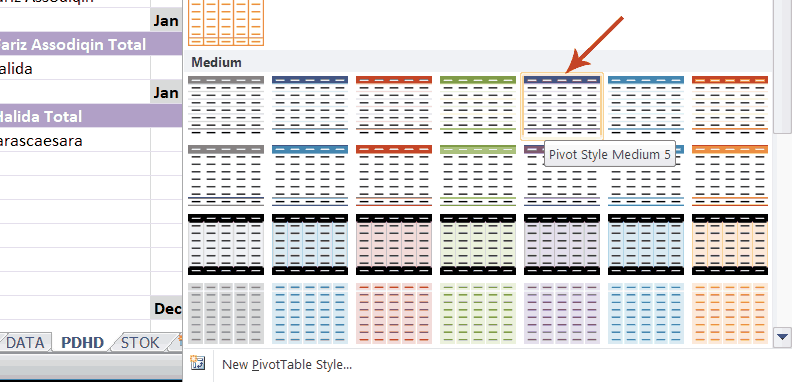
Masih di menu tab Design, pada PivotTable Styles, klik tanda panah kebawah.
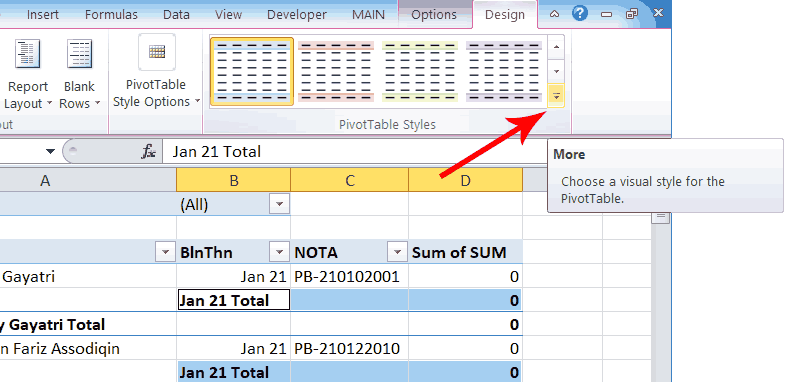
Sebenernya bebas bebas saja mau pilih Style yang mana, anyway disini pak Adi memilih Style Medium 5.
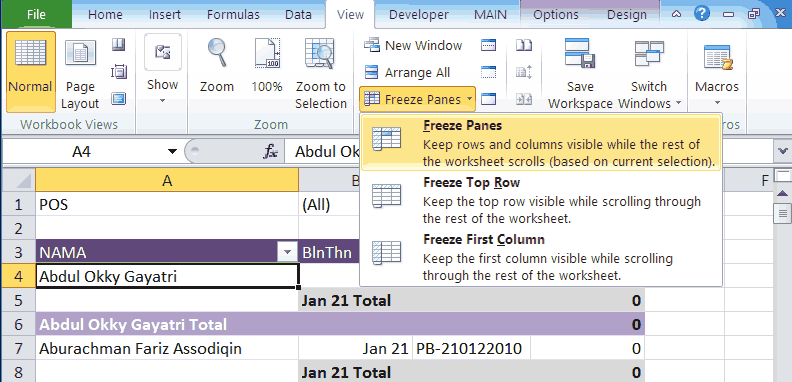
Agar sewaktu halamannya di scroll kebawah header Pivot Table-nya tetep kliatan : klik cell A4, lalu pada menu tab View, klik Freeze Panes dan pilih Freeze Panes.
Seperti yang terlihat pada gambar dibawah ini, setelah di Freeze Panes, header-nya tetep kliatan walo halamannya sudah di scroll sampai baris 94.
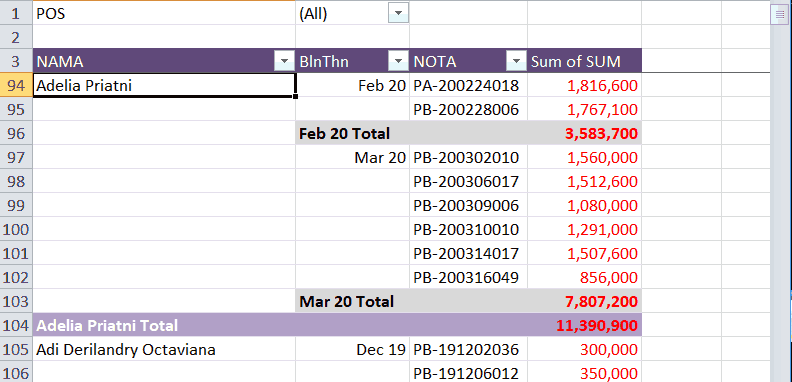
Demikianlah Pivot Table di halaman PDHD yang pak Adi buat. Apabila dia ingin melihat para Piutang Dagang saja, maka dia meng klik segitiga kebawah pada kolom B1 (POS) dan memilih PD. Dia juga bisa memfilter kolom NAMA, BlntThn dan NOTA.
Berikutnya pak Adi membuat Pivot Table untuk keluar masuk stok barang barang dagangannya. Caranya : pada menu tab Options, klik Actions, klik Select, klik Entire PivotTable, lalu pada keyboard komputer tekan Ctrl+c. Jadi disini pak Adi memilih (select) seluruh Pivot Table yang ada di halaman PDHD (ptPDHD nama Pivot Table ini), lalu meng-kopi ptPDHD lewat keyboard komputer.

Selanjutnya aktif-kan (pilih/klik) halaman STOK. Pastikan cell yang sedang aktif adalah cell A1 di halaman STOK ini. Lalu pada keyboard tekan Ctrl+v.
Pak Adi menamai Pivot Table yang baru di paste di halaman STOK dengan nama ptStok. Selanjutnya dia merubah field field-nya sesuai dengan keinginan dia. Sehingga hasilnya seperti pada gambar dibawah ini :

Selesai sudah pak Adi membuat Pivot Table hutang piutang dan stok di Excel. Berikutnya pak Adi akan membuat aplikasi peng-inputan transaksi jual beli.
Apabila ada pembaca yang tidak jelas ataupun ada yang ingin ditanyakan terkait topik ini, silahkan tulis di kolom Comment. Saya akan berusaha untuk bisa menjawabnya.
231 replies on “Membuat Pivot Table hutang piutang dan stok di Excel”
You can now get out there on the soccer field and have fun utilizing the tips that have been described.
Hey There. I discovered your blog the use of msn. Thatis an extremely well written article. I’ll make sure to bookmark it and return toread more of your helpful information. Thank you for the post.I’ll definitely return.
This post provides clear idea in favor of the new users of blogging, that genuinelyhow to do running a blog.
Thank you for another excellent post. Where else could anyone get that kind of info in such a perfect way of writing? I’ve a presentation next week, and I am on the look for such info.
Thank you for creating this awesome blog post. I greatly enjoyed it.
Great, thanks for sharing this blog post.Much thanks again. Awesome.
Looking forward to reading more. Great blog article.Much thanks again. Great.
Muchos Gracias for your article post.Much thanks again.
Looking forward to reading more. Great article.Thanks Again. Much obliged.
Thanks-a-mundo for the blog article.Thanks Again. Want more.
Say, you got a nice blog post.Thanks Again. Really Cool.
Very neat blog article.Much thanks again. Cool.
My brother suggested I may like this blog. He was once totally right.This post truly made my day. You can not believe just how much time I hadspent for this info! Thank you!
Cómo reducir el sonido de la escena del altavoz en una PC
Harland Galyen says:Hiya there, just turned aware about your blog through The Big G, and have found that it’s seriously helpful. I’ll take pleasure in should you decide maintain such.Reply 02/21/2020 at 10:19 am
on line pharmacy canada pharmacy safedrg – canadian pharmacies comparison
Woah! I am really enjoying the template/theme of this blog. It as simple, yet effective.
Sweet blog! I found it while surfing around on YahooNews. Do you have any tips on how to get listed in YahooNews? I’ve been trying for a while but I never seem to get there!Thank you
News about Iran from an unbiased and accurate source.Updated daily with the latest from Iran’s economy, politics andbusiness
Can anyone in a position to recommend quality Asphalt B2B Database? Thank you 🙂
It’s nearly impossible to find knowledgeable people in this particular topic, butyou sound like you know what you’re talking about!Thanks ps4 games allenferguson ps4 games
An interesting discussion is definitely worth comment. I do think that you ought to write more on this topic, it may not be a taboo subject but usually people do not speak about such subjects. To the next! Best wishes!!
Remarkable! Its really amazing article, I have got much clear idea regarding from this post.
Heya i’m for the primary time here. I came across this boardand I to find It truly useful & it helped me out much.I’m hoping to offer something back and help others such as you helped me.
Wow that was unusual. I just wrote an very long commentbut after I clicked submit my comment didn’t show up.Grrrr… well I’m not writing all that over again. Anyhow, just wanted tosay fantastic blog!
Hello there! This is my first visit to your blog!We are a group of volunteers and starting a new project in a community in the same niche.Your blog provided us beneficial information to work on. Youhave done a outstanding job!
onlinecanadianpharmacy mail order pharmacy – legitimate canadian pharmacy
I truly appreciate this article post.Really thank you! Want more.
This post is truly a good one it assists new net viewers, who are wishing for blogging.
Highly descriptive article, I liked that bit. Will there be a part2?
Remarkable! Its reall rmarkable article, I have got much clear idsa on theetopic of from thhis piece of writing.
Thanks again for the post.Really looking forward to read more. Really Cool.
Hi my loved one! I want to say that this post is awesome, nice written and include approximately all significant infos. I would like to see extra posts like this.
Howdy! This article couldn’t be written much better!Going through this post reminds me of my previous roommate!He always kept talking about this. I will forwardthis article to him. Pretty sure he’ll have a good read.Many thanks for sharing!
It’s fantastic that you are getting thoughts from this article aswell as from our argument made here.
Your point of view caught my eye and was very interesting. Thanks. I have a question for you.
I do not even know how I ended up here, but I thought this post was good. I do not know who you are but certainly you are going to a famous blogger if you aren’t already
best canadian online pharmacy canada pharmacies/account erectile dysfunction pills
I am extremely impressed with your writing skills as well as with the layout on your blog. Is this a paid theme or did you customize it yourself? Either way keep up the excellent quality writing, it is rare to see a nice blog like this one these days..
Appreciating the dedication you put into your blog and detailed information you offer. It’s nice to come across a blog every once in a while that isn’t the same old rehashed material. Excellent read! I’ve bookmarked your site and I’m including your RSS feeds to my Google account.
You can definitely see your enthusiasm in the work you write. The world hopes for even more passionate writers like you who aren’t afraid to say how they believe. Always follow your heart.
Hi! Do you know if they make any plugins to assist with SEO? I’m trying to get my blog to rank for some targeted keywords but I’m not seeing very good gains. If you know of any please share. Thanks!
Pretty part of content. I simply stumbled upon your blog and in accession capital to assert that I get actually enjoyed account your weblog posts. Anyway I will be subscribing on your feeds or even I success you get admission to persistently rapidly.
I believe this is among the such a lot significant info for me. And i’m happy reading your article. However wanna statement on some common issues, The site style is perfect, the articles is truly great : D. Good activity, cheers
Undeniably imagine that that you said. Your favourite reason appeared to be on the web the simplest factor to take into accout of. I say to you, I definitely get annoyed whilst other folks think about issues that they just do not understand about. You controlled to hit the nail upon the top and outlined out the whole thing with no need side effect , other folks could take a signal. Will probably be again to get more. Thank you
Thankfulness to my father who shared with me about this blog, thisblog is truly remarkable.
Needed to create you the tiny remark to be able to give thanks once again over the incredible principles you’ve discussed here. It is certainly extremely generous with you to allow unhampered precisely what a number of people would have offered for sale as an e-book to help with making some bucks for their own end, most importantly seeing that you might well have tried it in the event you desired. Those principles additionally worked like the easy way to fully grasp other individuals have similar fervor similar to my own to know a whole lot more related to this issue. I know there are several more pleasurable times ahead for those who scan your blog post.
Great – I should certainly pronounce, impressed with your site. I had no trouble navigating through all the tabs as well as related information ended up being truly easy to do to access. I recently found what I hoped for before you know it in the least. Quite unusual. Is likely to appreciate it for those who add forums or anything, web site theme . a tones way for your client to communicate. Excellent task..
Hello my family member! I want to say that this article is amazing, nice written and come with approximately all important infos. I would like to look extra posts like this .
Howdy just wanted to give you a brief heads up and let you know a few of the images aren’t loading correctly. I’m not sure why but I think its a linking issue. I’ve tried it in two different internet browsers and both show the same outcome.
tamoxifen bone density startqyw – clomid nolvadex
Aloha! Interesting material! I’m really enjoy this. It will be great if you’ll read my first article on AP!)
Amazing! This blog looks exactly like my old one! It’s on a completely different topic but it has pretty much the same layout and design. Great choice of colors!
Your article helped me a lot, is there any more related content? Thanks!
I don’t think the title of your article matches the content lol. Just kidding, mainly because I had some doubts after reading the article.
Its superb as your other content : D, thanks for posting . “Talent does what it can genius does what it must.” by Edward George Bulwer-Lytton.
Thanks again for the article.Really looking forward to read more. Awesome.
I think this is a real great blog.Much thanks again. Much obliged.
You said it adequately.!help writing college essays essay assignment writer
Thanks so much for the article post.Much thanks again. Awesome.
I appreciate you sharing this blog post.Really thank you!
Hi my loved one! I want to say that this post is amazing, great written and come withalmost all significant infos. I’d like to see extra posts like this .
Thanks for the blog. Keep writing.
Im obliged for the blog.Thanks Again. Will read on…
canadian pharmacy store trust pharmacy online
I truly appreciate this blog.Really thank you! Much obliged.
Really informative article post.Thanks Again. Really Great.
It is really a nice and useful piece of info. I am glad that you just shared this useful info with us. Please keep us informed like this. Thanks for sharing.
Evden eve nakliyatÇok kolay 3 adımda nakliyat fiyat teklifleri alabilirsiniz.Sağdaki teklif isteme formunu doldurun. Teklifler cebinize gelsin, onaylayın.eşya depolama
Hey, thanks for the blog post.Much thanks again. Will read on…
This is one awesome blog.Thanks Again. Want more.
Your point of view caught my eye and was very interesting. Thanks. I have a question for you.
Really enjoyed this article.Really looking forward to read more.
Awesome blog. Want more.
I am sure this post has touched all the internet people, its really really fastidious piece of writing on buildingup new blog.
the best ed pill generic ed pills – medications for ed
I don’t think the title of your article matches the content lol. Just kidding, mainly because I had some doubts after reading the article.
Really informative post. Great.
Looking forward to reading more. Great article.Thanks Again. Fantastic.
Im obliged for the post.Really looking forward to read more.
After I start your Rss feed it appears to be a ton of junk, is the problem on my side?
Thank you for your sharing. I am worried that I lack creative ideas. It is your article that makes me full of hope. Thank you. But, I have a question, can you help me?
Im obliged for the blog post.Really looking forward to read more. Awesome.
Thanks for the article.Really looking forward to read more. Great.
Fantastic blog post.Much thanks again. Really Great.
Thank you for your sharing. I am worried that I lack creative ideas. It is your article that makes me full of hope. Thank you. But, I have a question, can you help me?
I just like the helpful info you provide to your articles.I will bookmark your blog and check again here frequently.I am relatively certain I’ll learn many new stuff proper here!Good luck for the following!
I blog often and I really thank you for your content.This article has truly peaked my interest.I am going to take a note of your blog and keep checking fornew details about once a week. I subscribed to your Feed too.
generic bactrim online — bactrim uk bactrim ds 800
Your point of view caught my eye and was very interesting. Thanks. I have a question for you.
My brother recommended I might like this blog. He was totally right. This post truly made my day. You cann’t imagine simply how much time I had spent for this info! Thanks!
Ja naprawdę wartość twoją dzieło, Świetny post szybki test na przeciwciała szybki test na przeciwciała.
Awesome article.Really looking forward to read more. Cool.
modafinil pill provigil over the counter modafinil online
Im grateful for the post.Really looking forward to read more. Awesome.
even talk to your friends as if tiktok for free install
I am so grateful for your blog.Really looking forward to read more. Really Cool.
Pennsylvania divorce says:Great write-up, I’m normal visitor of one’s blog, maintain up the excellent operate, and It’s going to be a regular visitor for a long time.Reply 02/09/2020 at 12:16 am
I am so grateful for your article post. Cool.
Good day! Do you use Twitter? I’d like to follow you if that would beok. I’m undoubtedly enjoying your blog and look forward to new posts.
walk, admin, to God, the sacrifice 1450 came to me too ??Loading…
Whats Happening i’m new to this, I stumbled upon this I have found It absolutely helpful and it has helped me out loads. I’m hoping to contribute & assist different users like its helped me. Good job.
darknet wallstreet market darknet market search
Muchos Gracias for your post.Thanks Again. Cool.
Looking forward to reading more. Great blog.Thanks Again. Awesome.
Major thanks for the blog.Much thanks again. Awesome.
Really enjoyed this post.Really thank you! Want more.
I value the blog article.Much thanks again. Cool.
I need to say your site is really helpful I also love the theme, its amazing!
Thanks for the blog article.Really thank you! Keep writing.
Thank you for your sharing. I am worried that I lack creative ideas. It is your article that makes me full of hope. Thank you. But, I have a question, can you help me?
When I initially commented I clicked the „Notify me when new comments are added” checkbox and noweach time a comment is added I get four emails withthe same comment. Is there any way you can remove mefrom that service? Thank you!
bilecik hava durumu; bilecik için hava durumu en güncel saatlik, günlük ve aylık tahminler.
list of canadian mail order pharmacies your pharmacy online
A big thank you for your blog article.Really looking forward to read more. Fantastic.
is stromectol over the counter topical ivermectin rosacea
I appreciate you sharing this blog post.Thanks Again. Awesome.
You truly did more than visitors’ expectations. Thank you for rendering these helpful, trusted, edifying and also cool thoughts on the topic to Kate.
Muchos Gracias for your post.Much thanks again. Really Cool.
When I originally commented I clicked the «Notify me when new comments are added» checkbox and now each time a comment is added I get three emails with the same comment. Is there any way you can remove people from that service? Thank you!
Good way of describing, and fastidious paragraph to get facts regarding mypresentation subject matter, which i am going to deliver in academy.0mniartist asmr
Thanks again for the article.Really looking forward to read more. Much obliged.
Good information. Lucky me I discovered your blog by accident (stumbleupon). I’ve book-marked it for later!
Very good blog.Thanks Again. Really Cool.
Hi, I check your new stuff like every week.Your humoristic style is awesome, keep doing what you’re doing!
Your style is so unique compared to other folks I’ve read stuff from. Thanks for posting when you’ve got the opportunity, Guess I will just book mark this blog.
It’s going to be finish of mine day, but before ending I am reading this fantastic post to increase my knowledge.
This is one awesome article post.Much thanks again. Fantastic.
Awesome blog article. Want more.
I really like and appreciate your blog post.Really thank you! Cool.
Link Xem Trực Tiếp Soccer Futsal Việt Nam Vs Lebanon Vòng Chủng Loại World Cupxôi yếnNếu cứ chơi như cách vừa đè bẹp Everton cho tới 3-1 bên trên sân quý khách hàng
Awesome article.Much thanks again. Really Great.
Thank you ever so for you post.Thanks Again. Much obliged.
Really enjoyed this post.Thanks Again. Much obliged.
Great, thanks for sharing this article post.Really thank you! Cool.
Thank you for your sharing. I am worried that I lack creative ideas. It is your article that makes me full of hope. Thank you. But, I have a question, can you help me?
I cannot thank you enough for the article.Much thanks again. Much obliged.
Awesome blog article.Much thanks again. Awesome.
I appreciate you sharing this blog.Much thanks again. Really Great.
Your point of view caught my eye and was very interesting. Thanks. I have a question for you.
Thank you for your article post. Want more.
A big thank you for your post.Really looking forward to read more. Great.
Thanks a lot for the post.Really thank you! Cool.
I cannot thank you enough for the blog.Much thanks again. Fantastic.
Looking forward to reading more. Great blog article.Really looking forward to read more. Fantastic.
Enjoyed every bit of your blog article.Thanks Again. Great.
provigil online provigil online modafinil
I do not even know how I ended up here, but I thought thispost was good. I do not know who you are but definitely you are going to a famous blogger if you are not already 😉 Cheers!
I truly appreciate this blog article.Really looking forward to read more. Awesome.
Fantastic post.Really looking forward to read more. Awesome.
A round of applause for your article post.Really looking forward to read more. Really Great.
Wow, great article.Much thanks again. Much obliged.
I think this is a real great blog article.Really thank you!
Hello there! Do you use Twitter? I’d like to follow you if thatwould be ok. I’m definitely enjoying your blog and look forward to new updates.
Fantastic blog. Keep writing.
Major thankies for the article. Awesome.
Thank you ever so for you blog post.Thanks Again. Really Great.
I appreciate you sharing this blog post.Really looking forward to read more. Keep writing.
Thanks-a-mundo for the article. Awesome.
Muchos Gracias for your blog post.Really looking forward to read more. Keep writing.
Thanks-a-mundo for the blog post.Really looking forward to read more. Want more.
Really appreciate you sharing this article.Much thanks again. Awesome.
I value the blog.Really thank you! Fantastic.
wow, awesome blog article. Really Great.
Thanks-a-mundo for the blog.Really looking forward to read more. Awesome.
Thanks again for the blog article.Thanks Again.
Great post. I was checking continuously this blog andI am impressed! Very helpful info specifically the last part 🙂 I care for such infoa lot. I was seeking this particular info for a very long time.Thank you and good luck.
Muchos Gracias for your article post.Much thanks again. Want more.
I cannot thank you enough for the blog article.Thanks Again. Fantastic.
I am so grateful for your post.Much thanks again. Great.
I never thought about it that way, but it makes sense!
I cannot thank you enough for the blog.Really looking forward to read more. Cool.
Appreciate you sharing, great blog article.Really thank you! Want more.
Fantastic article.Really looking forward to read more. Want more.
A big thank you for your post.Much thanks again. Much obliged.
Really enjoyed this post. Keep writing.
Looking forward to reading more. Great article post. Cool.
I think this is a real great blog article.Really looking forward to read more. Awesome.
wow, awesome article post. Much obliged.
Hey, thanks for the blog.Much thanks again. Really Cool.
Thank you, I’ve recently been searching for info approximately this subject forages and yours is the best I have found out till now.But, what about the bottom line? Are you sure in regards to the supply?
At this time it appears like WordPress is the best bloggingplatform available right now. (from what I’ve read) Is that what you’re using on your blog?
I think this is a real great blog article.Much thanks again. Great.
Hey, you used to write great, but the last several posts have been kinda boring… I miss your great writings. Past few posts are just a little out of track! come on!
I really enjoy the blog.Really thank you! Great.
Regards! Wonderful information.writing a 3 paragraph essay thesis writing service help me write a speech
consumir wasabi time amamantar: seguridad y oportunidad
Very neat article post.Really thank you! Awesome.
Very informative blog article.Really thank you! Keep writing.
wow, awesome blog.Really thank you! Fantastic.
Your point of view caught my eye and was very interesting. Thanks. I have a question for you.
Your point of view caught my eye and was very interesting. Thanks. I have a question for you.
Your point of view caught my eye and was very interesting. Thanks. I have a question for you.
I don’t think the title of your article matches the content lol. Just kidding, mainly because I had some doubts after reading the article.
Your article helped me a lot, is there any more related content? Thanks!
Your point of view caught my eye and was very interesting. Thanks. I have a question for you.
Thanks for sharing. I read many of your blog posts, cool, your blog is very good.
Your point of view caught my eye and was very interesting. Thanks. I have a question for you.
I don’t think the title of your article matches the content lol. Just kidding, mainly because I had some doubts after reading the article.
Can you be more specific about the content of your article? After reading it, I still have some doubts. Hope you can help me.
Can you be more specific about the content of your article? After reading it, I still have some doubts. Hope you can help me.
Thank you for your sharing. I am worried that I lack creative ideas. It is your article that makes me full of hope. Thank you. But, I have a question, can you help me?
Your point of view caught my eye and was very interesting. Thanks. I have a question for you.
Your article helped me a lot, is there any more related content? Thanks!
Can you be more specific about the content of your article? After reading it, I still have some doubts. Hope you can help me.
I don’t think the title of your article matches the content lol. Just kidding, mainly because I had some doubts after reading the article.
Thank you for your sharing. I am worried that I lack creative ideas. It is your article that makes me full of hope. Thank you. But, I have a question, can you help me?
I really enjoy the article post.Much thanks again. Much obliged.
Im grateful for the post.Really looking forward to read more. Will read on…
Really informative post.Really thank you! Great.
Muchos Gracias for your article post.Really looking forward to read more. Really Cool.
Looking forward to reading more. Great article post.Much thanks again. Really Great.
Muchos Gracias for your article post.Really thank you! Awesome.
Awesome blog.Thanks Again. Fantastic.
Fantastic blog article. Fantastic.
Really enjoyed this article post.Thanks Again. Will read on…
I don’t think the title of your article matches the content lol. Just kidding, mainly because I had some doubts after reading the article.
Your article helped me a lot, is there any more related content? Thanks!
Thanks for sharing. I read many of your blog posts, cool, your blog is very good.
Your article helped me a lot, is there any more related content? Thanks!
Im obliged for the post. Will read on…
Wow, great article. Awesome.
Thanks for the blog post.Really thank you! Fantastic.
Wow, great article post.Much thanks again. Will read on…
Your article helped me a lot, is there any more related content? Thanks!
Your article helped me a lot, is there any more related content? Thanks!
Im thankful for the post.Really thank you!
Great post.Thanks Again. Fantastic.
Thank you for your sharing. I am worried that I lack creative ideas. It is your article that makes me full of hope. Thank you. But, I have a question, can you help me?
Your point of view caught my eye and was very interesting. Thanks. I have a question for you.
Your enticle helped me a lot, is there any more related content? Thanks!